
Trace an LLM Agent With 3 HTTP Headers, No Tracing SDK
Add three request headers to an agent's model calls and get a waterfall of each run: parallel calls, time spent in your own code, failed calls and cost.
Our picks
live pricing| Model | Verdict | Price |
|---|---|---|
| GPT-6 Luna Handles the function-calling loop of the demo. Its two calls per turn (plan and answer) cost $0.0002 together in the run shown on this page. | Main agent in the demo | from $0.1/M |
| DeepSeek V4.1 Flash Runs the three parallel one-sentence checks with reasoning off. Its six calls in the session shown on this page cost $0.0004, and a seventh sub-agent call failed at $0. | Sub-agent in the demo | from $0.3/M |
Contents
- What do you have to send to get a trace?
- What does the demo agent do?
- How do you read the waterfall?
- What does a session add on top of a trace?
- How do you split cost by feature or by user?
- What happens when a call fails?
- How do you get the cost of each call in code?
- What if your agent already sends trace headers?
- What do you do with a trace once you have one?
- What is left out?
- FAQ
- Do I need OpenTelemetry to trace an LLM agent?
- What is the difference between a trace and a session?
- Do trace headers change routing, billing or what the model sees?
- How long are traces kept?
- Does a failed call cost anything?
- Related reading
An agent that makes five model calls to answer one message is hard to debug from a flat request log: you cannot tell which calls belong to the same run, which ran in parallel, or how much of the wait was your own code. This guide adds three request headers to a small support agent and reads the result in the Synthorai console as a trace (one run drawn as a timeline) and a session (one conversation with its cost). There is no tracing SDK to install and no collector (a separate service that receives traces) to run. The source is at github.com/synthorai-io/use-cases under agent-tracing/. It needs Python 3.10 or later and an API key from the console.
TL;DR
- Three request headers (
X-Trace-Id,X-Span-Id,X-Session-Id) on each model call turn a request log into traces and sessions in the Synthorai console, with no tracing SDK. - In the demo trace, 8.5 s of wall time split into about 7.0 s in model calls and 1.6 s outside them, in the agent’s own code and on the network.
- A failed call, a 404, stayed in the trace and cost $0.
- The demo run of 21 model calls cost $0.0017.
git clone https://github.com/synthorai-io/use-cases
cd use-cases
cp .env.example .env    # put your API key in it
cd agent-tracing
python3 -m venv .venv && source .venv/bin/activate
pip install -r requirements.txt
python run.py --fail
The run made 21 model calls in under a minute and cost $0.0017 when we ran it on October 11, 2026. It prints two session ids and four trace ids. Open Traces in the console and the same ids are listed there. The console shows times in the browser’s time zone, so the screenshots on these pages read 19:24 for 11:24 UTC.
What do you have to send to get a trace?
You send three headers on each model call, and the values are strings you choose. The gateway already logs every request. The headers only tell it which requests belong together.
| Header | Send the same value on | What you get |
|---|---|---|
X-Trace-Id | every call of one run (one user message handled from start to finish) | the calls drawn as one waterfall |
X-Span-Id | one call only | the name of that call’s row in the waterfall |
X-Session-Id | every call of one conversation | the runs grouped, with totals for the conversation |
A span is one step inside a trace. In this guide every span is one model call. Each id can be up to 128 printable ASCII characters. The gateway returns the ids on the response and does not forward them to the model provider.
Three more headers are optional. X-Agent-Id says which sub-agent made a call, X-Parent-Agent-Id says which agent started that sub-agent, and X-Synthorai-Metadata carries labels such as the feature or the end user. All of them are in the request headers reference. The demo sends X-Agent-Id and labels and does not send X-Parent-Agent-Id: its one sub-agent is started by the main agent, so there is no nesting to describe.
In the demo, one function builds the headers for a call, and that function is the tracing layer:
@dataclass
class Run:
    """One agent run, which the gateway shows as one trace."""
    session_id: str
    labels: dict = field(default_factory=dict)
    trace_id: str = field(default_factory=lambda: new_id("trace"))

    def headers(self, span: str, agent: str | None = None, parent: str | None = None) -> dict:
        h = {
            "X-Session-Id": self.session_id,
            "X-Trace-Id": self.trace_id,
            "X-Span-Id": span,
        }
        if agent:
            # Only sub-agents need an id. Calls without one belong to the main agent.
            h["X-Agent-Id"] = agent
        if parent:
            h["X-Parent-Agent-Id"] = parent
        if self.labels:
            h["X-Synthorai-Metadata"] = json.dumps(self.labels, separators=(",", ":"))
        return h
Every model call in the agent goes through one wrapper that attaches them. With the OpenAI Python SDK, per-request headers go in extra_headers:
raw = await client.chat.completions.with_raw_response.create(
    model=model, messages=messages,
    extra_headers=run.headers(span, agent, parent), **kwargs)
resp = raw.parse()
request_id = raw.headers.get("x-request-id")   # the gateway's id for this call
with_raw_response is only there to read the response headers. If you do not need the request id, a plain create(..., extra_headers=...) is enough.
What does the demo agent do?
It answers a customer message in four stages and five model calls, chosen so that the trace has something to show. The main agent runs on GPT-6 Luna and the sub-agent on DeepSeek V4.1 Flash; both are environment variables. The sub-agent’s calls set reasoning_effort="none", because a one-sentence check does not need the model to reason first. If you point the sub-agent at a model that rejects that value, change or clear ANALYST_REASONING.
| Span | Who | What happens |
|---|---|---|
plan | main agent | reads the message and asks for tools (function calling: the model returns a function name and arguments for your code to run) |
| none | your code | runs the two tools locally: an order lookup (1.2 s) and a policy search (0.6 s), in parallel |
sentiment, policy-check, risk | sub-agent analyst | three one-sentence checks, sent at the same time |
answer | main agent | writes the reply from the tool results and the three checks |
The tools are plain Python functions with a sleep in them, standing in for a database and a search index. With --fail, one policy-check call first asks for a model that does not exist, gets a 404, and is retried under the span name policy-check.retry.
run.py plays two conversations of two turns each. Each conversation gets one session id and each turn gets a new trace id:
session_id, history = new_id("support"), []
for text in turns:
    run = Run(session_id, labels={"feature": "support-agent", "release": "v2", "_user": user})
    reply = await handle(run, history, text)
How do you read the waterfall?
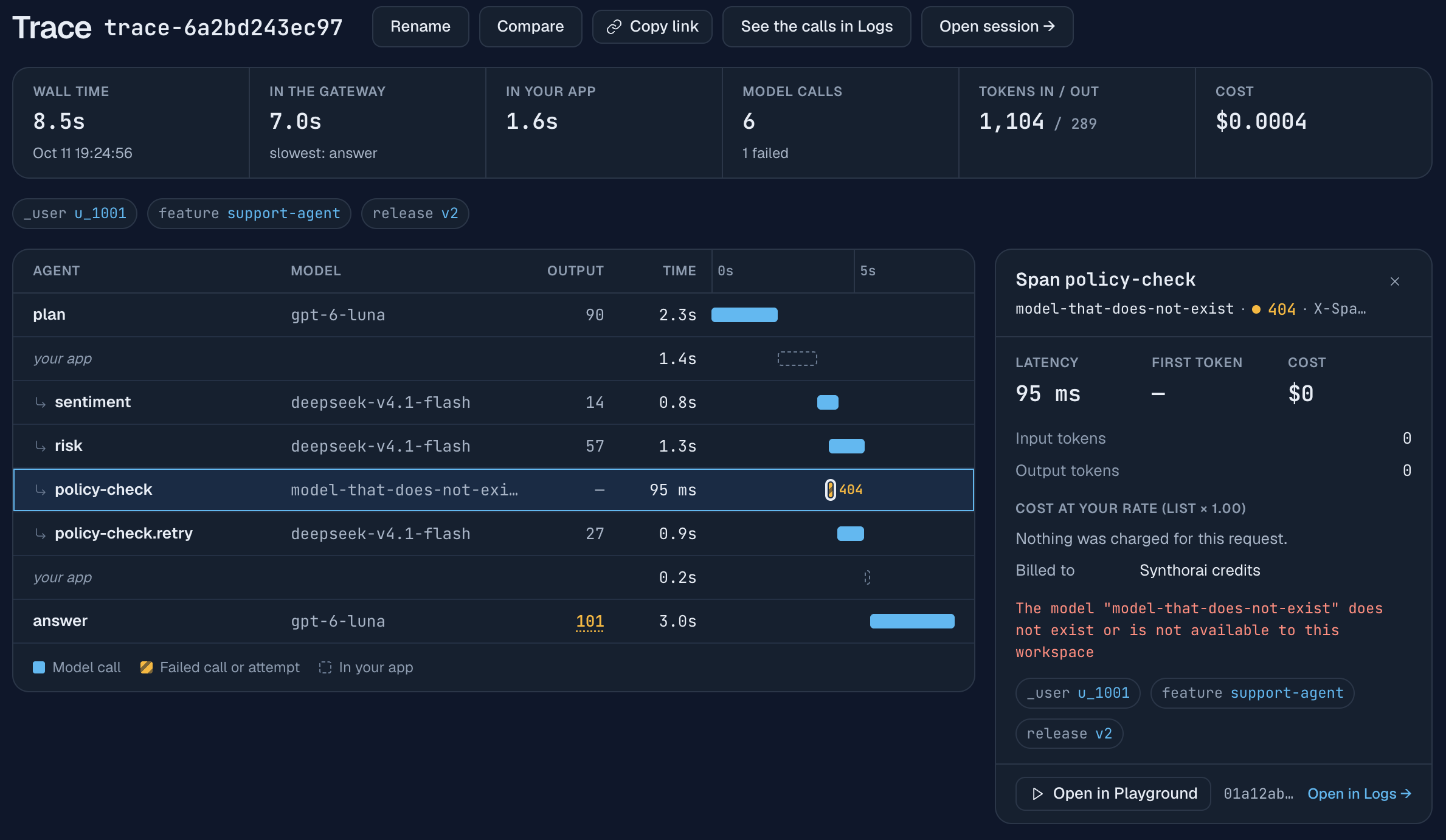
Each row is one model call or one gap in your own code, placed on a time axis that starts when the first call of the run reached the gateway. The screenshot above is the second turn of the first conversation. Reading it from the top:
plantook 2.3 s. Its bar is the time the gateway spent on that request, from receiving it to finishing the response.your apptook 1.4 s. No request was open during that stretch, so the time was spent outside the gateway: in your code, plus the network between your code and the gateway. Here it is the two local tools, and the slower one sleeps 1.2 s. In a real agent this row is where a slow database query or vector search becomes visible.sentiment,riskandpolicy-check.retryoverlap. The agent sent the three checks withasyncio.gather, and overlapping bars are how parallel calls look. The arrow in front of their names marks calls made by a sub-agent.policy-checkis a 95 ms hatched mark with404. A failed call stays in the trace with the status code your code received.answertook 3.0 s and is the slowest call, which the summary above the waterfall also states.- The Output column is the output tokens of each call. Output is what a call spends its time on, so this column usually explains the length of the bar next to it:
answerwrote 101 tokens and the three checks 14 to 57 each. The console underlines a count when most of a larger output was reasoning, as it does for the 101 here.
The summary splits the 8.5 s of wall time into 7.0 s in the gateway and 1.6 s in your app. That split answers the first question of most latency investigations: whether to look at the model calls or at your own code. In this run 82% of the wait was model time, and the two calls of the main agent, plan and answer, account for 5.3 s of it, so a faster model for the main agent would help more than making the three checks faster.
The gateway cannot see inside your code. It infers the your app rows from the gaps between requests, so a gap tells you how long your code ran and nothing about what it did. If you need spans for your own functions, that is the job of an SDK for OpenTelemetry, the open standard for tracing, and the two can share ids: the gateway reads traceparent, the standard header that carries a trace id, when you do not send X-Trace-Id.
What does a session add on top of a trace?
A session groups the runs of one conversation and totals them. Open one from the Traces list, or use “Open session” on any trace.
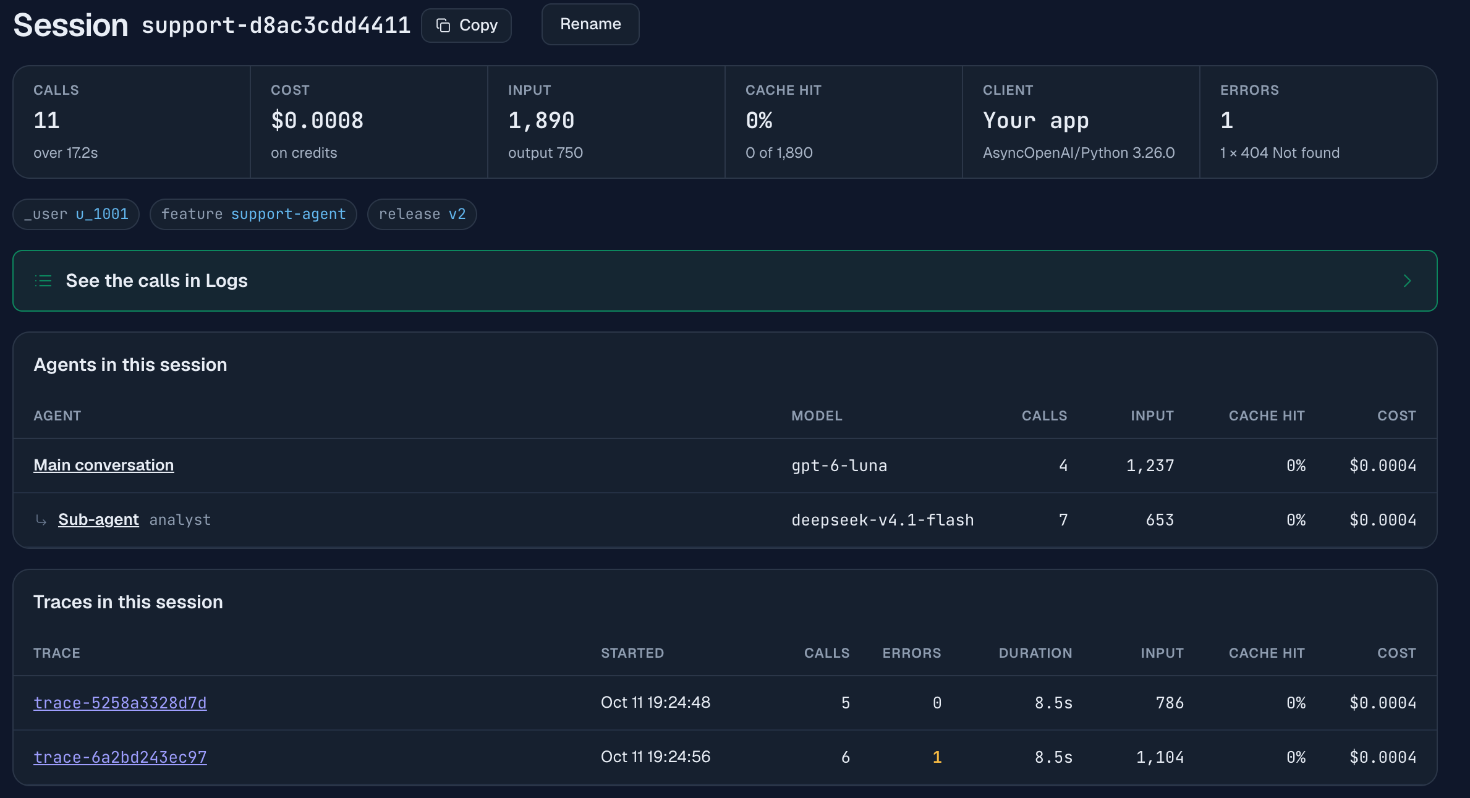
The session above is one customer conversation of two turns: 11 calls, 1,890 input and 750 output tokens, $0.0008, one error. The page has three parts:
- Agents in this session splits calls and cost by agent. The main agent made 4 calls on GPT-6 Luna for $0.0004, and the
analystsub-agent made 7 calls for $0.0004, six of them on DeepSeek V4.1 Flash and one the failed call. This table appears because the sub-agent’s calls carriedX-Agent-Id: analyst. Calls without that header are counted as the main conversation. - Traces in this session lists each turn with its errors, duration, input tokens, cache hit and cost, so you can find the slow, failed or expensive turn of a long conversation without scrolling a log.
- Cache hit is the share of input tokens read from the provider’s prompt cache. It is 0% here because the prompts are a few hundred tokens long, and providers only cache prefixes above a minimum length (1,024 tokens for most of them; see prompt caching).
The session id does a second job that matters once your prompts are long enough to cache. Send the same X-Session-Id on every call of a conversation: the gateway uses it to keep the conversation’s prompt cache hits consistent, so the second turn reads the cache the first turn wrote. On /v1/chat/completions and /v1/responses you can put the value in the request body as session_id if setting headers is awkward in your framework.
How do you split cost by feature or by user?
Send X-Synthorai-Metadata with a flat JSON object of strings, then group or filter by it. The demo labels every call with a feature, a release and the end user:
labels = {"feature": "support-agent", "release": "v2", "_user": "u_1002"}The labels appear as small tags on the trace and the session. For totals, open Analytics, select the Breakdown tab and find the Cost by metadata card. Pick a key and it lists every value of that key with its requests, errors, input tokens and cost:
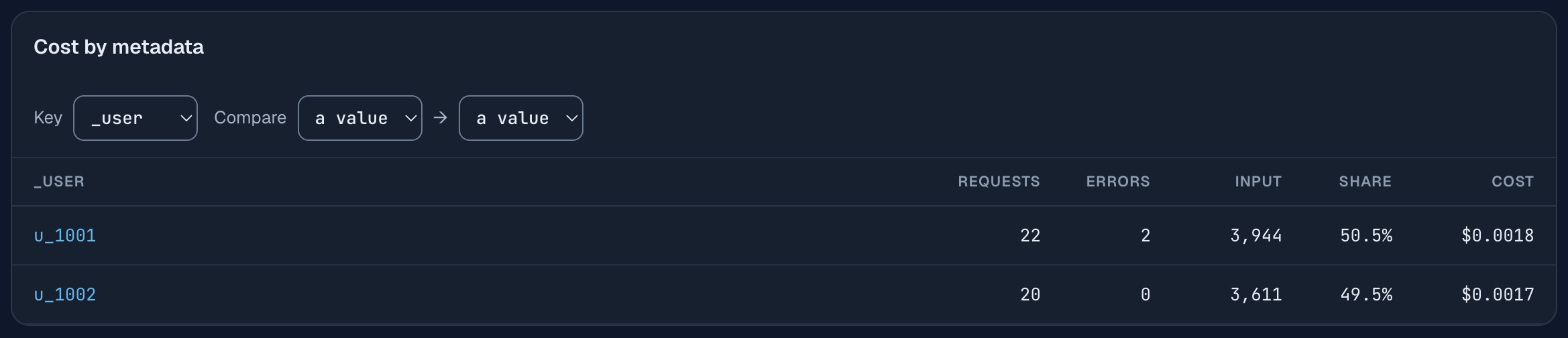
The card above covers an hour in which the demo ran twice: 22 requests and $0.0018 for u_1001, whose runs include the two failed calls, and 20 requests and $0.0017 for u_1002. After one run you will see 11 and 10. Pick feature as the key for the bill of each feature, or release to see what a prompt change did to cost. The card can also put two values of a key side by side, and the same tab has a Cost by agent card that totals each X-Agent-Id across sessions.
To find the runs behind a number, labels work as a search. Type metadata._user = u_1002 in the search box of the Traces list and press Enter, and it keeps only that user’s sessions and traces. The filter box in Logs takes the same expression for single requests.
The rules for labels are short:
- At most 10 labels per request. A key is 1 to 32 characters from
a-z,0-9,_,.and-. A value is a string of up to 128 bytes. _useris the label for the end user the request was made for. Other keys starting with an underscore are reserved.- A label that breaks a rule is dropped and the request still runs. The response header
X-Synthorai-Metadata-Droppednames the dropped keys, so log that header while you set this up. We sent a key namedBad?Keyto check, and the header came back withBad?Keyin it. - Do not put prompt text, personal data or secrets in labels. Use your internal user id for
_user, not an email address.
What happens when a call fails?
It stays in the trace as a hatched mark with its status code, and it costs nothing. In the demo the failed policy-check asked for a model id that does not exist. Selecting it in the waterfall opens the panel on the right of the screenshot above, with the error the code received: The model "model-that-does-not-exist" does not exist or is not available to this workspace, a latency of 95 ms, a cost of $0 and the note that nothing was charged.
The demo gives the retry its own span name:
try:
    await call(run, span, model=BROKEN_MODEL, messages=messages, agent="analyst")
except APIStatusError:
    span = f"{span}.retry"      # the retry is its own span, so both show in the waterfall
resp = await call(run, span, model=ANALYST_MODEL, messages=messages, agent="analyst", max_tokens=400,
                  **analyst_options())   # reasoning_effort="none" unless ANALYST_REASONING says otherwise
Keeping the trace id and changing the span name is what puts the failure and its retry next to each other in one picture. If your retry logic lives in a library that reuses the same headers, both attempts still appear, as two rows with the same name.
Errors also roll up. The trace summary reads “6 model calls, 1 failed”, the session lists its errors by status code (1 × 404 Not found), and the Traces list has an Errors column you can sort by to find the runs that need attention.
How do you get the cost of each call in code?
Ask the gateway for the billing record of the request, by the request id that came back on the response. GET /v1/generation?id=<request id> returns the cost, the token counts, the latency and the status of one request.
async def cost_of(http: httpx.AsyncClient, request_id: str) -> float | None:
    """The billing record of one request. It is written a moment after the call returns."""
    if not request_id:
        return None                                  # a call that got no response has no record
    for _ in range(6):
        try:
            r = await http.get(f"{BASE_URL}/generation", params={"id": request_id})
            if r.status_code == 200:
                return r.json()["data"]["total_cost"]
        except (httpx.HTTPError, KeyError, TypeError, ValueError):
            pass                                     # a dropped connection or a half-written record: try again
        await asyncio.sleep(2)
    return None
The record is written shortly after the response finishes, so the function retries until it gets a 200. It takes an httpx.AsyncClient that the caller creates once, with the Authorization header set, and passes to every lookup. Looking up twenty calls through one client reuses a few connections. Opening a new client for each lookup opens twenty connections at once, and in our runs one or two of those were dropped. The demo prints one line per call from its own timings and these records. This is the first turn of the session in the screenshots:
trace trace-5258a3328d7d  session support-d8ac3cdd4411
  plan                 main     gpt-6-luna                 200   1878 ms    153 in   22 out  $0.000026
  sentiment            analyst  deepseek-v4.1-flash        200   1431 ms     91 in   28 out  $0.000061
  risk                 analyst  deepseek-v4.1-flash        200   1877 ms     96 in   33 out  $0.000068
  policy-check         analyst  deepseek-v4.1-flash        200   1885 ms     96 in   39 out  $0.000076
  answer               main     gpt-6-luna                 200   4142 ms    350 in  339 out  $0.000205
The times here are measured in the client and include the network, so they are longer than the bars in the console, which measure the request inside the gateway. In the second turn, the one in the waterfall above, plan took 2,499 ms in the client and 2.3 s in the gateway, and answer 3,161 ms and 3.0 s. Calls sent in parallel can differ by more: the failed call took 694 ms in the client and 95 ms in the gateway.
Copy this function if you want the billed cost of each call in your own logs. It is the wrong tool for stopping a run that is spending too much, because each record arrives a moment after its call and the function can wait several seconds for it. For a live budget, price the usage on each response yourself as the run goes, and use these records afterwards to check the arithmetic.
What if your agent already sends trace headers?
In that case you may not need to add anything. For each of the three ids that a request does not carry, the gateway reads the equivalent header that common tools already send:
| What you run | Header it sends | Read as |
|---|---|---|
| OpenTelemetry HTTP instrumentation | traceparent | trace, with its parent id as the span |
| LiteLLM SDK | X-Litellm-Trace-Id, X-Litellm-Session-Id | trace, session |
| Langfuse SDK | baggage: langfuse_trace_id=…, langfuse_session_id=… | trace, session |
| Open WebUI | X-OpenWebUI-Chat-Id | session |
| Claude Code | X-Claude-Code-Session-Id | session |
| OpenAI Codex CLI | Session-Id | session |
Your own X-Trace-Id, X-Span-Id and X-Session-Id win when both are present. The full list is in the request headers reference. Agent frameworks that send none of these need the headers added through whatever custom-header setting they offer.
What do you do with a trace once you have one?
The most common use is to compare it with another one. Every trace page has a Compare button: pick a second trace and the console shows both on one page, with each metric as A, B and the change, each call paired with the call of the same name, and the two waterfalls on one time axis. That is how you check what a change to a prompt, a model or your own code did to a run.
Three follow-up guides use the same agent and the same headers, each with problems reproduced, fixed and compared this way:
- Why is my LLM agent slow? Serial calls, a slow tool in your own code, and reasoning on one-line answers.
- Why is my LLM agent expensive? A cache-breaking timestamp, growing context, a retry loop and a wrong model.
- Debug an LLM agent From a user complaint to the call that went wrong.
Three more look at the same log from other directions:
- Claude Code cost by sub-agent A coding agent you did not write, read through the same session and agent views.
- Ask Claude about your LLM logs Questions about these sessions, answered in a chat window through a read-only MCP connection.
- Give your agent log tools The same tools in a program of your own, and what the model tokens cost.
What is left out?
The demo covers model calls. Four things a production setup usually adds:
- Spans for your own code. The gateway shows the gaps between model calls but not what filled them. Instrument tools, retrieval and queues with OpenTelemetry and pass
traceparentthrough, so one trace id joins both views. - Prompt and response bodies. This guide uses the timing, token and cost record of each call. It does not cover inspecting what the model was sent.
- Budgets.
cost_ofgives you the billed number after the fact. Stopping a run at a limit means pricing each response’susageas it arrives, a few lines in your agent loop that the demo does not include. - Sampling. Every call is recorded, because the trace is built from the request log the gateway keeps anyway. There is nothing to sample and no agent-side overhead beyond a few headers.
FAQ
Do I need OpenTelemetry to trace an LLM agent?
No, you do not. Three request headers (X-Trace-Id, X-Span-Id, X-Session-Id) on each model call are enough for a waterfall of the model calls, with the time between them shown as your app. OpenTelemetry becomes useful when you also want spans for your own functions.
What is the difference between a trace and a session?
A trace is one agent run: everything done to handle one user message or one task. A session is one conversation, made of many runs. In the demo each customer conversation is a session with two traces, and each trace has five or six model calls.
Do trace headers change routing, billing or what the model sees?
X-Trace-Id and X-Span-Id change nothing. X-Session-Id keeps a conversation’s prompt cache hits consistent. None of the headers is forwarded to the model provider, and billing is keyed on the gateway’s own request id.
How long are traces kept?
Traces and sessions are built from the request log and cover the same 90 days. The Traces list opens on the last 7 days.
Does a failed call cost anything?
The failed call in the demo, a 404 for an unknown model id, was recorded with a cost of $0 and the note that nothing was charged.
Related reading
- Build an LLM chatbot: the single-agent case, with context management, memory and prompt caching.
- Request headers reference: every header on this page, with the aliases read from other tools.
- Traces and Sessions in the console: the list, the waterfall and the session page.
- LLM Token Usage Anatomy: what the token counts in each record mean, per provider.