
Build an LLM Chatbot: Streaming, Context Compression, Memory
A step-by-step chatbot build: model picker, a Stop that reaches the provider, a measured context budget, compression into memory, and gateway web search.

Our picks
live pricing| Model | Verdict | Price |
|---|---|---|
| Gemini 3.6 Flash Fast, a real 1M context (needle recalled at 972K), and reasoning set to minimal cut measured per-call cost 91-97% on chat-shaped single-step tasks. | Best default | from $0.75/M |
| DeepSeek V4 Flash The cheapest chat-capable pick on this page, with the deepest cache-read discount in the table, so re-reading a long history costs almost nothing. Also the MVP's default summarizer. | Budget pick | from $0.138/M |
| Claude Sonnet 5 The strongest persona and writing consistency of the four. Budget note: identical text tokenizes to 41% more tokens than on Sonnet 4.6, so compare token counts, not sticker prices. | Quality pick | from $2/M |
| GLM-5.2 A warm tool-call turn measured $0.0009 vs $0.0051 on claude-opus-4-8. Median warm-turn latency was 6.6s, so reserve it for flows where the user expects a wait. | Cheap tool calls | from $1.4/M |
Contents
- What must an MVP chatbot do?
- How is it put together?
- Which models go in the picker?
- What does the model actually see each turn?
- How does prompt caching work, and which models honor it?
- How do you know you are near the context limit?
- What happens at the limit?
- How does memory survive across sessions?
- What happens when the user hits Stop?
- What happens when a turn fails?
- How does web search work without a tool loop in your code?
- How does markdown render without breaking mid-stream?
- What does a conversation cost?
- Where do all the knobs live?
- What is left out, and where would it attach?
- Related reading
This guide walks through a complete chatbot you can run locally in about two minutes and read in an afternoon: a FastAPI server, one static page, no database, no build step. It covers the design of each subsystem, the order things happen in on every turn, and the failure modes we hit while building it. The full source is at github.com/synthorai-io/use-cases under chatbot/. Every request goes through one OpenAI-compatible endpoint, so the models in the picker are a dropdown, not separate integrations.
git clone https://github.com/synthorai-io/use-cases
cd use-cases
cp .env.example .env    # put your API key in it
cd chatbot
python3 -m venv .venv && source .venv/bin/activate
pip install -r requirements.txt
uvicorn server:app --reload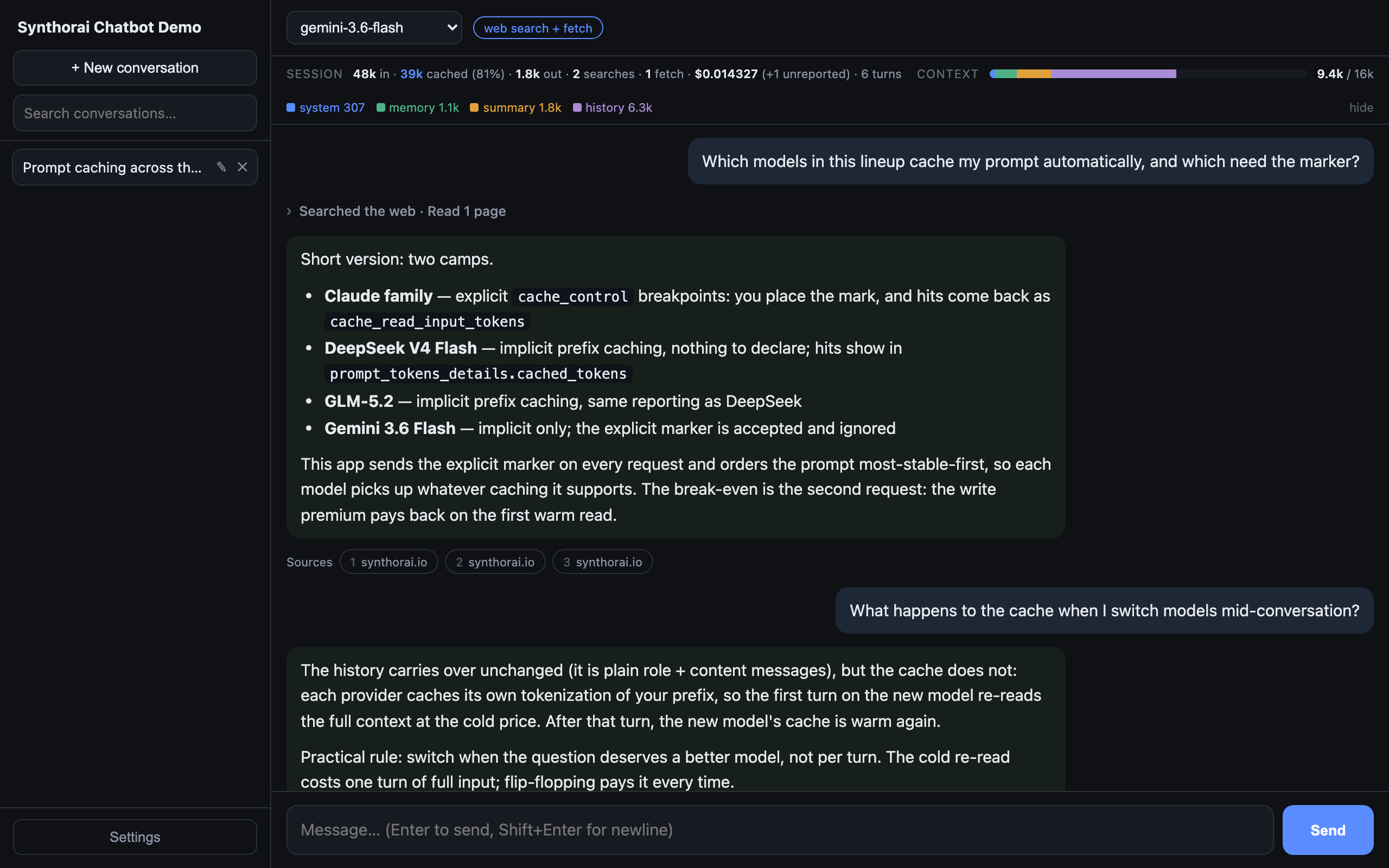
What must an MVP chatbot do?
Eight things, and each one is there because of a specific way chatbots fail without it:
| Feature | The failure it prevents | Where it lives |
|---|---|---|
| Persistent conversations (list, search, rename) | a chat that forgets everything on reload is a demo, not a tool | storage.py |
| Model selection, switchable mid-conversation | one model priced for the hardest question overpays every easy one | config.py |
| An editable persona, with presets | the system prompt is the product; changing it must not need a deploy | presets/ |
| Streaming, with a Stop that reaches the provider | silence before the first token reads as broken; a fake Stop keeps billing | server.py |
| A context budget, with compression at the limit | every model has a window; hitting it silently is how bots “get stupid” | context.py |
| Long-term memory | re-introducing yourself every session is the most-felt chatbot annoyance | context.py + .data/memory.md |
| Web search and web fetch | the model’s knowledge froze at training time; chat questions skew current | tools.py |
| Cost visibility, per turn and per session | the bill grows with history; you cannot tune what you cannot see | server.py |
Web search and fetch deserve the longer argument, because they are the pair most MVP feature lists cut first. A chat model’s knowledge stops at its training cutoff, months before today, and chat questions skew heavily toward the current: prices, versions, releases, “does X support Y yet”. A chatbot that answers those from training data is not degraded, it is confidently wrong, and the user cannot tell which answers are stale. The failure goes deeper than missing facts: while building this we found that a model with no date anchor assumes its cutoff is “now”, so it even searches wrong, putting a stale year into its own queries. Retrieval is not an enrichment feature for a chatbot; it is the difference between an interface to a snapshot and an assistant.
Why two tools and not one: search and fetch answer different questions. Search returns snippets a few hundred characters long that regularly disagree with one another; it answers “what is out there”. Fetch retrieves one page in full and answers “what does that page say”, which is what settles an exact figure. One discovers, the other verifies. The model decides per turn whether to use either, so a turn that needs neither costs nothing extra, and per-use caps bound the ones that do.
The rest of the table stakes come along too: Regenerate, markdown rendering that does not break mid-stream, named recovery paths for failures. The sections below walk the list roughly top to bottom, in the order a request flows through the code.
How is it put together?
Three pieces: a static page, six small Python files, and the gateway. The page posts a message; the server assembles context, compresses if needed, streams the completion back as server-sent events, and records measured usage. Conversations are JSON files you can cat.
static/index.html   the chat UI (vanilla JS: picker, budget bar, markdown, activity trail)
server.py           routes; the per-turn pipeline: project → compress → stream → record
context.py          token budgeting, compression call, memory file, message assembly
tools.py            the /v1/messages transport used by tool-enabled turns
storage.py          one JSON file per conversation under .data/ (settings included)
config.py           env-driven settings: model lineup, budgets, prompts
presets/            system-prompt presets, one .txt each
The per-turn pipeline in server.py is the part worth internalizing. Every message the user sends flows through the same five steps, and each step maps to a section below:
user message
    │
    ▼
[1] project the next request's size     last measured prompt_tokens
    │                                   + estimate(new message, pessimistic)
    │                                   + completion reserve
    ▼
[2] over budget? ──yes──▶ compress      old turns ──▶ rolling summary
    │                                       └───────▶ durable facts ──▶ memory.md
    ▼
[3] assemble and send                   [persona][memory][summary][date][history]
    │                                   cache mark after the system blocks
    ▼
[4] stream SSE back to the page         delta / reasoning / search / fetch /
    │                                   compression notice / warning / error
    ▼
[5] record measured usage               usage.prompt_tokens becomes step [1]'s
                                        input on the next turn
The loop closes on itself: step 5’s measured number is what step 1 trusts next turn, so the budget is always grounded in what the API actually counted rather than a local guess.
One architectural fork to know about up front: plain turns go to /v1/chat/completions, and turns with web search or fetch enabled go to /v1/messages. That split is not a stylistic choice; the section on tools explains the measured behavior that forces it.
Which models go in the picker?
Seven ship in .env, grouped by tier in the picker (fast & cheap, balanced, frontier), and you can add any id the gateway serves from Settings; added ids persist in .data/models.json. The choice of default matters more than the lineup: the MVP starts on Gemini 3.6 Flash with its reasoning dial pinned to the floor. Chat replies are single-step work, and on single-step tasks reasoning_effort: "minimal" cut measured per-call cost 91-97% versus the default with output a reader could not tell apart. That setting lives in config, per model, because not every model accepts it:
# config.py — extra request params per model
MODEL_PARAMS: dict[str, dict] = {
    "gemini-3.6-flash": {"reasoning_effort": "minimal"},
}
DeepSeek V4 Flash is in the lineup twice over: as the budget option in the picker, and as the default summarizer for compression, because summarization is also single-step, quality-tolerant work. Claude Sonnet 5 is the pick when writing quality is the product; budget it by token counts rather than sticker price, since identical text tokenizes to 41% more tokens than on Sonnet 4.6. GLM-5.2 earns its slot on tool-heavy flows: a warm tool-call turn measured $0.0009 against $0.0051 on Claude Opus 4.8, with the caveat that its 6.6s median warm turn is felt latency in a chat window.
Per-model capability is measured, not assumed, and the code routes around the differences rather than pretending they are not there. In this lineup, only DeepSeek and GLM stream their working out as reasoning_content; the Claude models return no thinking blocks through this gateway even with the thinking parameter set, so the UI only offers a live “Thinking” panel where one can exist.
Switching models mid-conversation costs nothing structurally. The history is provider-neutral {"role", "content"} messages, so the same conversation can start cheap and escalate to the quality pick when a hard question arrives. The one real cost is invisible: a model switch abandons the previous model’s prompt cache, so the first turn after a switch re-reads the full context at the cold price.
What does the model actually see each turn?
A layered prompt, assembled in one place and in a deliberate order: most-stable content first.
| Layer | Comes from | Changes |
|---|---|---|
| System prompt (persona) | presets/*.txt or free text | never, unless edited |
| Long-term memory | .data/memory.md | rarely (facts appended) |
| Rolling summary | compression | only when compression fires |
| Date anchor | the server clock | daily |
| Tool instructions | Settings, tool turns only | rarely |
| Recent turns | the conversation | every turn |
The ordering rule is: most stable first, because of caching (next section). The persona never changes, memory changes rarely, the summary changes only on compression, and the history changes every turn, so each layer sits behind everything that changes less often than it does.
The date anchor earns its place in the stack, and its position in it. A model with no date anchor assumes its training cutoff is “now”: it writes search queries with a stale year in them and reads a release table as if the newest row were current. But the anchor is deliberately a date, not a timestamp: it lands in the prompt prefix, so anything finer than day granularity would break the cache on every single request. And it sits after persona, memory, and summary, so those keep their cache across midnight.
How does prompt caching work, and which models honor it?
The principle: providers cache the byte-identical prefix of a request and serve it back at a steep discount, charging a small premium to write it the first time. Chat is the single best workload for this, because each request is the previous request plus two messages: the entire past is a stable prefix by construction. The write premium pays back on the very next turn (on Anthropic models, 1.25x to write for the 5-minute TTL against roughly 0.1x to read; the write-side economics are measured here), and cache_control markers cut measured cost 88-89% across three Claude tiers. On a conversation carrying real memory and a summary, later turns cost roughly a tenth of a cold first turn.
The catch is that “caching” is not one mechanism. Providers split into two camps, and this lineup contains both:
| Model | Caching style | You do | Hits reported as |
|---|---|---|---|
| Claude family | explicit: cache_control breakpoints | place the mark | cache_read_input_tokens |
| DeepSeek V4 Flash | implicit: automatic prefix | nothing | prompt_tokens_details.cached_tokens |
| GLM-5.2 | implicit: automatic prefix | nothing | prompt_tokens_details.cached_tokens |
| Gemini 3.6 Flash | implicit; the marker is accepted and ignored | nothing works | not reported through this gateway |
Explicit caching (Anthropic’s model) makes you name the breakpoint but tells you exactly what happened: separate fields for tokens written and tokens read, so the discount is auditable per turn. Implicit caching (the OpenAI-style camp) needs no markers and just happens when your prefix repeats, but you get whatever the provider decides, and the only evidence is a cached_tokens field after the fact; how reliably that fires varies widely by provider. The MVP’s strategy is to serve both camps at once: order the prompt most-stable-first (which is what implicit caching keys on) and always send the explicit marker (which the implicit camp ignores harmlessly). One request shape, every model gets whatever caching it is capable of.
Where the explicit mark goes came out of measurement, not documentation: on this gateway, cache_control is honored on a system block and silently ignored anywhere else. The common multi-turn pattern of marking the newest user message (which would let the whole history be cached) reads back zero cached tokens at full price. So the MVP marks the end of the system section, and the cacheable prefix is persona + memory + summary. Two consequences follow. Caching only engages once that prefix clears the model’s minimum (about 1,024 tokens), so a fresh conversation caches nothing and one with accumulated memory and a summary caches everything. And anything that edits the prefix has a price: editing the system prompt goes cold from byte one, compression re-writes the summary (one cold read, covered below), and switching models abandons the old model’s cache entirely.
The TTL is a config decision with the same shape everywhere: the default 5-minute cache covers an active conversation, and the 1-hour tier covers a user who stepped away, at double the write premium. CACHE_TTL=1h is the one-line change; whether it pays depends on whether your users actually come back inside the hour.
How do you know you are near the context limit?
Measure, don’t guess: the only token count that is true for the model you are talking to is the usage.prompt_tokens the API returned for the previous request. Local estimators mislead across vendors, and the spread is not small: the same English text tokenizes 41% apart between two models from the same vendor (we measured it), more across vendors. The MVP counts tokens locally only for the one thing the API has not seen yet, the message being sent right now, and that estimate rounds up on purpose:
# context.py
def needs_compression(last_prompt_tokens, pending_text, message_count, budget=None):
    if message_count <= config.KEEP_RECENT_MESSAGES:
        return False  # nothing old enough to fold away
    projected = (
        last_prompt_tokens                    # measured, last response
        + estimate_tokens(pending_text)       # estimated, pessimistic
        + config.MAX_COMPLETION_TOKENS        # worst-case reply
    )
    return projected > (budget or config.CONTEXT_BUDGET_TOKENS)
Overestimating triggers compression one turn early, which costs one cheap summary call. Underestimating overflows the window, which costs a failed or silently truncated request. The asymmetry decides the rounding direction.
There is a trap inside “measure”: providers disagree about whether prompt_tokens already includes the cached tokens. Some report the full prompt, others only the uncached delta. Getting this wrong is not cosmetic, because this number is the budget’s ground truth: under-count it by the size of the cache and compression never fires, and the window silently overflows. The server normalizes (when prompt_tokens is smaller than the reported cached count, it cannot be the whole prompt, so the parts are summed) and keeps its own estimate as a floor under the measured value. What usage actually reports per provider is its own topic; LLM Token Usage Anatomy covers it.
The default budget is 102,400 tokens, which a normal conversation will not reach; it is a working budget, not a model limit, and the number to set is the point where a turn costs more than it is worth. To watch the mechanism work, open Settings and drop the window to a few thousand for one conversation (the budget is per-conversation), then paste a few long messages. The context bar in the header is drawn from the measured number and segmented by what is filling the window: persona, memory, summary, history.

What happens at the limit?
Compress, don’t truncate. Truncation makes the bot forget the beginning of the conversation, and users experience that as the bot being stupid. Instead, everything except the most recent messages (default: last 8) is folded into a rolling summary by the cheap summarizer model, and the summary rides along as a system block. The recent window survives verbatim, so the bot’s short-term voice does not change; only the deep past gets lossy. Nothing is silently dropped: a notice appears in the transcript when compression fires, with the message count and the summary’s size.
One compression, end to end:
before   (projected next request 103.1k > 102.4k budget)

  [persona][memory][date][ m1 ..................... m34 │ m35 ....... m42 ]
                            old enough to fold            last 8, kept

one summary call to deepseek-v4-flash:
  in:   prior summary + m1 ... m34
  out:  {"summary": "one dense paragraph: topics, decisions,
                     open questions, promises",
         "facts":   ["prefers Python", "timezone is UTC+8"]}

after

  [persona][memory + new facts][summary][date][ m35 ....... m42 ]
   unchanged  grows rarely      replaced         verbatim
Three design points in the compression call carry most of its reliability:
- The summary absorbs the previous summary. The second compression folds in the first summary along with the newly old messages, so it stays one rolling paragraph rather than a chain of summaries-of-summaries growing without bound.
- Failure does not cost the turn. If the summary call errors, the server drops the oldest turns unsummarized, tells the user exactly what was lost, and answers the message anyway. A sloppy memory beats a dead chatbot, and the error path that never runs in demos is the one that pages you in production.
- The prompt is a setting, with one guard. What the summarizer is asked to keep decides what the conversation remembers, so the compression prompt is editable per conversation. The server rejects an edit that removes the
{transcript}placeholder, because that prompt would summarize nothing, and the failure would surface much later, on the first overflow. Same logic behindCOMPRESS_MAX_TOKENS: the output cap has headroom over what the prompt asks for, because a summary truncated mid-sentence is what every later turn inherits.
For the cache, compression charges you exactly one cold re-read: the summary block changes, so everything after the memory block goes cold for one request, then the new, smaller prefix is cached again. That is the honest accounting: a summary call plus one cold read buys every subsequent turn priced on a smaller, warm context.
How does memory survive across sessions?
Step back and the bot has three memory stores, distinguished by scope and lifetime, and every design choice in this section falls out of that split:
| Store | Scope | Lifetime | Size on the wire |
|---|---|---|---|
| Recent turns, verbatim | this conversation | until compression folds them | full text of the last 8 messages |
| Rolling summary | this conversation | dies with the conversation | one paragraph, under 200 words |
memory.md facts | every conversation | until a human prunes them | a few lines |
The summary and the facts look similar but age differently, which is why they are separate. The rolling summary is conversation-shaped (decisions, open questions, what the assistant promised) and dies with the conversation, correctly. Durable facts about the user (“prefers Python”, “timezone is UTC+8”) are still true next week and wasted if they die here.
The compression prompt asks for both at once and returns JSON: a summary string and a facts array. Facts append to .data/memory.md, and every conversation loads that file as a system block. Extraction happens at compression time rather than as a separate pass for a cost reason: compression is the moment a model is already re-reading the old turns, so the harvest rides on tokens you were paying for anyway. One call, two outputs.
The MVP’s dedup is an exact-line match, and the limitation shows quickly: one compression stores “User prefers Python over Node.js” and a later one adds “The user prefers Python over Node.js.” Semantic dedup means embedding or LLM-comparing each candidate against the store, which is a real feature with real cost, so the MVP does the dumb thing and says so. The memory file is markdown precisely so a human can read and prune it; Settings exposes it as an editable text box, which doubles as the transparency panel: what the bot knows about you is a file you can open.
What happens when the user hits Stop?
The provider stops generating. That sentence is the feature, and most chat UIs do not have it: a Stop that only hides the output while the completion runs on means paying for tokens nobody will read.
The chain has three links. The Send button becomes Stop while a reply streams (same position, no confirmation) and clicking it aborts the browser’s fetch. The server polls for disconnect between events, notices, and breaks out of its streaming loop, which closes the upstream connection so the provider halts. Whatever text already arrived is persisted and marked interrupted, shown with a dashed border in the transcript. The same chain fires when the tab closes or the connection drops, because from the server’s side those are the same event.
Persistence has to be exactly-once here, and the code is explicit about it: the save runs from inside the streaming loop on a clean finish, from the exception handler on a broken stream, and from the finally block on a hard disconnect (where the framework cancels the generator and nothing after the loop runs). The function is idempotent, so whichever path fires first wins.
Stop pairs with Regenerate: interrupt a reply you do not want, then redo it without retyping. Regenerate drops trailing assistant turns (including an interrupted one) so the conversation ends on the user message again, and re-answers it, with the current model. Since the model dropdown applies to the next turn, Stop plus Regenerate is also how you re-ask the same question on a stronger model.
What happens when a turn fails?
One of six things, and each gets its own recovery path rather than one red line. classify() in server.py maps upstream exceptions onto failure kinds; the UI maps kinds onto actions:
| Failure | What the user sees | Recovery |
|---|---|---|
| Network error | named as such | Retry button |
| Rate limit | wait time from retry-after when present | Retry button |
| Bad API key | the env var to fix, by name | edit .env |
| Content filter | ”retrying the same text will be refused again” | Edit & resend |
| Broken mid-stream | the partial reply, kept, marked interrupted | Retry |
| Compression failed | warning naming what was dropped | none needed; the turn continues |
Two invariants do most of the work. First, the user’s message is never lost: if the request fails before the first event, the server rolls the message back out of the conversation and the UI puts the draft back in the composer, so a retry cannot double-send it. If the stream breaks after text arrived, the partial is kept and marked. Second, a refused reply gets rewind, not retry: the server pulls the user message back out of the history and returns it to the composer for editing, because retrying verbatim into a content filter fails identically forever.
A subtler storage rule sits behind both: a blank assistant turn is never stored. An empty assistant message replayed upstream breaks the user/assistant alternation some providers enforce, and the error it eventually causes names the wrong message, on a later turn, which makes it miserable to debug. The MVP strips empty content from the wire format and refuses to store text-free replies (unless the turn has search or reasoning activity worth keeping, in which case the activity is stored and the empty text stripped on the way out).
How does web search work without a tool loop in your code?
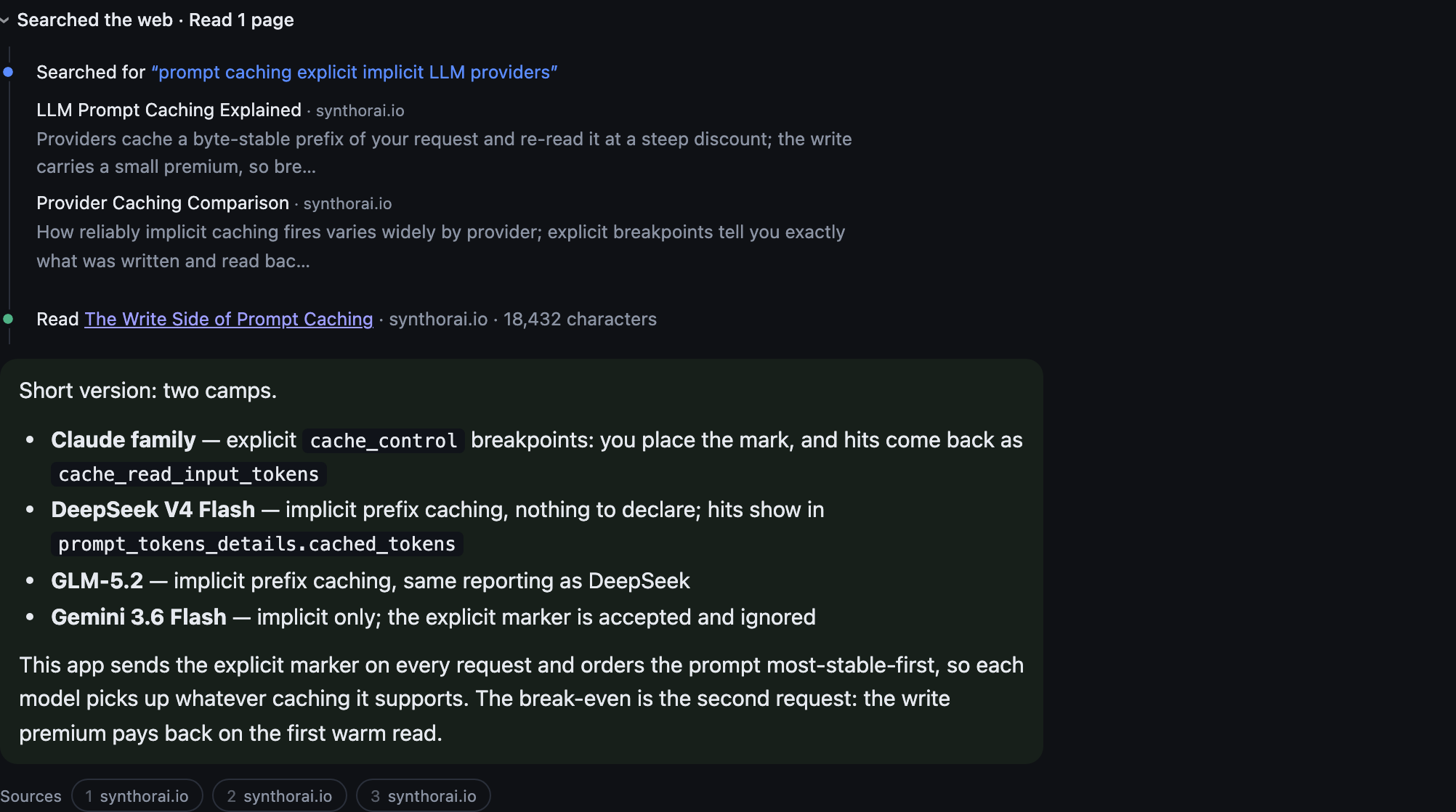
The gateway runs the tools server-side, which changes whose code does the work. Classic function calling is a loop you own: the model returns a tool_calls block, your code executes the tool, appends a tool_result message, and re-sends the whole conversation, once per call. Server-side tools move that loop into the gateway: declare synthorai:web_search or synthorai:web_fetch on the request and the gateway sits between the LLM and the tool providers, relaying the model’s tool calls to third-party search and fetch APIs and folding the results back into the model’s context. Nothing about the tools is magic: each search and each fetch is itself a call to an external API, which is exactly why they are billed per use. There is no tool_result round trip in this codebase, only events to render:
browser        server (tools.py)     Synthorai gateway       LLM / tool providers
   │ POST /chat    │                     │
   ├──────────────▶│ declare tools +     │
   │               │ budget note         │
   │               ├────────────────────▶│── question + tools ──▶ [LLM]
   │               │                     │◀── tool_use: search ── [LLM]
   │               │                     │── query ─────────────▶ [search API]
   │               │  search results     │◀── results ─────────── [search API]
   │ SSE: search ◀─┤◀────────────────────┤── results ───────────▶ [LLM]
   │               │                     │◀── tool_use: fetch ─── [LLM]
   │               │                     │── URL ───────────────▶ [fetch API]
   │               │  fetch result       │◀── page text ───────── [fetch API]
   │ SSE: fetch ◀──┤◀────────────────────┤── page text ─────────▶ [LLM]
   │ SSE: delta ◀──┤◀────────────────────┤◀── answer tokens ───── [LLM]
   │ SSE: done     │                     │
The roles split cleanly: the model decides (whether to search at all, whether a snippet settles the question or a page needs fetching, when to stop and write), the gateway executes (calls the search or fetch provider, feeds the result back to the model), and your server just renders the events streaming past it. Both tools are on by default and a turn that needs neither costs nothing extra, so arithmetic stays free while “what is the current…” searches. The loop on the gateway side is bounded too: if the server-side search loop pauses at its own iteration limit (pause_turn), the transport echoes the turn back to resume it, at most three times.
Four things we learned building this are worth more than the happy path:
- The endpoint decides what you can see. Both endpoints run the search and bill for it (measured 2026-08-04, on Anthropic and Gemini channels alike), but only
/v1/messagessurfaces the search itself: the query and the result URLs arrive as typed blocks your code can render and store. On/v1/chat/completionsthe same search runs invisibly: HTTP 200, an answer that opens “Based on the search results…”, and zero citations or annotations on the streaming and non-streaming paths alike. A search you paid for but cannot audit is silent degradation, the worst failure shape (nothing errors, the provenance is just gone), and it is the entire reasontools.pyexists as a second transport instead of one extra field on the normal request. - The model must be told its budget, in words. The caps (default: 3 searches, 2 fetches per turn) are enforced silently by the gateway, so a model that does not know about them plans as if tools were unlimited and burns the last round mid-thought; the turn ends on “Let me search for…” with no answer. The MVP injects one sentence stating the budget, and the wording is a measurable cost lever: in testing, no note at all spent the whole tool budget and finished mid-sentence, an over-strict note gave up and told the user to go read the page, and the shipped wording skipped search entirely, fetched the two authoritative pages, and cost the least of the three. It is editable in Settings; change it and watch the per-turn cost line.
- Caps are the only brake. Both tools are billed per use, and the model decides how many rounds it wants. One uncapped turn in testing ran three searches and two fetches before a single output token was billed.
- Degrade, don’t die. Two failures get the same treatment: drop the tool, retry once, tell the user. Web fetch needs an entitlement on the key, and without it the whole request fails with
web_fetch_not_enabledrather than degrading. And Gemini accepts the tool declaration, then errors the moment it actually calls one (Function call is missing a thought_signature). In both cases, losing the user’s turn over an optional tool is the wrong trade.
Everything the model did to reach an answer (thought, searched, read) streams live into an activity trail above the reply, collapsed to one muted line (“Thought for 5s · Searched the web · Read 2 pages”) and expandable into a timeline with queries, result domains, and reasoning text. The trail is stored with the message, which is the point: a trail that vanishes on reload cannot be used to audit an answer later. Citations render as numbered domain chips under the reply.
How does markdown render without breaking mid-stream?
By splitting the accumulated text into a stable prefix that is safe to render and a tail that is not. Rendering a half-open construct makes the layout jump when the next token closes it, so the renderer cuts at the last complete line, and if an opening code fence has no closer yet, everything from that fence on stays plain text until it closes. The bubble re-renders only when the stable prefix actually grows, so streaming does not rebuild the DOM per token. Code blocks get a copy button; the renderer is a hundred lines of vanilla JS, no library, and that is a statement about what an MVP needs rather than about markdown libraries.
What does a conversation cost?
Whatever the gateway’s usage says, and the MVP’s job is to read that honestly. Two normalization problems turned out to be load-bearing:
- Vendors disagree on field names. For cached tokens alone: Anthropic models report
cache_read_input_tokens, DeepSeek and GLM onlyprompt_tokens_details.cached_tokens, Gemini neither. The stats line reads whichever is present so “cached” means one thing. - A missing cost is not zero. The gateway reports
coston some turns and omits it on others (reproducibly, on turns where a tool is declared but not used). Turns that arrive without a cost field are counted and shown as “+N unreported” instead of being summed as zero, because a total that silently omits turns reads as the bill when it is only a floor.
The header shows running session totals (input, output, cached share, searches, fetches, cost, turns) and each reply carries its own line. The cached share is the number to watch: it is the caching section above, measured on your own conversation.
Where do all the knobs live?
In one Settings panel, and the scoping is the design decision worth copying: almost everything in it belongs to a single conversation.
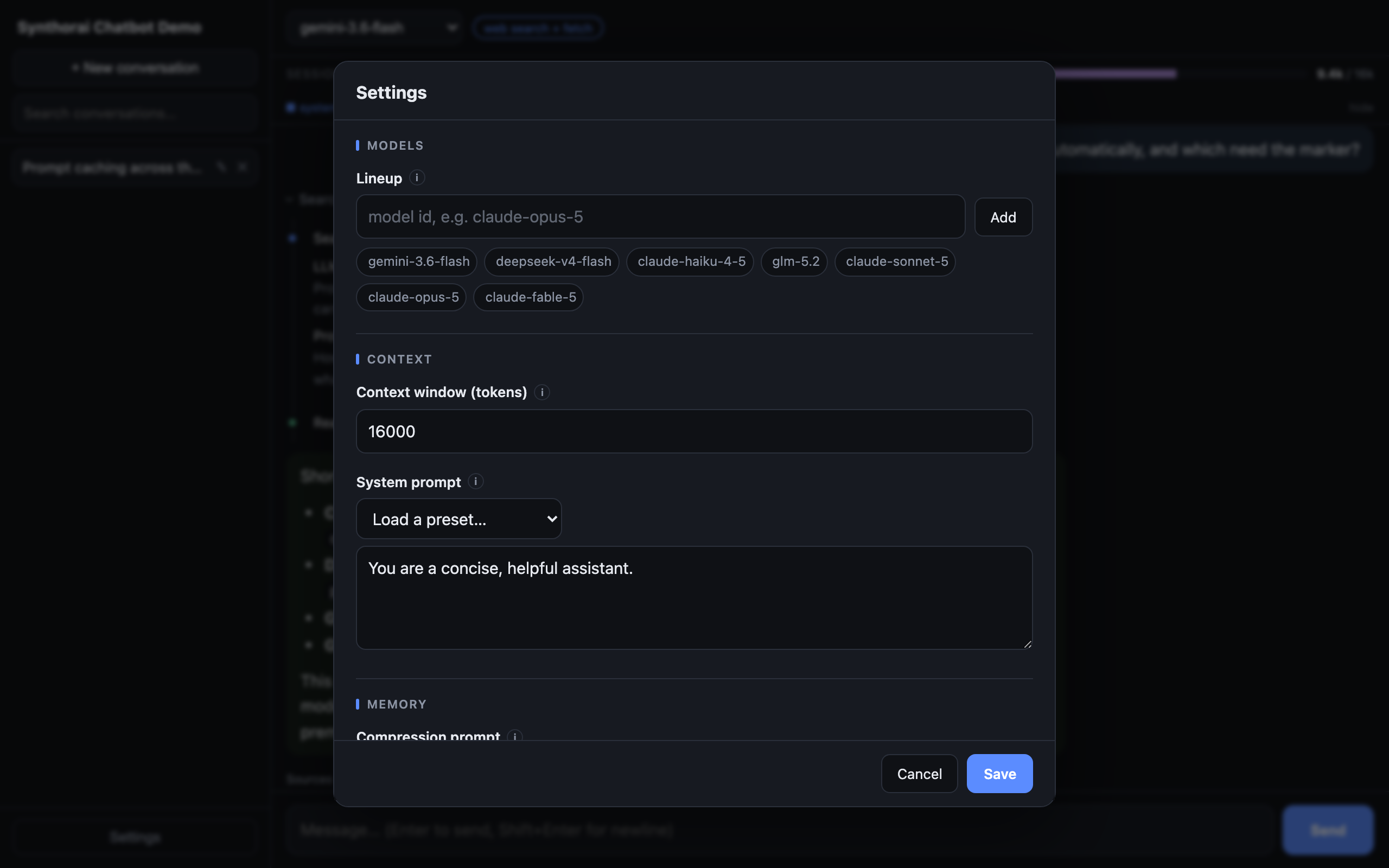
Only two things are global, because they describe the user rather than a conversation: the model lineup (add any id the gateway serves; it persists in .data/models.json) and the long-term memory file, exposed as an editable text box. Everything else is scoped to the open conversation: the system prompt (with the presets from presets/ as a dropdown), the context budget, the web search and fetch toggles, the tool instructions, and the compression prompt. Two conversations can therefore run side by side with different personas, budgets, and tools against the same models, which is how you reproduce a claim from this guide instead of taking our word for it.
Each field carries a small info marker (hover to peek, click to pin) stating what changing it costs, because most of these knobs have a price that is not visible in the UI otherwise: editing the persona invalidates the cache from byte one, so it costs one cold turn; rewording the tool instructions moves the per-turn bill; lowering the budget makes compression fire sooner. The model dropdown in the top bar is the one setting that saves immediately, since switching models mid-conversation is a first-class action rather than a configuration change.
What is left out, and where would it attach?
Deliberate omissions, each with its attachment point:
- Auth and multi-user: a session layer in front of the routes; conversations already have ids, so scoping them to a user is a filename prefix, not a redesign. Until then this is a localhost tool: every request it serves spends your API key, so do not expose it to the public internet as-is.
- Rate limiting: same place, same reason: it guards a shared deployment, and this is not one yet.
- RAG: retrieved documents belong after the summary and before the recent messages: volatile content goes late in the prefix so it does not churn the cached persona and memory blocks. Model-side, this is where the 1M-context picks earn their windows.
- Client-side function calling: the streaming loop grows a
tool_callsbranch and an executor; the GLM-5.2 write-up covers the cross-provider contract differences waiting there. The gateway-side tools above deliberately avoid that loop. - Semantic memory dedup: embed each candidate fact, compare against the store, keep the novel ones. The memory file format does not change.
- Syntax highlighting: the copy button is the feature people use; highlighting is a library decision for a real frontend.
- A real database:
storage.pyis a handful of functions; porting them to SQLite is an afternoon, and the JSON files were the point until you have users.
Related reading
- Best LLM by Use Case (2026): Chat, RAG & Agents Cost Matrix: the cost formula this build optimizes, applied across workload shapes.
- Gemini 3.6 Flash: the Thinking Dial That Moves Cost 30x: the measurements behind pinning reasoning to minimal.
- Claude Sonnet 5’s tokenizer: why cross-model token counts, not prices, are the comparison unit.
- LLM Token Usage Anatomy: what
usageactually reports, per provider. - GLM 5.2 tool calls: warm-turn economics and contract quirks for the function-calling extension.