
Ask Claude About Your LLM Logs: An OAuth MCP Connector, No API Key
Add an LLM gateway to Claude as a custom connector, sign in, grant read access to the request log, and ask in chat. Three questions, 14 tool calls, checked.
Our picks
live pricing| Model | Verdict | Price |
|---|---|---|
| Claude Fable 5.1 Answered three questions about a request log in 14 tool calls. Every cost, token count, request count and status matched the billing records, and so did its explanation of the most expensive session. | Model in the chat | from $10/M |
Contents
- How do you add the gateway to Claude?
- What do you approve when you sign in?
- Where does the connection show up on the gateway side?
- What did we ask, and were the answers right?
- What should you check in an answer?
- What does it cost, and how do you keep it safe?
- FAQ
- Can Claude read my LLM request logs?
- Do I need an API key to connect Claude to an MCP server?
- How accurate is Claude at analyzing logs?
- What does it cost to ask Claude about gateway logs?
- Is it safe to connect Claude to a request log?
- Related reading
“Which session cost the most this morning, and why?” is a question you can answer by clicking through a console, or by asking Claude in a chat window that can read the same records. This guide adds the Synthorai gateway to Claude as a connector over MCP (the protocol for giving a model tools), signs in instead of pasting an API key, grants read access to the request log and nothing else, and asks three questions about the sessions from the earlier guides in this series. Every number in the answers matched the billing records.
TL;DR
- Claude connects to the Synthorai gateway’s MCP server as a custom connector by OAuth sign-in, with no API key to paste.
- Approving only the request log gave Claude four read-only tools and a key with the
logs.readscope that expires in 7 days. - Claude Fable 5.1 answered three log questions in 14 tool calls, and every figure matched the billing records.
- The log tools return cost, tokens and status, never prompt or reply text.
The connection uses MCP (Model Context Protocol), the standard way to give an assistant tools: a server lists what it offers and the assistant calls them. The gateway is such a server at https://synthorai.io/v1/mcp. A connector is what Claude calls an MCP server you have added to your account. There is no code on this page and nothing to install.
We set the connection up on October 10, 2026, and asked the questions the day after, in claude.ai in a browser, with Claude Fable 5.1 as the chat model. Claude Desktop adds a custom connector the same way.
How do you add the gateway to Claude?
You add a custom connector with a name and the server’s URL. In Claude, open Customize, then Connectors, select Add and choose “Add custom connector”:
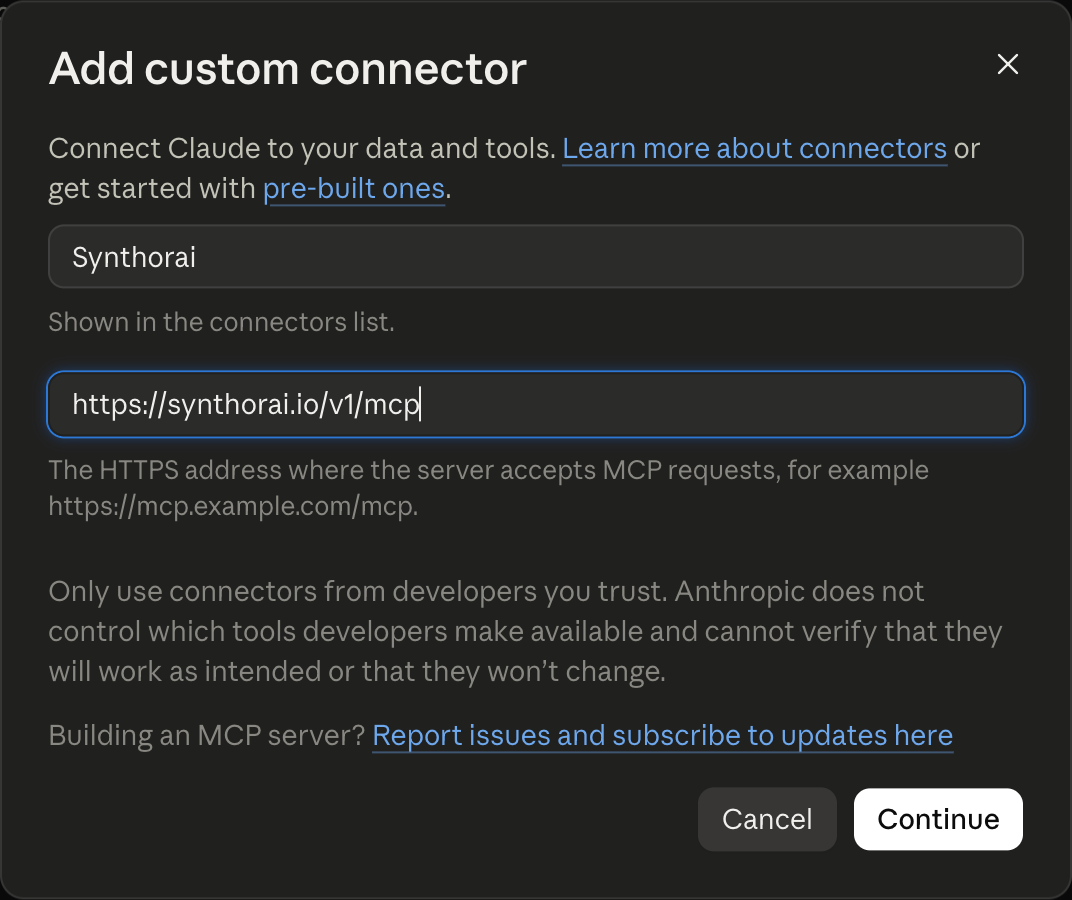
Select Continue and Claude checks the server. It then shows how it will connect, with two choices already detected from what the server reports:
- Authentication: “Sign in now”. Each person signs in to the server before using its tools. This is OAuth: the server asks you to approve the connection in your browser and gives Claude an access token, so no API key is typed or stored in a file.
- OAuth client: “Register automatically”. Claude registers itself with the server when you connect. You do not create a client id anywhere.
Leave both as detected and select Add. Claude sends you to Synthorai to approve the connection. If the connector page says the connection has expired instead, select Reconnect: that is what took us to the approval page.
What do you approve when you sign in?
You choose the workspace, what the connection is for, which data it can use and when access ends. The page is served by the gateway. If you are not signed in to its console, it asks you to sign in first:
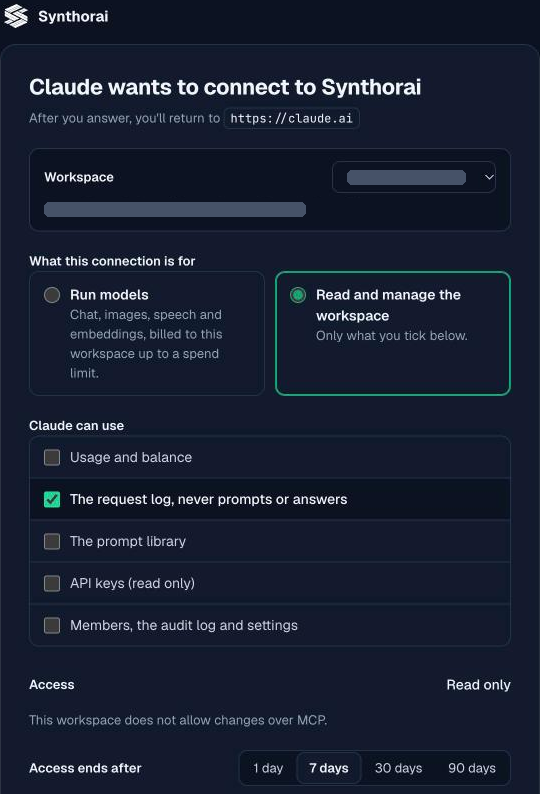
- Workspace. The connection sees one workspace. Pick the one that holds the requests you want to ask about.
- What this connection is for. “Run models” lets Claude call models through the gateway, billed to the workspace. “Read and manage the workspace” is the one for this guide, and it grants only what you tick below it.
- Claude can use. Five groups: usage and balance, the request log, the prompt library, API keys (read only), and members with the audit log and settings. We ticked the request log only.
- Access. Read only. Our workspace does not allow changes over MCP, which is a workspace setting, so the page offers nothing else.
- Access ends after. 1, 7, 30 or 90 days. We kept 7.
Select Allow and the browser returns to Claude, which reports the connector as connected and lists its tools:
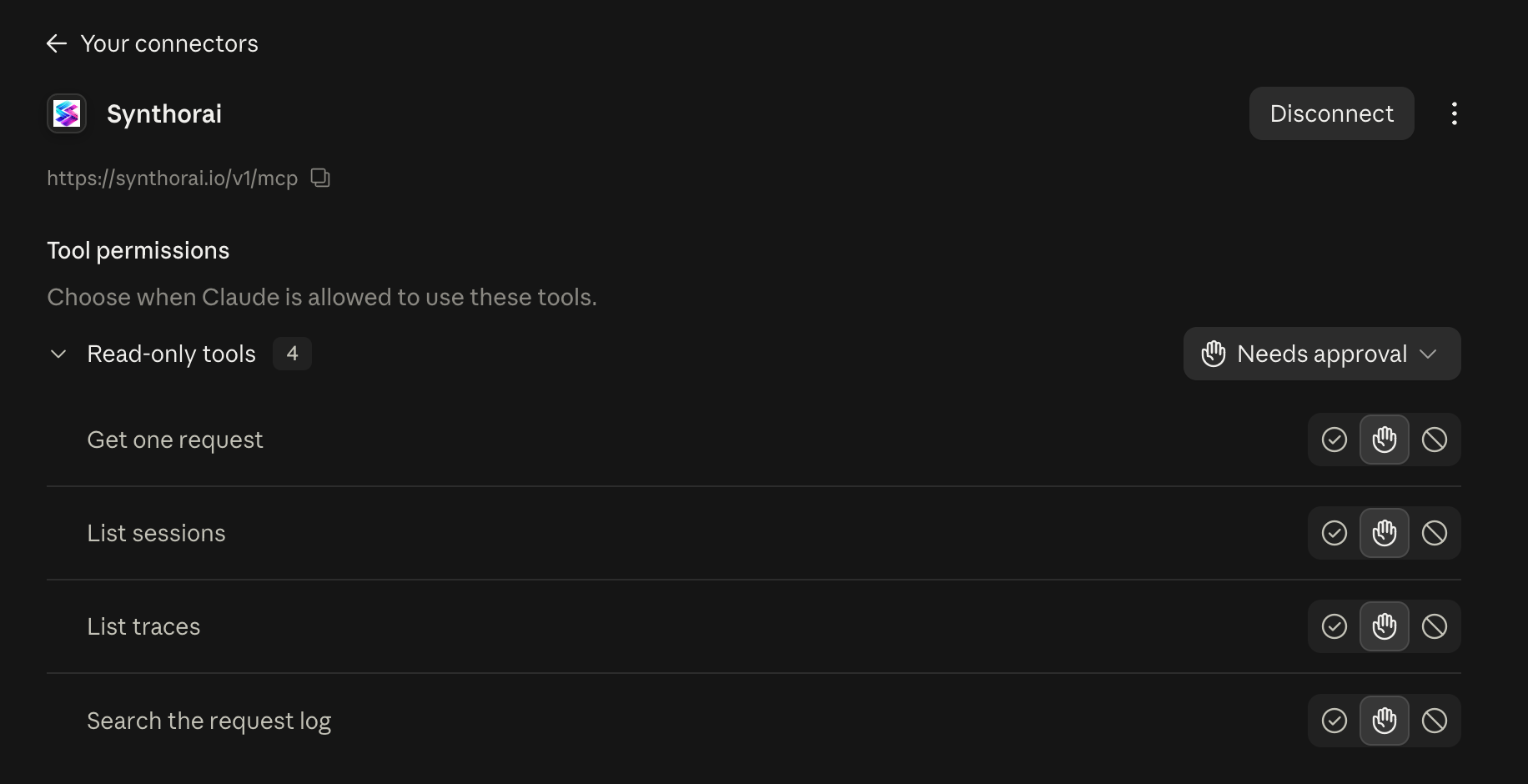
The connector has four tools, all read-only: search_requests, get_request, list_sessions and list_traces. They return what was called and how it went (model, status, tokens, cost, timing, session, trace and labels) and never the prompt or the reply. On this page you can also set each tool to always allowed, to ask first, or to blocked.
Where does the connection show up on the gateway side?
It shows up as a key of its own, under API keys on the Admin keys tab:
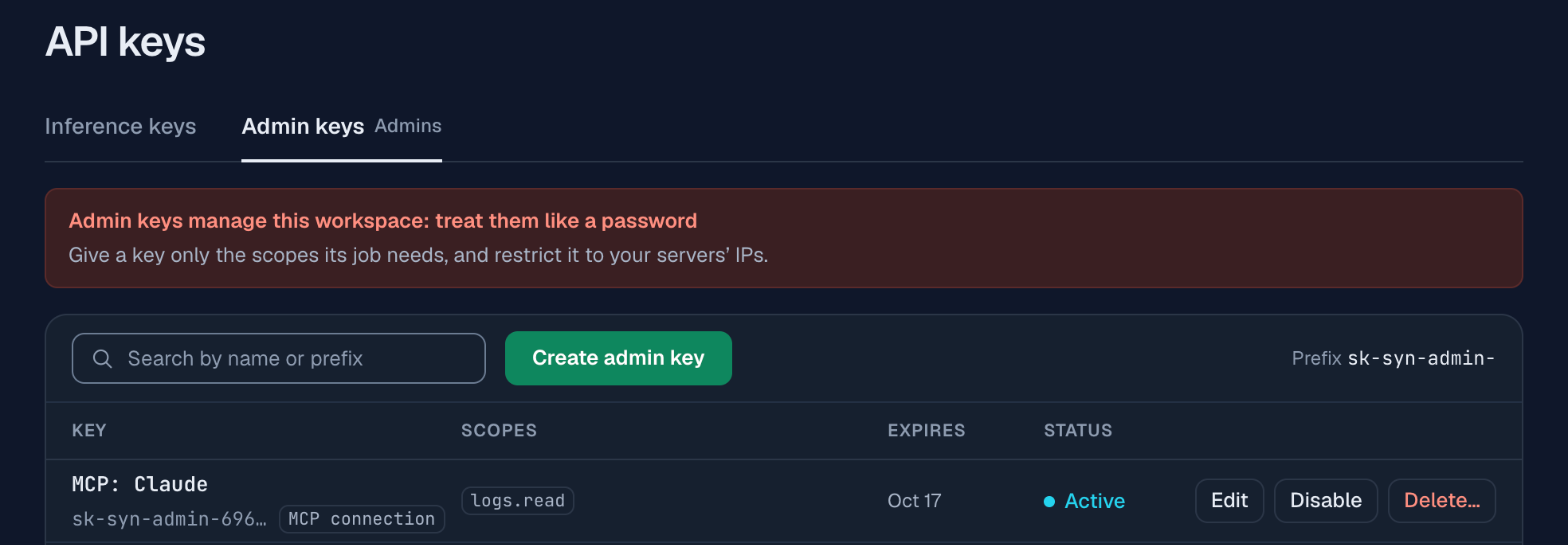
The key is named MCP: Claude, carries the one scope you ticked (logs.read), and expires on the day you chose. A scope is a permission attached to a key. You never see or handle the key, but you can disable or delete it here, which ends the connection at once whatever Claude has stored.
What did we ask, and were the answers right?
We asked three questions about the requests the demos of this series had just made, and every figure in the answers matched the billing records the demo scripts printed. Each question names a time range and a label to stay within. A label is a key and value the application sends with each request in the X-Synthorai-Metadata header. The demos label every request with feature, with case (which problem it reproduces) and with variant (before for the broken run, after for the fixed one, its twin). Prompt caching, which the answers refer to, bills a repeated prompt prefix at a lower rate: a write the first time it is sent and a read after that.
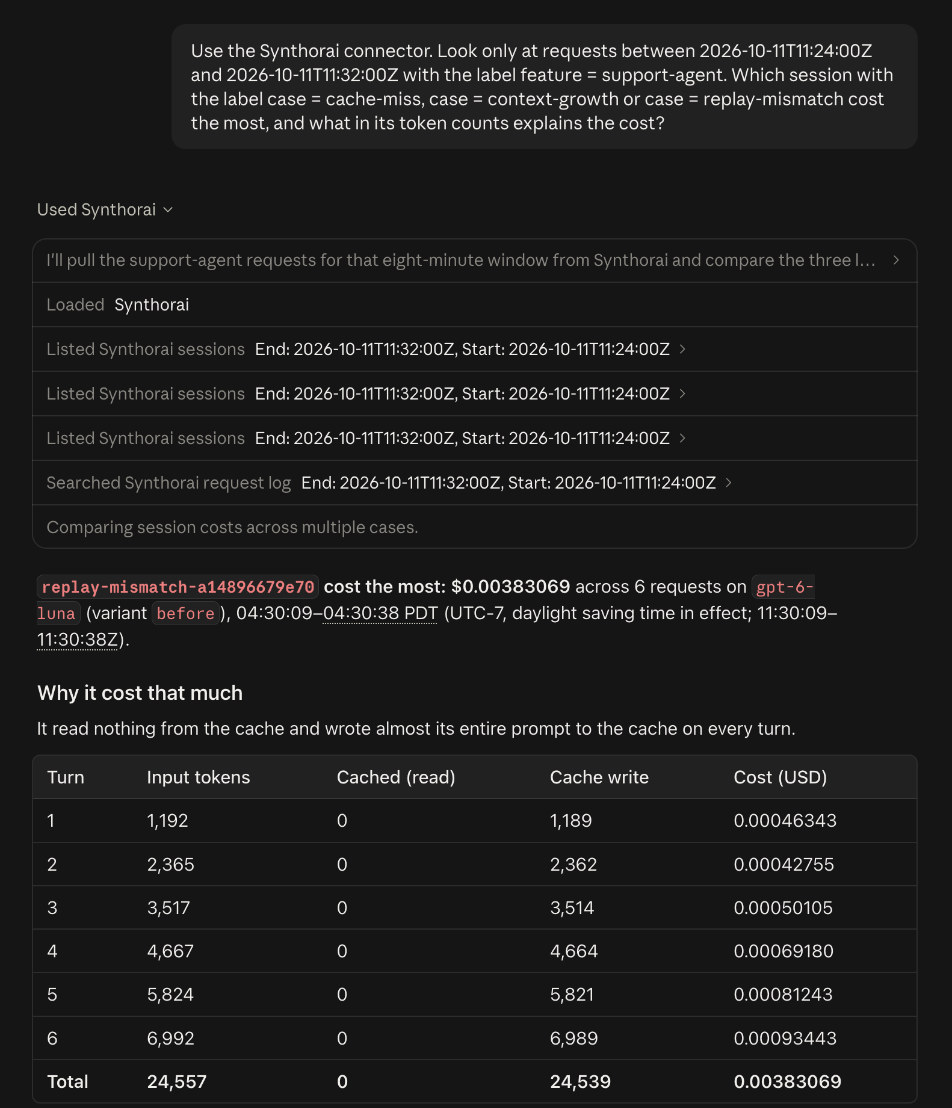
Use the Synthorai connector. Look only at requests between 2026-10-11T11:24:00Z and 2026-10-11T11:32:00Z with the label feature = support-agent. Which session with the label case = cache-miss, case = context-growth or case = replay-mismatch cost the most, and what in its token counts explains the cost?
| Question | Claude’s answer | Tool calls | Billing records |
|---|---|---|---|
Which cache-miss, context-growth or replay-mismatch session cost the most, and why? | replay-mismatch-a14896679e70, $0.003831 over 6 requests: 0 of its 24,557 input tokens read from cache. Its twin read 18,844 of 24,702 and cost $0.001522 | 3 × list_sessions, 1 × search_requests | $0.003831, 24,557 input, 0 cached; $0.001522, 24,702 input, 18,844 cached |
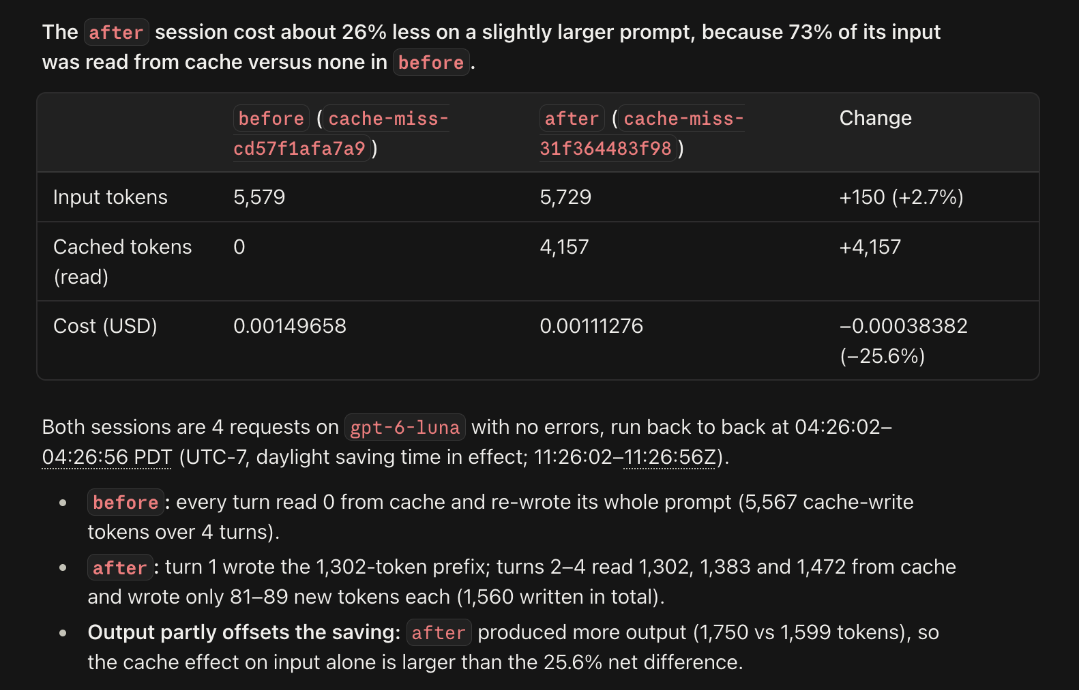
Compare the two cache-miss sessions, before and after | before: 5,579 input tokens, 0 cached, $0.001497. After: 5,729, 4,157 cached (73%), $0.001113, which is 25.6% less | 2 × list_sessions, 1 × search_requests | 5,579, 0 and $0.001497; 5,729, 4,157 and $0.001113 |
Did any request for u_1001 fail? And u_1002? | one of u_1001’s 11 requests, a 404 for a model that does not exist, retried successfully a second later. All 10 of u_1002’s succeeded | 7 × search_requests | 21 calls in the two conversations, one 404 |
Three things in the answers go beyond reading numbers back:
- It used labels without being told how. Opening a tool call in the chat shows its arguments: the first
list_sessionscall carriedlabelsofcase = cache-missandfeature = support-agent, the time range and a limit of 50, and there was one such call per case. For the third question it first searched for which field holds the user, found the_userlabel, and filtered on it. - It found the comparison a person would make. The first answer is the session from Why is my LLM agent expensive? in which a message was saved differently from how it was sent. Claude found the fixed twin by its
variant = afterlabel, noted that the two had nearly the same prompt volume, and put the 2.5x difference down to tokens written to the cache against tokens read from it. It also listed the expensive session turn by turn, which shows the cost roughly doubling from the first turn to the sixth as the prompt grows. - It said what the numbers do and do not show. The second answer points out that the fixed session wrote more output (1,750 tokens against 1,599), so the saving on input alone is larger than the 25.6% net difference. The first says the connector does not return prompt content, so it cannot see what broke the cache match.
We checked the explanation of the first answer as well as its numbers. The model in those sessions is GPT-6 Luna, which bills, per million tokens, $0.10 for input, $0.01 for input read from cache, $0.125 for input written to the cache and $0.50 for output. At those prices the expensive session’s 24,539 cache writes, 18 other input tokens and 1,523 output tokens come to $0.003831, and its twin’s 5,840 writes, 18,844 reads, 18 other input tokens and 1,204 output tokens come to $0.001522. Both are the billed amounts, so the write-against-read explanation holds.
What should you check in an answer?
Check the scope of the tool calls first, then any explanation that depends on prices or on your setup. The numbers in our three answers were right. Figures copied from a tool result are the safest; percentages and ratios are the model’s own arithmetic, so recheck those. Four things can still mislead:
- An answer is only as wide as its tool calls. Each call has a time range, labels and a limit. The chat lists every call with its arguments, so you can see whether “the most expensive session” was chosen from all sessions or from the first 50.
- Explanations come from general knowledge. The records say what happened. Why it happened is the model’s reasoning, and it may not fit your models or your prices. Recompute one figure, as we did above, before you act on a reason.
- Times are shown in your time zone. The log is in UTC, and we asked in UTC. The answers gave times in Pacific time, the zone Claude had for our account, so compare them with the UTC range in the question.
- The tools never return content. Claude can tell you a request failed with a 404 and what the error said. It cannot tell you what the user asked, and it says so when a question needs that.
A label and a narrow time range in the question keep the answer both accurate and small, since every row a tool returns goes into the conversation.
What does it cost, and how do you keep it safe?
The log tools are free to call, and the model’s work is part of your Claude plan, so asking costs nothing on the gateway bill. A long investigation does use up plan allowance, since tool results count as conversation.
The connection is as limited as what you approved:
- One group of data. Only the request log was ticked, so the connection has no tool for balances, prompts, keys or members.
- Read only. No tool changes anything or calls a model.
- An end date. The key expires after the period you chose, and you can delete it sooner.
- No prompt or reply text. The tools return metadata only.
- Tool permissions in Claude. Each tool can be set to ask before it runs, which is the default on the connector page. Our chat ran in Claude’s Auto permission mode, in which Claude uses connectors on its own and pauses only when something looks unsafe, so the read-only calls ran without a prompt.
Share a chat like this with care. An answer can quote session ids, user ids from your _user label and model names.
FAQ
Can Claude read my LLM request logs?
Yes, Claude can read them through a connector to an MCP server that exposes them. With the Synthorai gateway added as a custom connector and the request log approved at sign-in, Claude can search requests, list sessions and traces, and read cost, tokens, status and labels. It cannot read prompts or replies, because the tools do not return them.
Do I need an API key to connect Claude to an MCP server?
You do not need one if the server supports OAuth sign-in. Adding https://synthorai.io/v1/mcp as a custom connector sends you to an approval page, and the gateway creates a key for the connection itself, with only the scopes you ticked and an expiry of 1 to 90 days. The key is listed under API keys, where you can delete it.
How accurate is Claude at analyzing logs?
In our test with Claude Fable 5.1, every figure in three answers matched the billing records: costs, token counts, request counts and status codes. Its explanation of the most expensive session also held when we recomputed the bill from the model’s prices. Still check which tool calls an answer rests on.
What does it cost to ask Claude about gateway logs?
It costs nothing on the gateway bill: the log tools are free, and the three questions on this page made 14 tool calls. The model’s work counts against your Claude plan. A program that asks through the API pays for its own model tokens instead, which Give your agent log tools measures.
Is it safe to connect Claude to a request log?
It is as safe as what you approve. This connection had one group of data (the request log), read-only access, a 7-day expiry and no access to prompt or reply text. It cannot change the workspace or call a model, and deleting its key under API keys ends it.
Related reading
- Trace an LLM agent: how requests get the session ids and labels these questions filter on.
- Why is my LLM agent expensive?: the sessions the first two questions are about.
- Why is my LLM agent slow? and Debug an LLM agent: the same kind of investigation done by hand in the console.
- Claude Code cost by sub-agent: what Claude Code’s own sessions look like in the same log.
- Give your agent log tools: the same tools from a program with an API key, and what the model tokens cost.
- MCP server reference: every tool, the key scopes and how to limit a connection.