
Debug an LLM Agent: 3 Failures in a Trace, One With Status 200
Find one user's agent run by label, then read three failures in its trace: a 404 with a retry, replies cut off at status 200, and a 400 on the second turn.
Our picks
live pricing| Model | Verdict | Price |
|---|---|---|
| GPT-6 Luna Rejected the second turn of a conversation with a 400 in 0.5 s at no charge when the saved history had lost a tool call. | Main agent in the demo | from $0.1/M |
| DeepSeek V4.1 Flash With max_tokens at 40, three calls in a row returned status 200 and exactly 40 output tokens with no usable reply. With the cap raised and reasoning off, one call answered in 49 tokens. | Sub-agent in the demo | from $0.3/M |
Contents
- How do you find one user’s run?
- What does a failed call with a retry look like?
- Why did the agent return nothing when every call succeeded?
- Why does the second turn fail when the first one worked?
- What should every agent log to make this possible?
- FAQ
- How do I debug an LLM agent in production?
- Why does my LLM return an empty response with status 200?
- What causes “No tool call found for function call output”?
- Should I retry a failed LLM call?
- Related reading
“The assistant gave me a useless answer yesterday afternoon” is how most agent bugs arrive: one user, an approximate time, no request id. Finding the run takes a label on your requests, and understanding it takes a trace, because the failure is usually one call out of several and often does not look like an error. This guide walks the path from a complaint to the call that went wrong, then reproduces three failures in a small support agent and shows what each looks like in the Synthorai console.
TL;DR
- A
_userlabel on every request finds one user’s agent runs with a single search in the Traces list. - A failed call and its retry appear side by side when the retry keeps the trace id. The 404 in the demo cost 95 ms and $0.
- With
max_tokens=40on a reasoning model, three calls returned status 200 with 40 output tokens and no reply. - A saved history that lost a tool call made the second turn fail with a 400 at no charge.
This guide builds on Trace an LLM agent, which covers the request headers used here. Set the demo up as that guide describes (Python 3.10 or later, the virtualenv active), then run these from the same directory of github.com/synthorai-io/use-cases:
cd use-cases/agent-tracing
python run.py --fail                    # a failed call with a retry
python incidents.py cut-off bad-history
The numbers on this page are from one run of each on October 11, 2026.
| What you see in the trace | What it means | Case |
|---|---|---|
| a hatched mark with a status code, then a similar call | a call failed and was retried | run.py --fail |
| the same span several times, all 200, the Output column equal to your cap | replies are cut off before they are usable | cut-off |
| a 400 on the second turn of a session, 0 tokens, $0 | the request your code built is invalid | bad-history |
How do you find one user’s run?
You find it by the label you sent with it. If every request carries X-Synthorai-Metadata with a _user key, the user’s requests are one filter away:
labels = {"feature": "support-agent", "release": "v2", "_user": "u_1002"}- Open Traces, type
metadata._user = u_1002in the search box and press Enter. Set the time range to cover the complaint. - Read the list. It now holds only that user’s sessions and their traces, each with its calls, errors, duration and cost, and the Calls, Errors, Duration and Cost columns are sortable. Start with traces that have an error or far more calls than the ones around them.
- Open that trace. It shows the whole run, “Open session” shows the conversation around it, and “See the calls in Logs” lists its single requests.
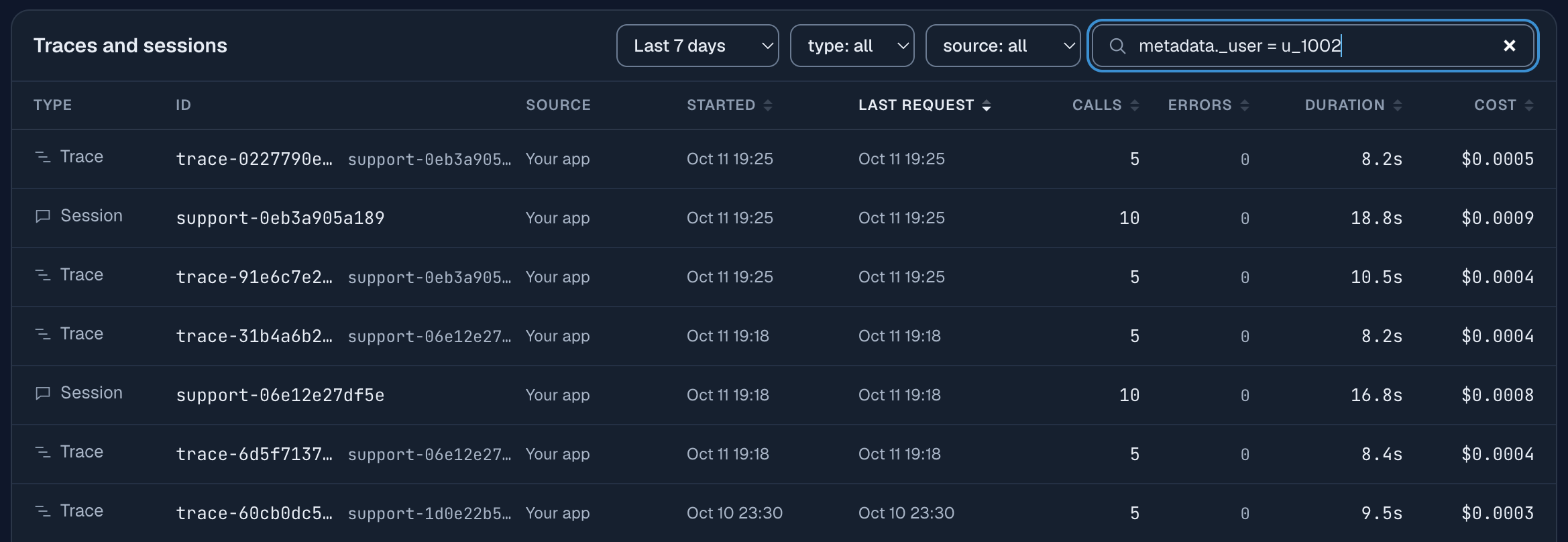
To search single requests instead of runs, the filter box in Logs takes the same label, along with status (error, success, 4xx, 5xx or a code), latency, cost, model, session and trace.
Without labels the same search starts from whatever you do have: a trace id from your own logs goes in the Traces search box, and a request id from a response header goes in the Logs filter as request_id. This is the reason to log the x-request-id response header next to your own user and conversation ids.
Use an internal user id for _user, not an email address or a name. Labels are stored with the request.
What does a failed call with a retry look like?
It looks like a hatched mark with the status code, next to the call that replaced it. In the tracing guide, one of three parallel checks asks for a model id that does not exist. The trace shows policy-check as a 95 ms mark labeled 404 and policy-check.retry as a normal bar beside it, the trace summary reads “6 model calls, 1 failed”, and the session page lists “1 × 404 Not found”. The failed call cost $0.
Two things make this readable, and both are choices in your code. The retry keeps the trace id, so the failure and the retry are in one picture. And the retry has its own span name, so you can tell the attempts apart. A retry that starts a new trace looks like two unrelated runs, one of which failed for no visible reason.
A failure in a trace is not always a problem. This run recovered, and the customer got an answer. The trace tells you what the failure cost: here 95 ms and nothing on the bill. That is the information you need to decide whether a retry is good enough or the cause needs fixing.
Why did the agent return nothing when every call succeeded?
The agent returned nothing because a status of 200 only means that the request completed. In this case the sub-agent on DeepSeek V4.1 Flash is asked which policy topics a message touches, with max_tokens=40 left over from an earlier, simpler prompt. Unlike the other sub-agent calls in the demo, the broken version of this check leaves reasoning at the model’s default (think in the snippet). The model reasons before it answers, the reasoning uses up the 40 tokens, and the reply comes back empty with finish_reason set to length. The code sees an empty reply and tries again, three times:
for attempt in range(1, 4):
    resp = await check(run, f"policy-check-{attempt}", prompt, think=variant == "before", max_tokens=limit)
    choice = resp.choices[0]
    if choice.finish_reason != "length" and (choice.message.content or "").strip():
        break                                    # a usable reply; otherwise try again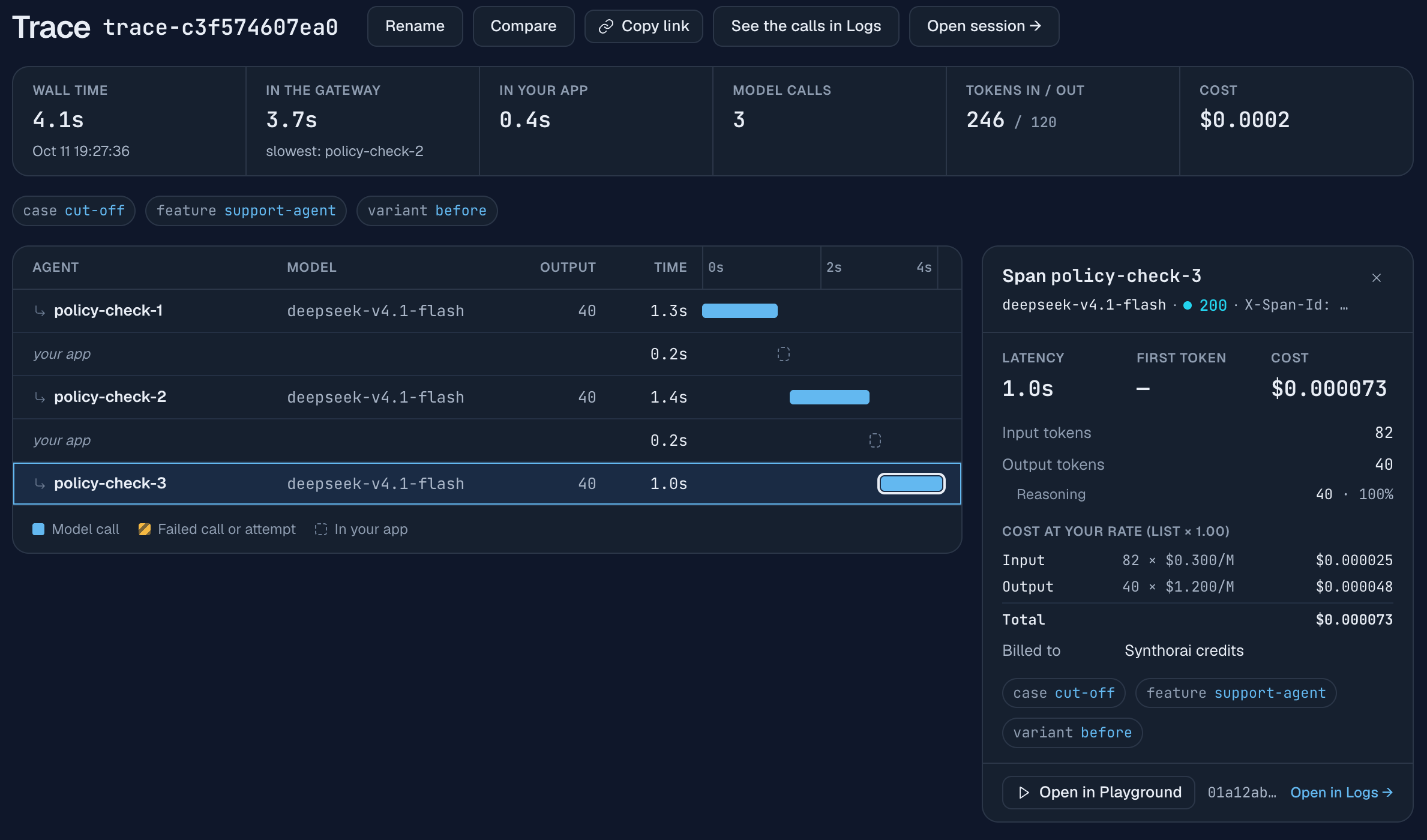
Nothing in the waterfall is marked as failed. The signs are the repeated span and the Output column: 40, 40 and 40, exactly the cap. Selecting a call opens the panel on the right, which confirms it: status 200, 40 output tokens and, on the line under them, “Reasoning 40 · 100%”.
An output count equal to the cap you set is the signature of a cut-off reply. The fixed version raises the cap to 2,000 and turns reasoning off for this check, which does not need it. One call then answers in 49 output tokens, and the trace has one bar where it had three. Raising the cap alone also ended the retries, but that one call reasoned for 1,876 output tokens and took 22 s.
For your own agent:
- Check
finish_reasonon every call.lengthmeans the reply was cut off. Treat it as a failure in your own logs even though the status is 200. - Size
max_tokensfor reasoning plus the reply. On a reasoning model the cap covers both. A cap sized for the visible answer alone can leave no room for it. - Do not retry a cut-off with the same cap. The second attempt hits the same limit. Raise the cap, lower the reasoning effort, or both.
Why does the second turn fail when the first one worked?
The usual cause is what your code saved between the turns. A model request carries the whole conversation, so a bug in how you store or rebuild history only shows up from the second turn on. In this case the first turn runs from messages held in memory: GPT-6 Luna makes a tool call, gets the result and answers, and nothing is wrong. Then the code saves the turn. It stores the assistant’s message as text only, which loses the tool call, and stores the tool’s result next to it:
# What the app stores for the next turn.
saved = msg.model_dump(exclude_none=True)
if variant == "before":
    saved.pop("tool_calls", None)                # the bug: the assistant message is saved as text only
    saved["content"] = saved.get("content") or ""
history = [saved, *results, {"role": "assistant", "content": answer.choices[0].message.content or ""}]
When the customer writes again, the second turn is built from that saved history. Its request has a tool result that answers a call the history no longer contains, and it is rejected with this error (“function call output” is the provider’s name for a tool result):
400 No tool call found for function call output with call_id call_Nqc1zUFvwLLuF5oGMEE9WheQ.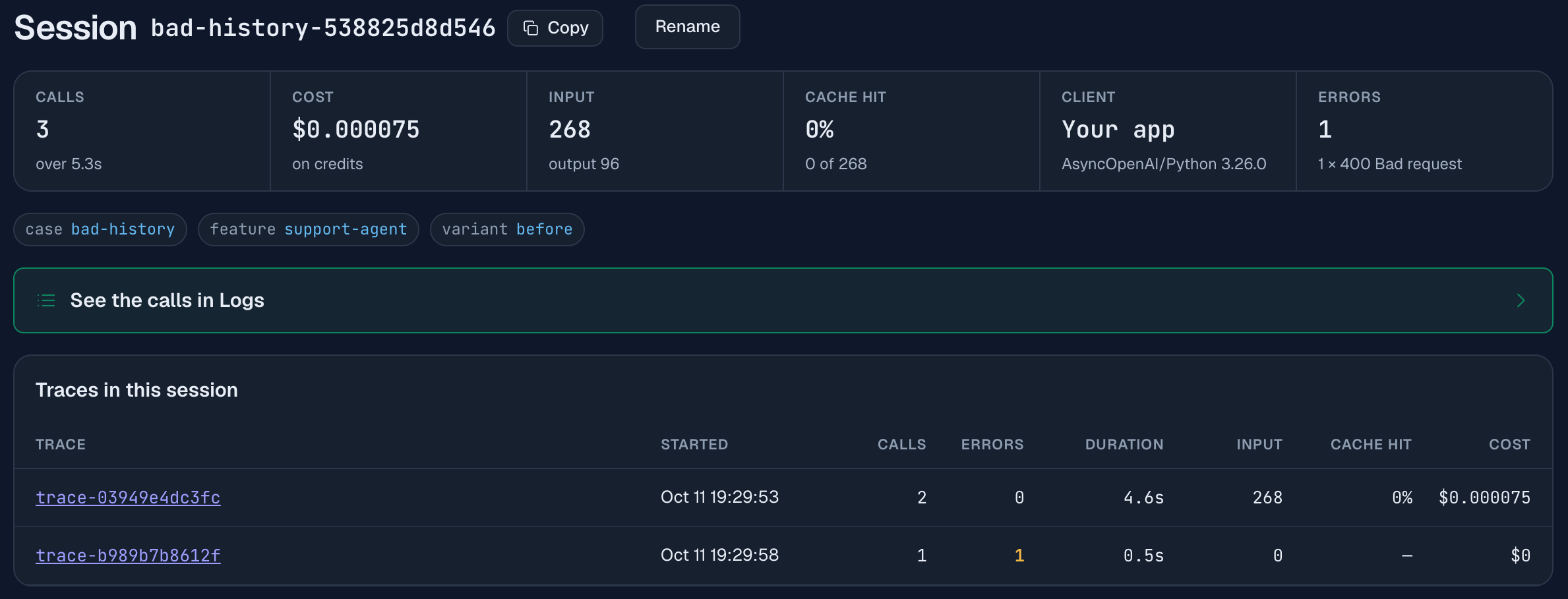
The session page shows the pattern: two traces, the first with 2 calls and no errors, the second with 1 call and 1 error, and “1 × 400 Bad request” in the errors card. The failed trace shows 0 input tokens, a duration of 0.5 s and a cost of $0. Those three values together say that no model ever ran: the request was refused as invalid. That separates this failure from a model or provider problem, where you would see tokens, a longer duration, or a 5xx status.
A 400 is a bug in the request, so retrying it cannot help, and the error text says what to fix. With the assistant message saved whole, the second turn succeeds.
The same shape (first turn fine, a later turn rejected) comes from a few other history bugs: a tool result saved without its call id, messages stored in the wrong order, or history trimmed in the middle of a tool exchange so that a result is kept and its call is dropped. If you trim history to control cost, cut between turns and never inside one.
What should every agent log to make this possible?
Log five things:
- A trace id per run and a session id per conversation, sent as
X-Trace-IdandX-Session-Id, and written to your own logs too. - A span name per call that says the step and the attempt, such as
plan-2orpolicy-check.retry. - Labels for the user, the feature and the release, sent as
X-Synthorai-Metadata. - The
x-request-idresponse header of every call, next to your own ids. finish_reasonand the output token count of every call, withlengthtreated as a failure.
Set a client timeout and a max_tokens value on every call as well, and set both generously. A call with neither can run for as long as the model keeps writing, and your code waits with it. But a cap sized for the visible reply alone is the bug from the second case, and a timeout shorter than a long generation ends calls that were working: on a reasoning model one call can take minutes. The demo waits 300 s and caps every call at 2,000 output tokens unless a call sets its own.
FAQ
How do I debug an LLM agent in production?
Find the run first: filter your request log by a user or conversation label, then open the trace of a matching request. The trace shows every model call of the run in order, with failed calls marked, so you can see which step went wrong before reading any code.
Why does my LLM return an empty response with status 200?
The usual cause is that the output cap was reached before the model wrote its answer. On a reasoning model, max_tokens covers the reasoning and the reply. Check finish_reason: if it is length and the output token count equals your cap, the reply was cut off. In the demo, three calls in a row returned 200 with exactly 40 output tokens and no usable reply.
What causes “No tool call found for function call output”?
The conversation history contains a tool result whose matching tool call is missing. This happens when the assistant message that made the call is saved without its tool_calls, or when history is trimmed between a call and its result. Save the assistant message whole and trim only between turns.
Should I retry a failed LLM call?
It depends on the status. A 429 (rate limited) or a 5xx (server error) can succeed on a retry. A 400 is a problem with the request and will fail the same way, and a reply cut off by max_tokens will be cut off again unless the cap changes. When you do retry, keep the trace id so both attempts appear in one trace.
Related reading
- Trace an LLM agent: the headers, the waterfall and the failed-call example.
- Why is my LLM agent slow?: reading the same trace for latency.
- Why is my LLM agent expensive?: reading sessions for cost.
- Claude Code cost by sub-agent: the same views for a coding agent you did not write.
- Ask Claude about your LLM logs: “did any request for this user fail?”, answered through MCP.
- Give your agent log tools: the same log read by a program of your own, and what the model tokens cost.
- Request headers reference: ids, labels and their limits.