
Why Is My LLM Agent Expensive? Four Causes in a Trace
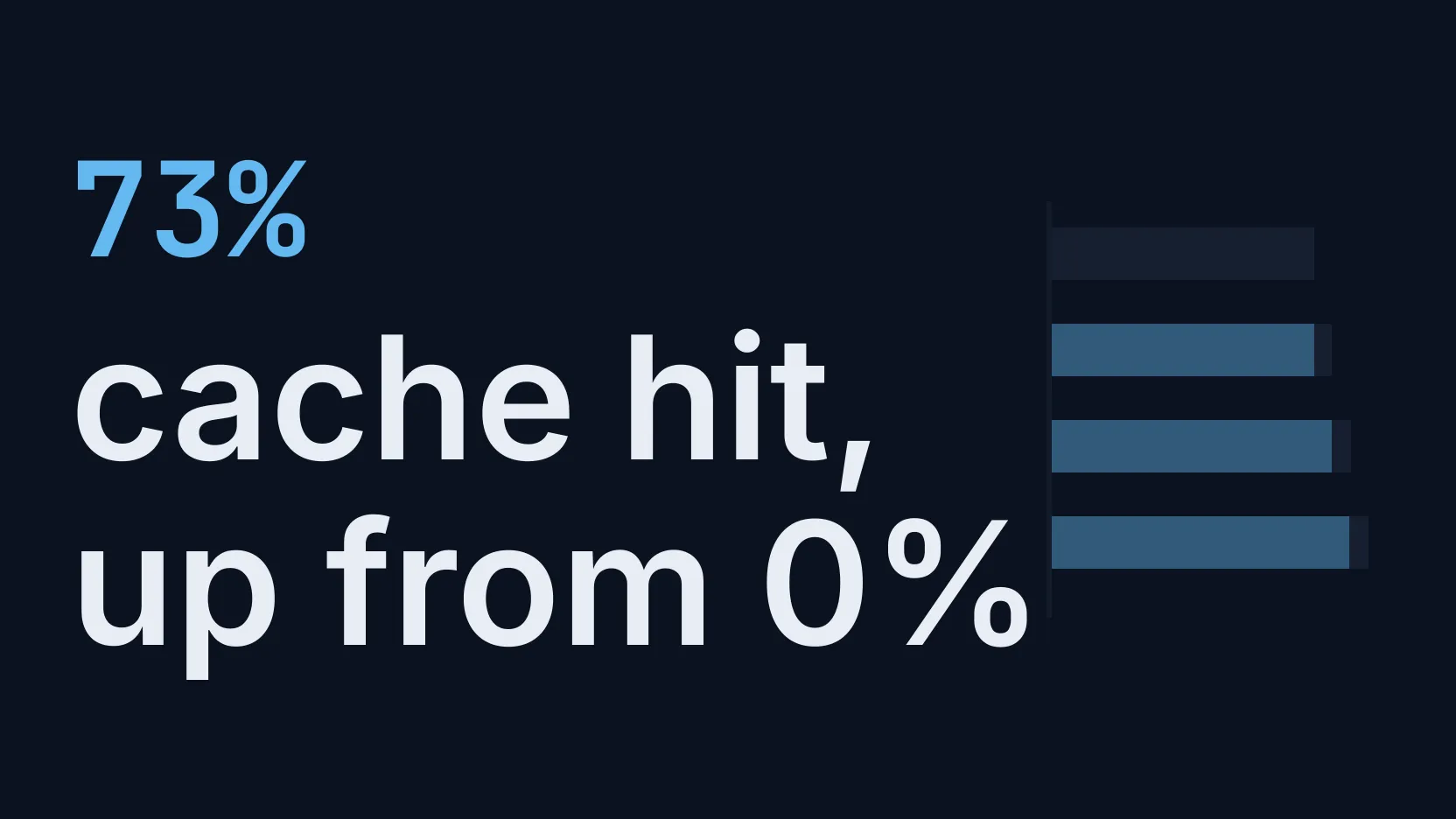
Four causes of a high agent bill, each reproduced and fixed: a cache-breaking timestamp (0% to 73% cache hit), growing context, a retry loop and a wrong model.
Our picks
live pricing| Model | Verdict | Price |
|---|---|---|
| GPT-6 Luna With the timestamp moved off the first line of the prompt, 4,157 of 5,729 input tokens over four turns were read from cache on a cold start. With the timestamp first, none of 5,579 were. | Main agent in the demo | from $0.1/M |
| DeepSeek V4.1 Flash Three one-sentence checks cost $0.0010 on GPT-6.1 Sol and $0.0001 on this model. | Sub-agent in the demo | from $0.3/M |
Contents
- Where do you start when the bill is higher than expected?
- Why is the cache hit rate zero?
- Why does every turn send more than the last?
- What does a retry loop look like?
- How do you spot an expensive model doing a cheap job?
- FAQ
- How do I find out which part of my LLM agent costs the most?
- Why is my prompt cache hit rate 0%?
- Why does the first turn of a conversation miss the cache?
- Does prompt caching make a long conversation history free?
- How much does prompt caching save?
- Does a retry loop show up as errors?
- Related reading
An agent’s bill grows for reasons that are invisible in a single request: a prompt that never hits the cache, a conversation that resends more on every turn, a loop that repeats the same work, or an expensive model doing a job a cheap one could do. Each of them shows up clearly once calls are grouped into sessions and traces. This guide reproduces all four in a small support agent, shows where each appears in the Synthorai console, fixes it, and gives the cost before and after.
TL;DR
- A timestamp on the first line of a prompt kept the cache hit rate at 0%. Moving it to the end raised it to 73% and cut input cost 66% on GPT-6 Luna.
- A history that resent every tool result used three times the input tokens for 21% more input cost, because 71% was read from cache.
- A retry loop made 10 model calls where 2 were needed, all with status 200.
- Three sub-agent calls on GPT-6.1 Sol were 81% of one session’s cost.
This guide builds on Trace an LLM agent, which covers the request headers that group calls into sessions and traces. Set the demo up as that guide describes (Python 3.10 or later, the virtualenv active), then run the four cases, plus replay-mismatch (a second way to lose the cache), from the same directory of github.com/synthorai-io/use-cases:
cd use-cases/agent-tracing
python incidents.py cache-miss context-growth replay-mismatch retry-loop wrong-model
Each case runs twice, broken and then fixed, and labels its calls with case and variant. The numbers are from one run of each on October 11, 2026. They are fractions of a cent because the demo is tiny. The ratios are what carry over to a real workload.
| Case | Where it shows | Before | After |
|---|---|---|---|
cache-miss | Cache hit per turn on the session page | 0% cached, $0.0015 | 73% cached from a cold start (nothing in the cache yet), $0.0011 |
context-growth | Input per turn rising down the session page | 24,546 input tokens, $0.0011 of input cost | 8,053 input tokens, $0.0009 of input cost |
replay-mismatch | Cache hit staying at 0% on the session page | 0% cached, $0.0038 | 76% cached, $0.0015 |
retry-loop | one trace with far more calls than a turn needs | 10 calls, $0.0004 | 2 calls, $0.0001 |
wrong-model | Agents table on the session page | $0.0012 | $0.0003 |
Where do you start when the bill is higher than expected?
Start in the Traces list, sorted by cost. Every row is a session or a trace with its number of calls, duration and cost, so the conversations that cost the most are at the top. Opening one shows which of the patterns below it has.
If you label requests with X-Synthorai-Metadata, narrow the list first. The search box of the Traces list takes a label, so metadata.feature = support-agent leaves the sessions and traces of one feature, and metadata.case = cache-miss finds both runs of a case from this page. For totals, the Breakdown tab of Analytics has a Cost by metadata card: pick a key and it lists requests, input tokens and cost for every value of it.
Why is the cache hit rate zero?
The cache hit rate is zero when something near the start of the prompt changes on every request. Prompt caching lets a provider bill the repeated beginning of a prompt at a fraction of the input price, but only up to the first token that differs from the previous request. The broken version of this case puts the current time on the first line of a system prompt of about 1,300 tokens:
# The clock is the first line, so the prompt differs from its first token on every turn.
system = f"Current time: {now}\n\n{SYSTEM}\n\n{MANUAL}"
Over a four-turn conversation on GPT-6 Luna, the session page reports Cache hit 0%, 0 of 5,579 input tokens. The fix moves the part that changes to the end:
# Stable text first, the part that changes last.
system, user = f"{SYSTEM}\n\n{MANUAL}", f"{text}\n\n(Current time: {now})"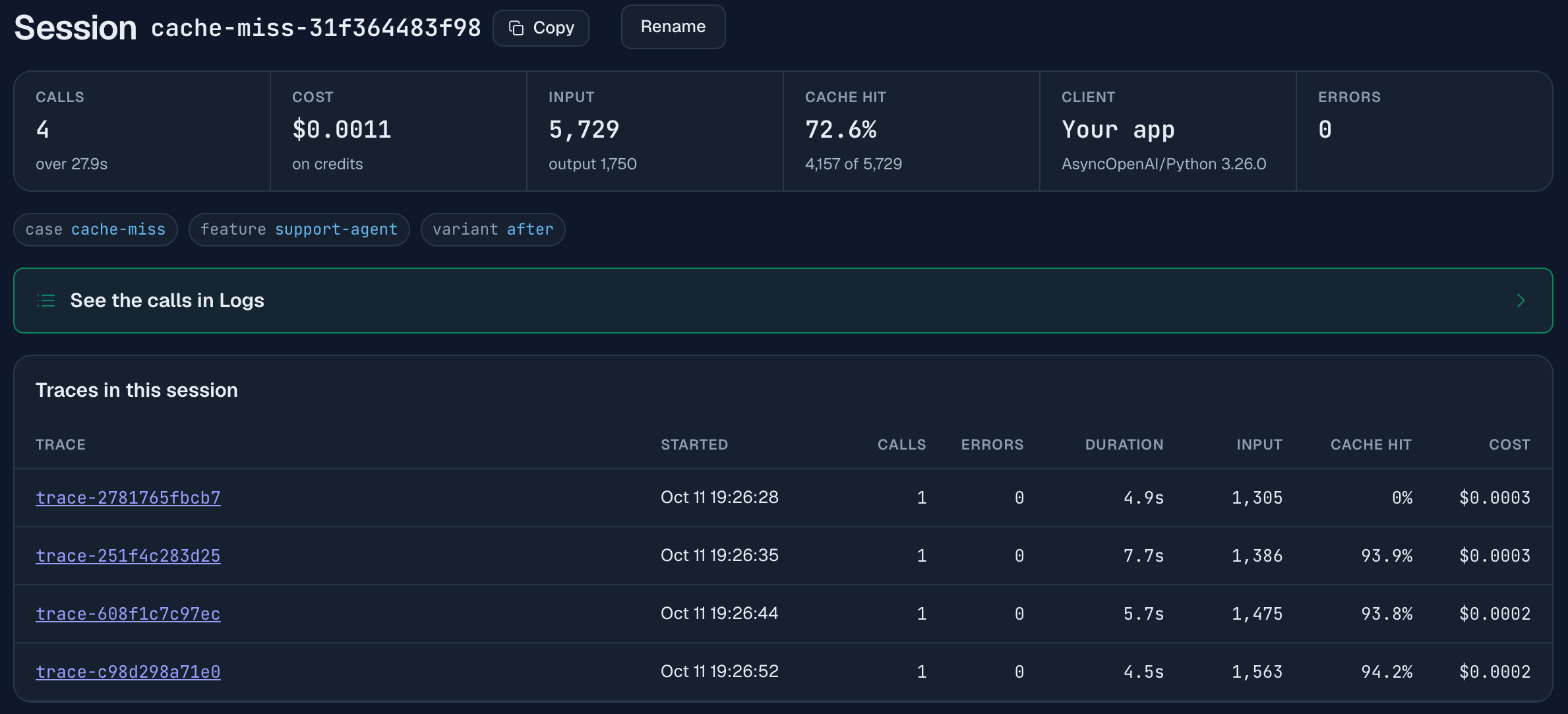
The session page lists each turn with its input and its cache hit, and the first row reads 0%. The first turn of a conversation cannot read an entry that no request has written yet, so it writes the entry and reads nothing. The next three turns read 1,302, 1,383 and 1,472 tokens from cache, which is nearly everything the turn before them sent, so each reads about 94% of its input. Over the conversation that is 4,157 of 5,729 input tokens, 73%.
The saving is on the input side. This model bills $0.10 per million input tokens, $0.125 for tokens it writes to the cache and $0.01 for tokens it reads from it, and nearly all of a long prompt is one or the other.
The broken run wrote 5,567 tokens to the cache and read none. The fixed run wrote 1,560 and read 4,157, so the input part of the bill fell from $0.00070 to $0.00024, which is 66% less. The session cost went from $0.0015 to $0.0011, a smaller drop than the input side alone, because output is the larger part of this bill and the fixed run happened to write more of it (1,750 tokens against 1,599).
How much you save depends on what is already in the cache when a conversation starts. This run started cold, so its first turn read nothing. An agent with steady traffic should do better than 73%, because every conversation starts with the same system prompt and the entry is still there from the conversation before, as long as requests keep arriving before it expires. A prompt that only one conversation ever sends pays the write price on its first turn.
A timestamp is the classic cause. A request id, a random greeting, a user name interpolated into the first paragraph or tool definitions in a different order all do the same thing. Two more conditions have to hold for a hit: the stable prefix (the unchanged start of the prompt) has to be longer than the provider’s minimum (1,024 tokens for most; see prompt caching), and the calls of a conversation should carry the same X-Session-Id, which the gateway uses to keep the conversation’s cache hits consistent.
Why does every turn send more than the last?
Every turn sends more because the conversation resends its history each time. Some growth is normal, since the history gets longer. The broken version of this case grows much faster: every turn looks the customer up, gets back about 1,100 tokens of order history as JSON, and keeps that lookup in the history, so turn six carries six copies of nearly the same data.
if variant == "before":
    history += [lookup_result]               # every old lookup is sent again on every later turn
history += [{"role": "user", "content": text}, {"role": "assistant", "content": reply}]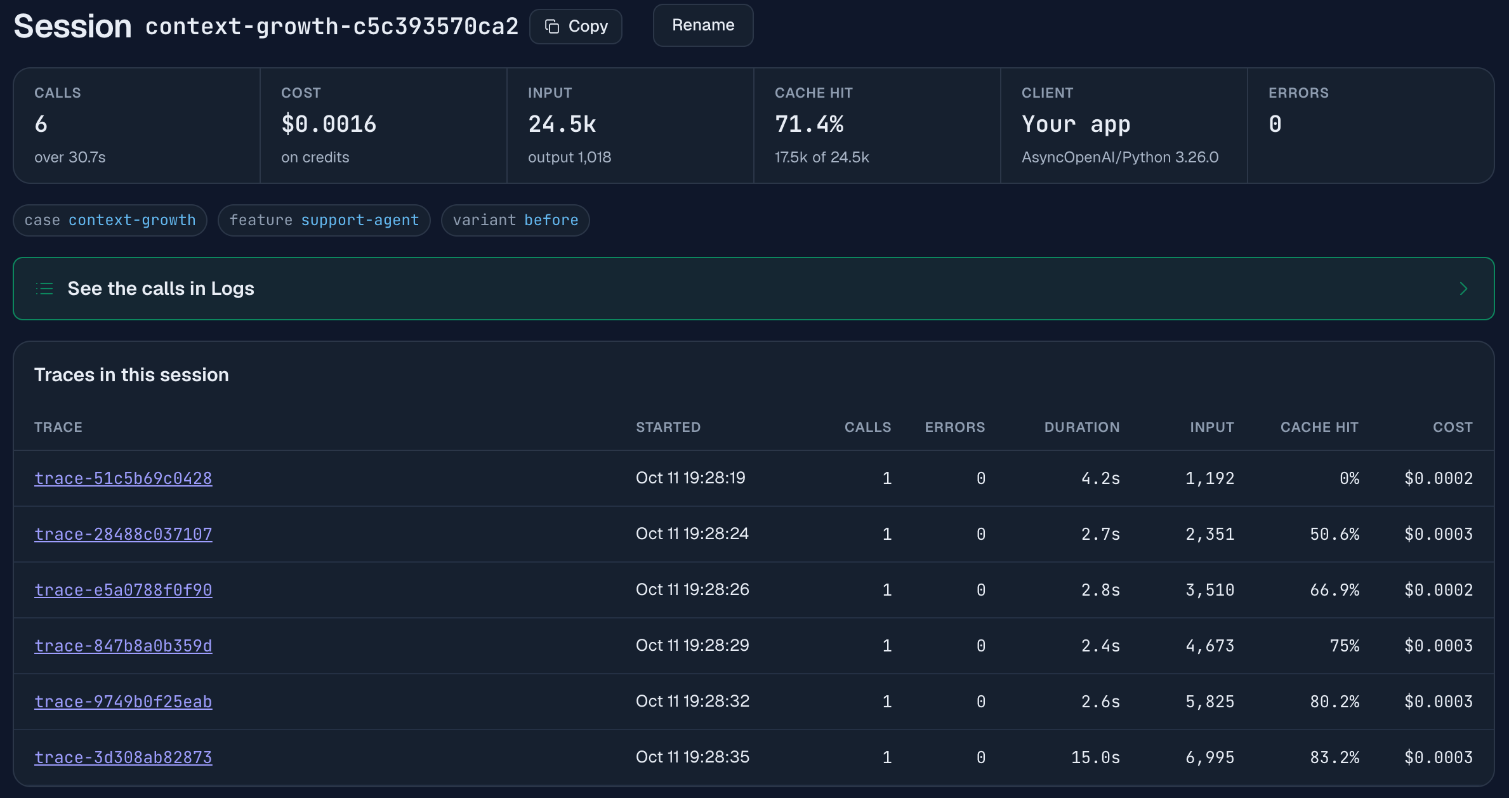
The sign is the Input column of the “Traces in this session” table: it rises by about 1,160 tokens a turn, from 1,192 on the first turn to 6,995 on the sixth, while the replies stay two sentences long. Six turns used 24,546 input tokens. In the fixed version the current turn still gets its fresh lookup, but old lookups are not kept, since the assistant’s reply already recorded what mattered. The six turns then use 8,053 input tokens, a third as many.
The two columns next to Input are why this problem hides. Cache hit rises with the input, and the cost per turn stays flat at $0.0002 to $0.0003. Each turn starts with the whole of the previous turn’s prompt, so the provider reads that part from cache: 17,536 of the 24,546 input tokens, 71%. The input of the broken session cost $0.0011, against $0.0009 for the fixed one: three times the input tokens for 21% more input cost.
The session totals do not show the fix at all in this pair. The broken session cost $0.0016 and the fixed one $0.0017, because the fixed run happened to write more output (1,756 tokens against 1,018). The extra output added about $0.0004, more than the $0.0002 saved on input. Compare the Input and Cache hit columns, which the fix changes, and not one session’s total.
So prompt caching can absorb most of the bill for a growing history. Three things it does not do:
- It does not shrink the context. Turn six still sends 6,995 tokens. A long session reaches the model’s context limit just the same, and a cached token is still billed, at the cached rate.
- It only works while the history is replayed exactly as it was sent. The demo has a case for this,
replay-mismatch: an instruction is appended to each user message when it is sent, and the message is saved without it. Every turn then rebuilds a prompt the previous turn never sent. That conversation read 0 of 24,557 input tokens from cache and cost $0.0038. Saving the message as it was sent brought it to 18,844 of 24,702, or 76%, and $0.0015. - It is not there on every model. At the full input price of GPT-6 Luna, the model in this case, 24,546 tokens cost $0.0025, against about $0.0011 billed with the cache. Check the Cache hit column before you rely on it.
For your own agent: tool results are usually the largest thing in an agent’s history and the least useful to resend. Keep the reply that used them, or a one-line summary, and drop the raw payload. You then save on every model, with or without a cache. Our chatbot guide covers the general version of this, compressing old turns into a summary.
What does a retry loop look like?
It looks like one trace with many more calls than a turn should need, repeating the same span names. In this case the carrier’s tracking API is down. The agent calls its tool, gets a timeout, and writes a reply saying it cannot see the parcel. The code then checks whether the reply names a parcel location, finds that it does not, and runs the whole turn again, up to five times:
if "sorting" in reply or "out for delivery" in reply:
    break                                    # the reply names a parcel location
if variant == "after" and (tool_failed or not results):
    break                                    # a retry cannot help while the tool is down or unused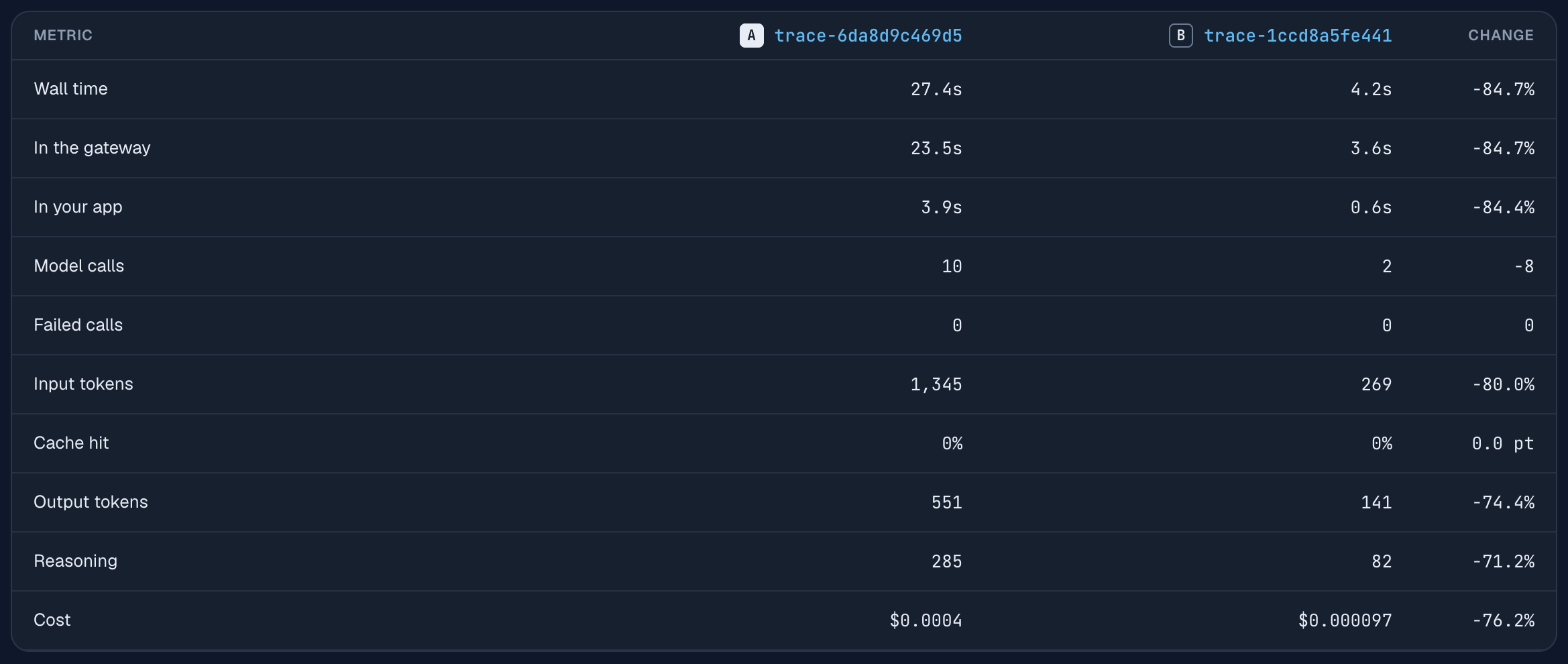
This is the Compare view of the two runs: open one trace, select Compare, pick the other. The broken run made 10 model calls over 27.4 s for $0.0004, and the customer still got the same answer at the end. “Failed calls” is 0 on both sides. Every call of the loop succeeded with status 200, so nothing here appears as an error. The fixed version tells a tool failure apart from a bad reply and does not retry when the tool is the problem: 2 calls, 4.2 s, $0.0001.
In the waterfall of the broken run the calls are named plan-1, answer-1, plan-2, answer-2 and so on. Name spans after the step and the attempt, as here, and a loop is readable on sight. To find loops you do not know about, sort the Traces list by calls.
How do you spot an expensive model doing a cheap job?
Look at the “Agents in this session” table, which splits a session’s calls and cost by agent. The broken version of this case runs the three one-sentence checks of the sub-agent on GPT-6.1 Sol, a model priced at $2 per million input tokens and $10 per million output tokens, while the main agent answers on GPT-6 Luna:
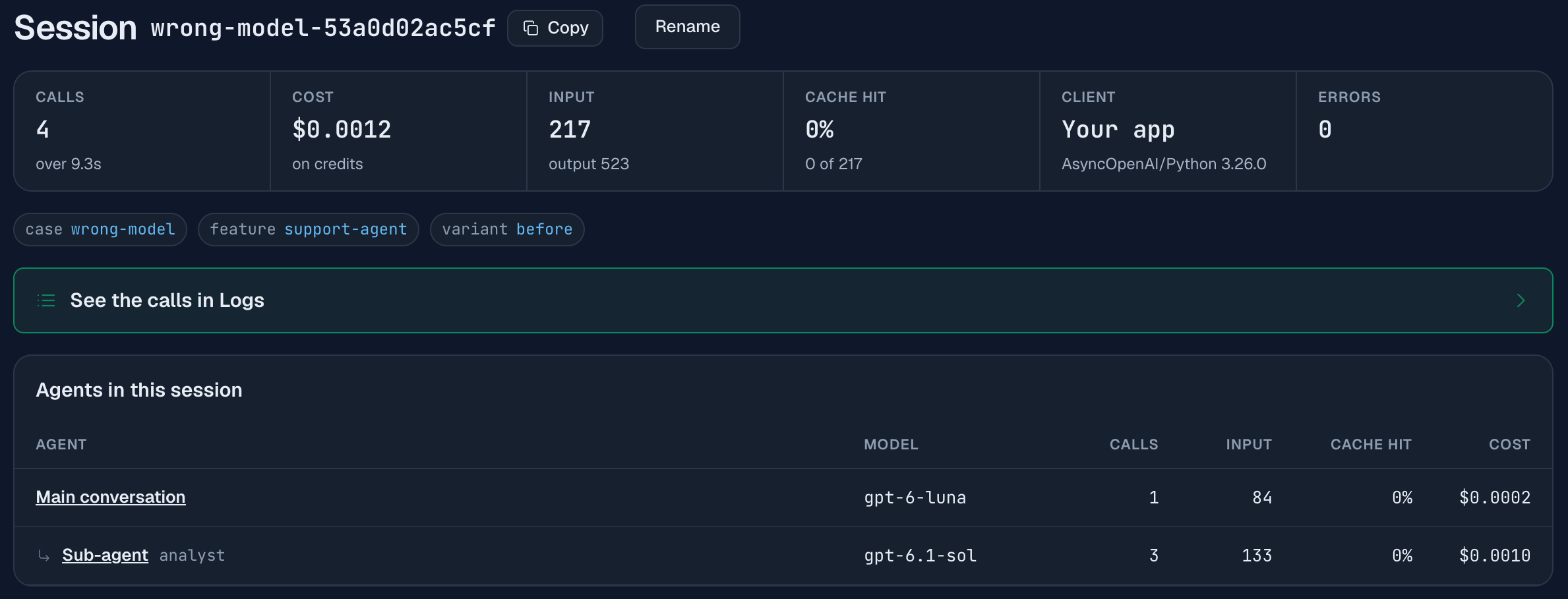
The sub-agent’s three calls cost $0.0010 of the session’s $0.0012, which is 81% of the bill for the least demanding work in the run. The same three checks on DeepSeek V4.1 Flash cost $0.0001, and that session $0.0003 in total. Both versions run the checks with reasoning off, so the difference is the price of the model.
This case measures cost only. We did not grade the checks, and a cheaper model is only the right choice if its answers are good enough for the step. The table tells you where the money goes, so you know which step is worth testing on a cheaper model.
The split appears when sub-agent calls carry X-Agent-Id. Without it, the “Models in this session” table gives a breakdown by model, which is the same split only when each agent uses its own model. For one agent across every session, the Breakdown tab of Analytics has a Cost by agent card.
FAQ
How do I find out which part of my LLM agent costs the most?
Group its calls into sessions and traces with request headers, then sort the Traces list by cost and open the top entry. The session page splits cost by agent, by model and by turn, which is enough to tell a cache problem from a context problem from a model-choice problem.
Why is my prompt cache hit rate 0%?
The most common cause is a value that changes near the start of the prompt, such as a timestamp. Caching only covers the prompt up to the first differing token. In the demo, moving a timestamp from the first line of the system prompt to the end of the user message took the cache hit rate from 0% to 73% on a cold start.
Why does the first turn of a conversation miss the cache?
The first turn misses because a cache entry is written by a request, and the first turn is that request. In the demo the four turns of a conversation read 0%, 93.9%, 93.8% and 94.2% of their input from cache. The first turn reads from cache only when an earlier conversation sent the same prefix recently enough for its entry to still exist.
Does prompt caching make a long conversation history free?
No, but it can hide most of the cost. In the demo a conversation that resent every old tool result used three times the input tokens of the trimmed version (24,546 against 8,053) and its input cost only 21% more, because 71% of its input was read from cache. The tokens still fill the context window, and the discount disappears the moment the replayed history differs from what was sent: in the demo’s replay-mismatch case a message saved differently from how it was sent took a conversation to 0% cached and more than twice the cost.
How much does prompt caching save?
It depends on the model’s cached-input price and on how much of the bill is input. In the demo on GPT-6 Luna, reading 73% of a conversation’s input from cache cut the input part of the bill by 66%, and the session cost $0.0011 against $0.0015 without the cache. Output tokens made up most of that bill, and caching does not change them.
Does a retry loop show up as errors?
A retry loop does not have to show up as errors. In the demo every call of the loop returned status 200. The loop was visible as one trace with 10 calls where 2 were needed, so look at the number of calls per trace, not only at the error rate.
Related reading
- Trace an LLM agent: the headers, sessions and labels this page relies on.
- Why is my LLM agent slow?: the same method applied to latency.
- Debug an LLM agent: from a user complaint to the call that went wrong.
- Claude Code cost by sub-agent: the same session view for a coding agent, where cache writes are 77% of a run.
- Ask Claude about your LLM logs: finding the most expensive of these sessions through MCP.
- Give your agent log tools: the same log read by a program of your own, and what the model tokens cost.
- Prompt caching: minimum prefix lengths and prices per provider.
- Best LLM by use case: cost by workload shape, for choosing the model of each step.