
Why Is My LLM Agent Slow? 3 Causes, Each Found in a Trace
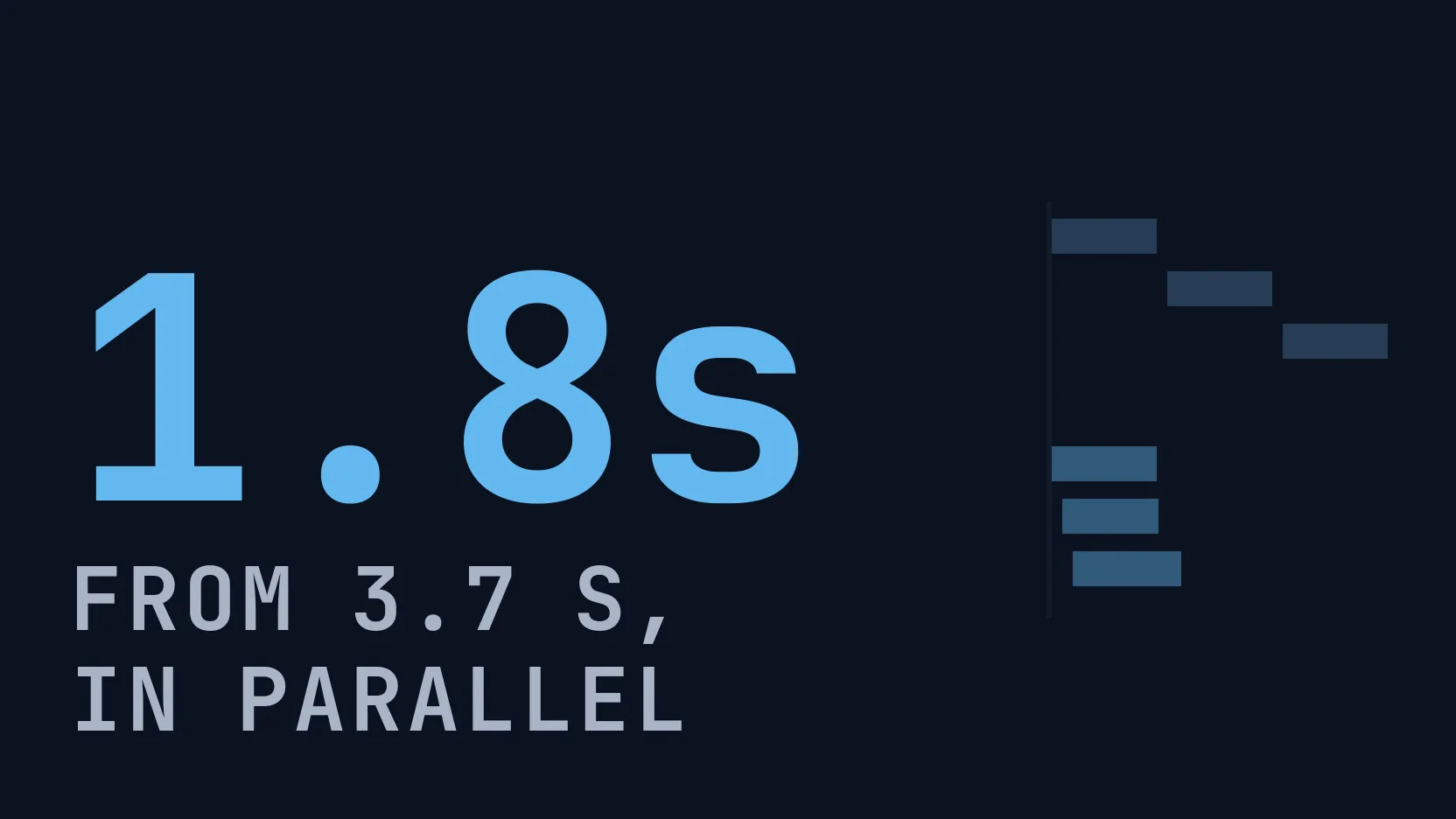
Three causes of a slow agent, each reproduced and fixed: serial model calls (3.7 s to 1.8 s), a slow tool in your own code, and reasoning on one-line answers.
Our picks
live pricing| Model | Verdict | Price |
|---|---|---|
| GPT-6 Luna Five one-sentence answers took a median of 25.6 s at the default reasoning effort and 10.2 s with reasoning_effort set to none, with output tokens down from 1,150 to 190. | Main agent in the demo | from $0.1/M |
| DeepSeek V4.1 Flash Three one-sentence checks took a median of 3.7 s when sent one after another and 1.8 s when sent together, for the same 127 input tokens. | Sub-agent in the demo | from $0.3/M |
Contents
- Where do you start when an agent run is slow?
- What does it look like when calls that could run together run one by one?
- How do you tell that the slow part is your own code?
- What if one model call is the slow part?
- What does this page leave out?
- FAQ
- How do I find the slowest step of an LLM agent?
- Do parallel LLM calls cost more than serial ones?
- Why is a model call slow when the reply is short?
- How do I measure whether a fix made my agent faster?
- Can the gateway show what my code did between two model calls?
- Related reading
A slow agent usually has one of three problems: its model calls wait for each other when they do not need to, its own code is slow between calls, or one model call is doing more work than the step needs. A trace tells you which one in a few seconds, because it draws every call on a time axis and shows the gaps between them. This guide reproduces each problem in a small support agent, fixes it, and puts the broken and the fixed run side by side in the Synthorai console.
TL;DR
- Sending three independent model calls together with
asyncio.gathercut a median of 3.7 s to 1.8 s at the same cost. - Running four simulated 1.1 s database lookups together cut the time in the agent’s own code from 4.6 s to 1.3 s, a part no model change touches.
- Turning reasoning off (
reasoning_effort="none") on five one-sentence answers on GPT-6 Luna cut 25.6 s to 10.2 s and output tokens from 1,150 to 190.
This guide builds on Trace an LLM agent, which covers the three request headers that turn model calls into a trace. Set the demo up as that guide describes (Python 3.10 or later, the virtualenv active), then run the three cases from the same directory of github.com/synthorai-io/use-cases:
cd use-cases/agent-tracing
python incidents.py serial-checks slow-tool reasoning
Each case runs twice, first broken and then fixed, and prints one line per run with the id of its trace:
serial-checks
  before   3.5 s   3 calls     127 in (     0 cached)     60 out  $0.000110   trace-d2bb96ebcf04
  after    1.5 s   3 calls     127 in (     0 cached)     62 out  $0.000112   trace-5f1e76a2de87
Model latency varies from call to call, so we ran every case five times on October 11, 2026. The table gives the median, with the fastest and slowest run in parentheses. One fixed run of the third case failed, so that median is of four runs. The sample output above and the pairs in the screenshots are one further run of each case, not among the five. Times are wall time (elapsed time from start to finish) measured by the script.
| Case | What the trace shows | Fix | Before | After |
|---|---|---|---|---|
serial-checks | bars in a staircase, none overlapping | send independent calls together | 3.7 s (3.5 to 4.5) | 1.8 s (1.7 to 2.0) |
slow-tool | a long your app row | fix your own code | 11.0 s (9.5 to 12.2) | 9.2 s (6.7 to 11.0) |
reasoning | an output count far larger than the reply | lower the reasoning effort | 25.6 s for five answers (19.0 to 31.8) | 10.2 s (7.9 to 12.1) |
Where do you start when an agent run is slow?
Start with the summary at the top of the trace, which splits the wall time into time in the gateway and time in your app. Wall time is what the user waited. “In the gateway” is the time during which at least one model request was open. “In your app” is the rest: the stretches between requests, when only your code was running. It also holds the network time between your code and the gateway, a few tenths of a second per call in the runs on this page.
That split decides where to look next:
- Mostly in the gateway, bars in a staircase: the calls are waiting for each other. See the first case.
- A large share in your app: the model is not your problem. See the second case.
- Mostly in the gateway, one long bar: one call dominates. The summary names it as “slowest”. See the third case.
To see what a change did, open the trace from before it, select Compare, and pick the trace from after it. The console then shows both runs on one page: every metric as A, B and the change, each call paired with the call of the same name, and the two waterfalls on the same time axis. Every picture on this page is that view.
What does it look like when calls that could run together run one by one?
The waterfall shows a staircase: each bar starts where the previous one ends. The agent in the demo runs three one-sentence checks on a customer message (sentiment, policy and risk) on DeepSeek V4.1 Flash. None of them needs another’s result, but the broken version awaits them in a loop:
for span, question in CHECKS.items():        # each call waits for the one before it
    await check(run, span, question)
The fix is one line:
await asyncio.gather(*(check(run, span, q) for span, q in CHECKS.items()))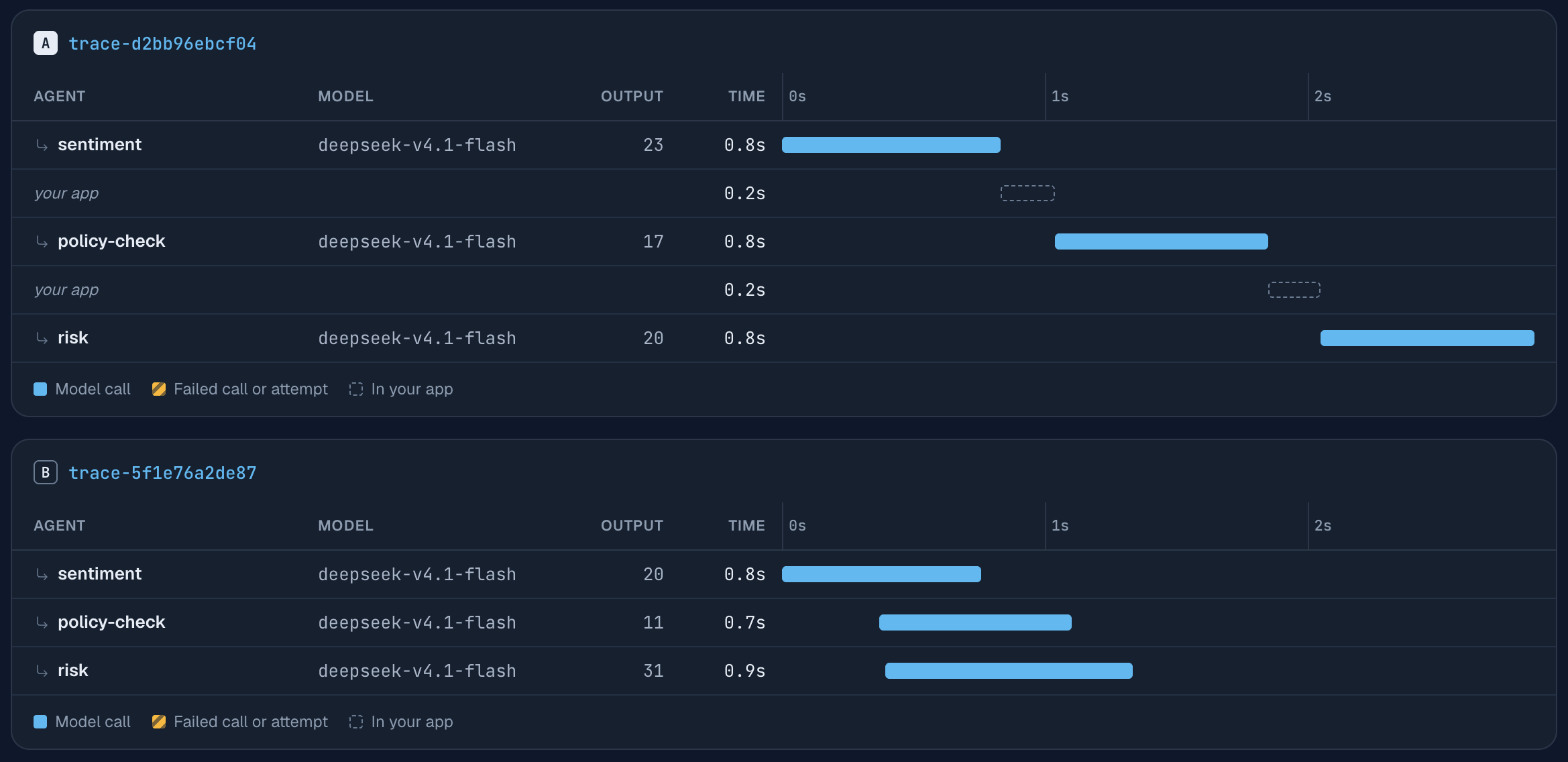
In trace A the wall time is 2.9 s: the three calls take 0.8 s each, one after another, with a gap of 0.2 s between them. In trace B the bars overlap and the wall time is 1.3 s. The comparison table on the same console page, above the part shown here, puts it as wall time 2.9 s to 1.3 s, down 53.4% (computed from unrounded times). The script measured 3.5 s and 1.5 s for the same pair, because it also counts opening connections and the network on each call.
The input is the same 127 tokens in both runs. Cost follows output, and output length varies a little from run to run: this pair cost $0.000110 and $0.000112, and over five runs the median was $0.000105 for the serial version and $0.000109 for the parallel one. Parallel calls send and receive the same tokens, so they do not cost more.
The check to run on your own agent: for every pair of consecutive bars, ask whether the second call used the first one’s output. If it did not, they can overlap. Calls that feed each other (a plan, then the step it planned) have to stay in sequence.
How do you tell that the slow part is your own code?
The your app row is long. The broken version of this case answers a question after looking the customer up in four tables, one query at a time. Each query is a 1.1 s sleep standing in for a database call:
rows = [await lookup(t) for t in tables] # four queries, one at a timeRunning the four queries together is again one line:
rows = await asyncio.gather(*(lookup(t) for t in tables))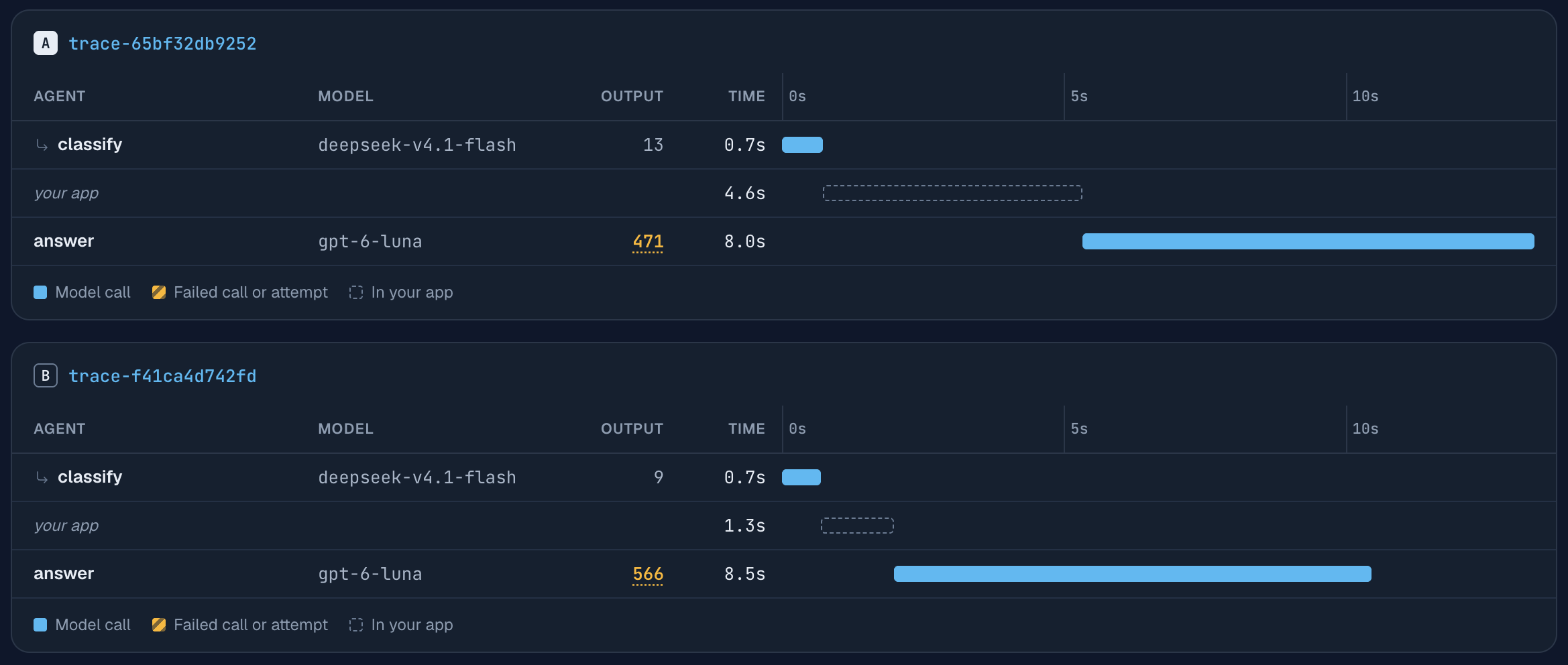
The row you fixed went from 4.6 s to 1.3 s, and the comparison table reports “In your app” down 71.8%, again from unrounded times. No change of model or prompt would have touched that part: no model request was open, and the agent was waiting on its own lookups.
The totals are less tidy. In this pair the wall time went from 13.3 s to 10.5 s, a saving of 2.8 s from a fix worth 3.3 s. The missing half second is the answer call on GPT-6 Luna, which wrote 471 output tokens in the first run and 566 in the second, and took 8.0 s and 8.5 s. Across the five runs in the table the two versions overlapped: fixed runs took 6.7 to 11.0 s and broken ones 9.5 to 12.2 s, so a single fixed run can be slower than a single broken one.
This is why you compare the row you changed, not the total of a single run. The call-by-call table in the comparison view does that for you: it lines each call up with its counterpart and shows time, output and cost as A and B. To claim an end-to-end improvement, compare the duration of many traces of each variant. The p95 latency in Logs (the time 95% of requests finish within) will not show this fix. It measures single requests, and the time saved here was between requests.
The gateway cannot see what your code did during the gap, only how long it lasted. If the gap is large and you do not know why, that is the point to add spans for your own functions with OpenTelemetry.
What if one model call is the slow part?
Look at how many tokens that call wrote, because output is what takes time. A reasoning model thinks before it answers, and the thinking is billed and timed as output tokens even when the visible reply is one sentence. The broken version of this case asks GPT-6 Luna five short policy questions with the instruction “Reply in one sentence” and leaves the reasoning effort at its default. The fixed version adds one parameter:
await call(run, "answer", model=PLANNER_MODEL, messages=messages, reasoning_effort="none")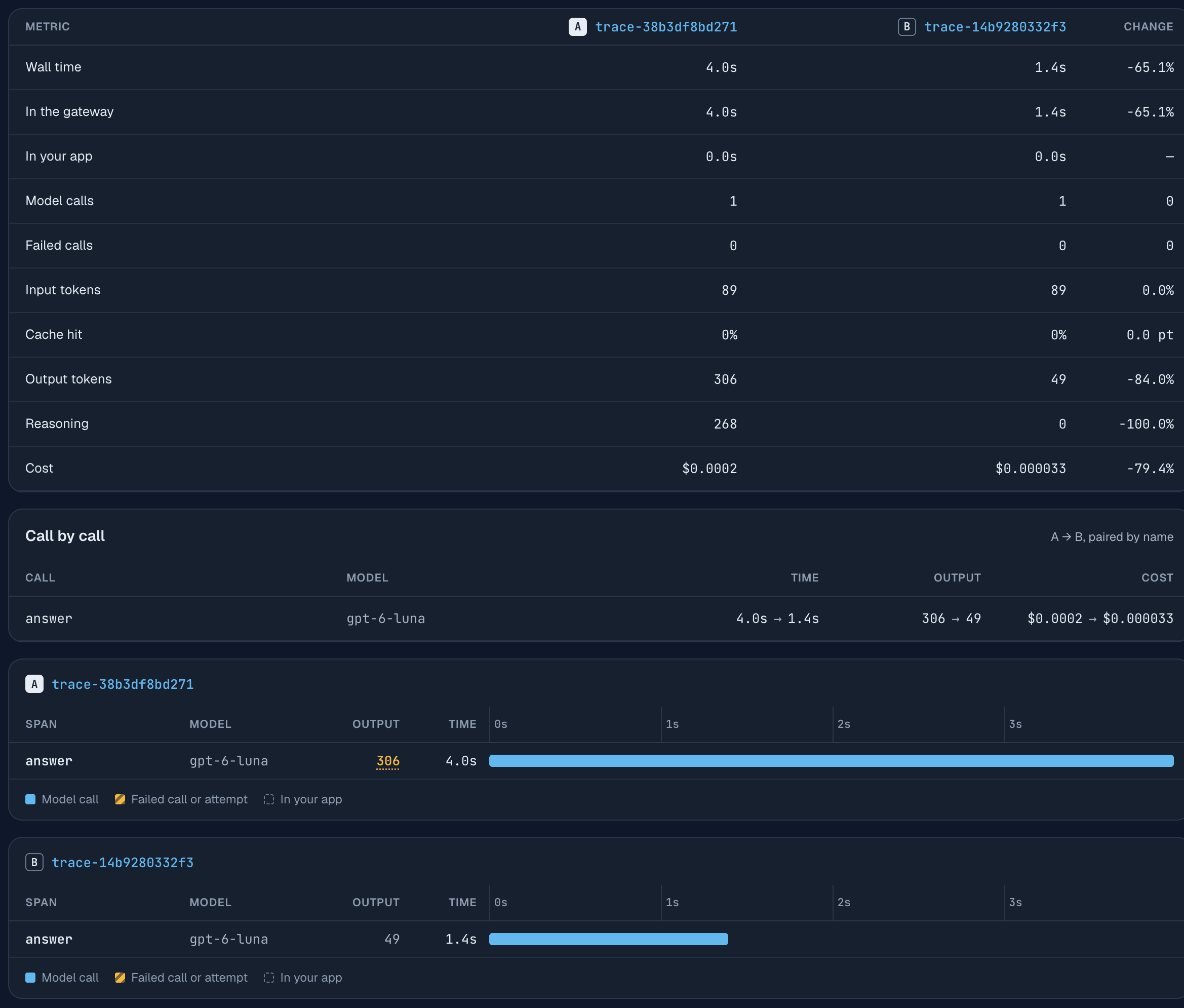
This is the first of the five questions, before and after. The reply is one sentence either way. At the default effort the model wrote 306 output tokens to produce it, 268 of them reasoning, and took 4.0 s. With reasoning off it wrote 49 and took 1.4 s. The cost of the call fell from $0.00016, which the console rounds to $0.0002, to $0.000033.
| Five one-sentence answers (median of five runs, four for the second row) | Time | Output tokens | Cost |
|---|---|---|---|
| default reasoning effort | 25.6 s | 1,150 | $0.000614 |
reasoning_effort="none" | 10.2 s | 190 | $0.000134 |
You do not need the comparison to spot this. The waterfall has an Output column, and it underlines the count of a call when most of a larger output was reasoning, as it does for the 306 above. Select the call and the panel shows the reasoning tokens on their own line under the output tokens.
Turning reasoning off is right for steps like these: lookups, classification, rephrasing a tool result. It is wrong for steps that need several steps of reasoning, which this demo does not test. Our GPT-6 Luna measurements give reasoning tokens and cost per answer at each setting, and the reasoning effort guide lists which models accept which values. Change it per step and check the step’s answers before and after.
What does this page leave out?
It leaves out two things. The first is how fast a reply feels. Streaming does not make a call shorter, but the user sees text sooner, and for a chat reply that is often what matters. The panel for a call has a First token field for this. It is empty in these traces because the demo does not stream.
The second is causes outside your agent: a provider that is slow that hour, or a rate limit that makes your client wait and retry. They show up as one long bar, or as a failed call followed by a retry, and no change to the structure of your code fixes them.
FAQ
How do I find the slowest step of an LLM agent?
Open the run’s trace and read the summary: it names the slowest call and splits the wall time into time in the gateway and time in your app. The waterfall below it shows every call as a bar, so the longest bar or the longest your app row is the step to look at.
Do parallel LLM calls cost more than serial ones?
No, they do not. In the demo, three checks cost a median of $0.000105 sent one after another and $0.000109 sent in parallel, with the same 127 input tokens; the difference is output length varying between runs. Cost depends on tokens, and parallel calls send and receive the same tokens. The limit to watch is your rate limit, since parallel calls arrive at once.
Why is a model call slow when the reply is short?
The usual reason is that the model reasoned first. Reasoning is generated as output tokens that you do not see in the reply. Five one-sentence answers on GPT-6 Luna used a median of 1,150 output tokens at the default reasoning effort and 190 with reasoning_effort="none".
How do I measure whether a fix made my agent faster?
Compare the part you changed, not one total. In the demo, running four lookups together cut the time in your own code from 4.6 s to 1.3 s, while the wall time of single runs ranged from 6.7 s to 11.0 s after the fix because one model call varied. Compare many runs of each version, by trace duration.
Can the gateway show what my code did between two model calls?
It shows how long the gap was, as a your app row, but not what happened in it. For spans inside your own code, use an OpenTelemetry SDK and pass its traceparent header through so both views share a trace id.
Related reading
- Trace an LLM agent: the headers and the waterfall this page reads.
- Why is my LLM agent expensive?: the same method applied to the bill.
- Debug an LLM agent: from a user complaint to the call that went wrong.
- Claude Code cost by sub-agent: the same views for a coding agent you did not write.
- Ask Claude about your LLM logs: questions about the request log, answered through MCP.
- Give your agent log tools: the same log read by a program of your own, and what the model tokens cost.
- GPT-6 Luna vs GPT-5.6 Luna: reasoning tokens and cost per answer at each effort setting.