
Prompt Versioning: Ship a Prompt Change in Under 10 s, No Redeploy
Keep LLM prompts in a library, call them by prompt_id, ship by moving a label. Measured: 8 to 9 s to reach live calls, the same 114.5 prompt tokens as inline.
Our picks
live pricing| Model | Verdict | Price |
|---|---|---|
| GPT-6 Luna Served v1 and v2 of support-answer. A call by prompt id sent the same 114.5 prompt tokens (median of 20 pairs) as the rendered request sent inline. | Model of the demo's answer prompt | from $0.1/M |
| DeepSeek V4.1 Flash Ran policy-check v1 with an output schema stored on the version: a JSON answer in 18 output tokens for $0.000033, with reasoning_effort set to none. | Model of the demo's JSON check | from $0.3/M |
Contents
- How do you call a prompt by id?
- Does a call by id cost more than the prompt written in code?
- How long does moving a label take to reach your calls?
- What happens when a call cannot be served?
- What can a version hold besides the text?
- Where do you see which version answered a call?
- What is left out?
- FAQ
- What is prompt versioning?
- Does calling a prompt by id add latency or tokens?
- How fast does a prompt change reach production?
- Can I keep using the OpenAI or Anthropic SDK?
- Related reading
Prompt versioning means keeping each prompt outside your code as numbered, immutable versions, calling it by an id, and choosing which version production gets by pointing a label at it. A label is a named pointer such as production or staging that names one version at a time. In the Synthorai prompt library, a request names the prompt with prompt_id, the gateway fills in the version’s messages, model and parameters, and moving the production label changes what the next calls get. In our runs a moved label reached live calls in 8 to 9 seconds under steady traffic and on the first call after a quiet spell, and a call by id sent exactly as many prompt tokens as the same request written out in code.
TL;DR
- A call by
prompt_idto the Synthorai gateway sent a median of 114.5 prompt tokens over 20 pairs, the same as the request sent inline. - A moved
productionlabel reached calls 8.0 to 8.5 s (median) after the move under steady traffic, and at once after 15 s without calls. - In 20 label moves, no call got the old version after the first one got the new version.
- Calls that could not be served failed with 400 or 404 before any model ran, unbilled.
This guide moves the prompts of the support agent from Trace an LLM agent into the library and calls them every way the gateway accepts. The code is at github.com/synthorai-io/use-cases under prompt-library/. It needs Python 3.10 or later, an inference key and an admin key with prompts.write from the console.
git clone https://github.com/synthorai-io/use-cases
cd use-cases
cp .env.example .env    # put both keys in it
cd prompt-library
python3 -m venv .venv && source .venv/bin/activate
pip install -r requirements.txt
python setup.py         # saves the prompts and their versions; safe to run again
python call.py          # every way to call a prompt
python ship.py          # moves production and times it
python errors.py        # what a call that cannot be served answers
The runs on this page are from October 19, 2026. setup.py saves two prompts. support-answer is the agent’s reply step, with four versions that each make one realistic change, and policy-check is a sub-agent check that answers in JSON:
| Prompt | Version | What changes | Model |
|---|---|---|---|
support-answer | v1 | the baseline: state the order number, never promise a refund date | GPT-6 Luna |
support-answer | v2 | shorter system text that drops the order-number rule | GPT-6 Luna |
support-answer | v3 | v1’s text on another model | DeepSeek V4.1 Flash |
support-answer | v4 | v1 plus a {{tone}} variable with no default | GPT-6 Luna |
policy-check | v1 | topics and a risk level, as JSON that follows a schema | DeepSeek V4.1 Flash |
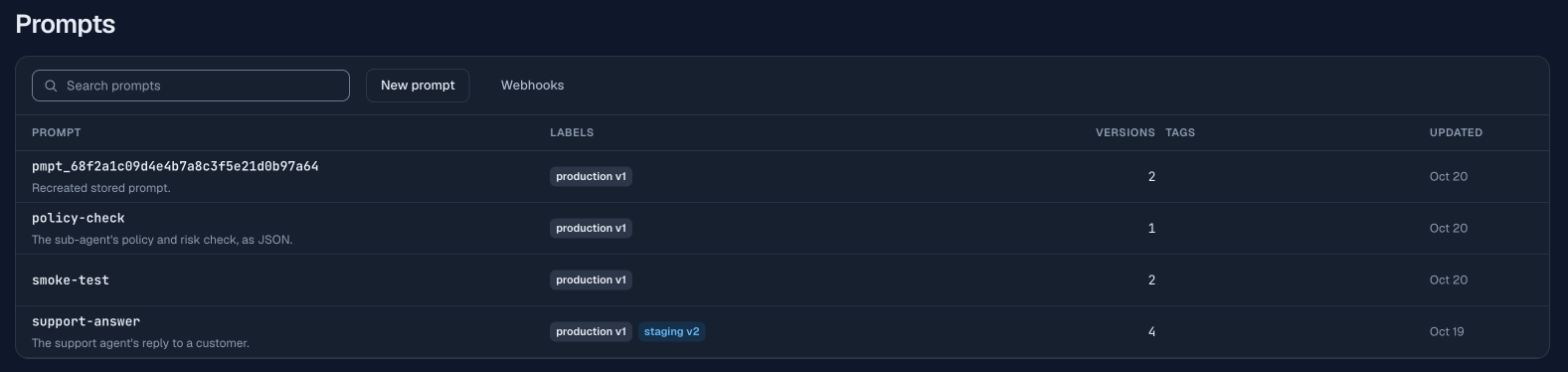
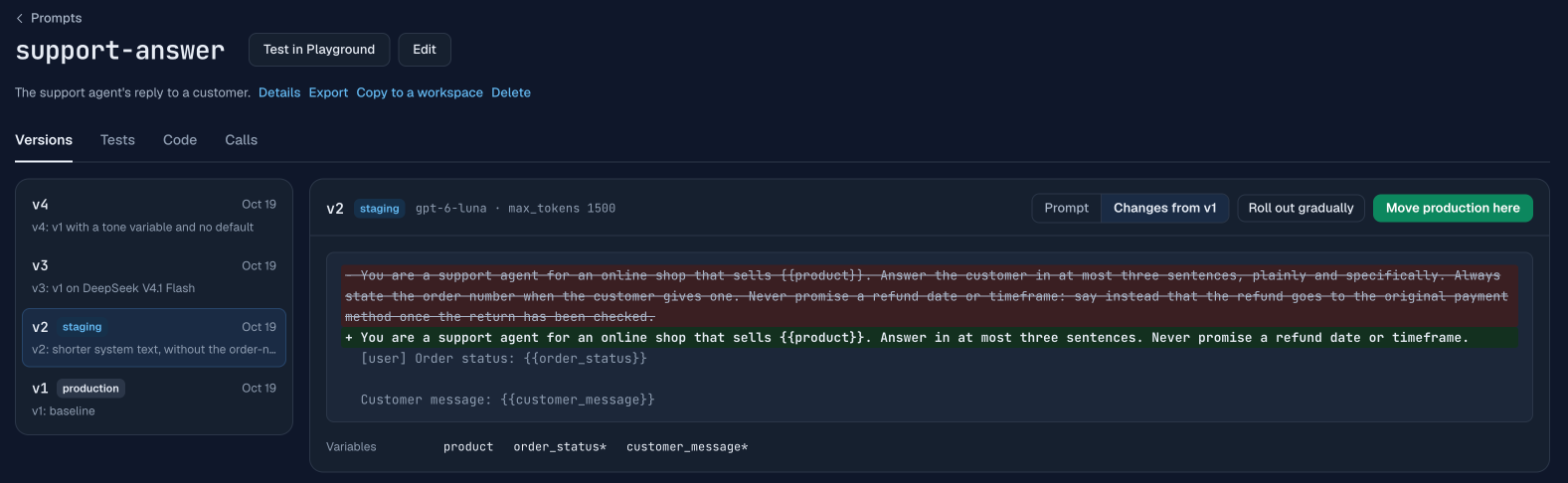
production points at v1 and staging at v2. v2 and v3 are the subjects of the two follow-up guides: testing a version before it ships and rolling one out to part of production. The console shows each version against the one before it:
How do you call a prompt by id?
You send an ordinary request to /v1/chat/completions, /v1/responses or /v1/messages and add prompt_id and prompt_variables to the body. A variable is a {{name}} placeholder in the version’s text, and prompt_variables gives each one its value for this call. The SDKs insist on a model and a message, so you send any model name and an empty user message: the gateway uses the version’s model and drops the empty message. With the OpenAI Python SDK the extra fields go in extra_body:
import os
from openai import OpenAI

client = OpenAI(base_url="https://synthorai.io/v1", api_key=os.environ["SYNTHORAI_API_KEY"])

raw = client.chat.completions.with_raw_response.create(
    model="any",                                   # the version's model is used
    messages=[{"role": "user", "content": ""}],    # required by the SDK; dropped
    extra_body={
        "prompt_id": "support-answer",
        "prompt_variables": {
            "customer_message": "Where is order A-50977? It has been a week.",
            "order_status": "in transit, shipped on 2026-10-01",
        },
    },
)
print(raw.headers["x-synthorai-prompt-version"])   # which version answered
print(raw.parse().choices[0].message.content)
product is not in the call because the version gives it a default (“home electronics”). The X-Synthorai-Prompt-Version response header says which version answered, which is the only way a caller knows when it asks by label.
Without a version, a call gets the version production points to. Two fields pick another one, and a call sends one or the other, not both:
| Field | Example | In the demo, served |
|---|---|---|
| none | v1 (production) | |
prompt_label | "staging" | v2 |
prompt_version | 1 | v1 |
The same call by id worked on all three endpoints: Chat Completions and Responses through the OpenAI SDK, and Messages through the Anthropic SDK with the same extra_body. All three were served by v1 on GPT-6 Luna. On Responses the version’s messages go into input; the prompt library guide lists how each field maps per endpoint.
Does a call by id cost more than the prompt written in code?
A call by id costs the same as the request written out in code, because the gateway sends the provider an ordinary request. We checked it with 20 pairs. Each pair rendered the prompt, sent the rendered request inline, and sent the same values by id, in alternating order and with the same salt (a short random tag added to the message so no two pairs were the same request):
| Prompt tokens, median | Client latency, median | |
|---|---|---|
By prompt_id | 114.5 | 4.1 s |
| Inline | 114.5 | 4.6 s |
The token counts are identical. The call by id was the faster of the two, which added overhead could not cause, so we read the gap as call-to-call variation of GPT-6 Luna and conclude that calling by id added no measurable time. We did not test the latency difference statistically.
To see what a call would send without calling a model, render it. POST /v1/prompts/{id}/render takes the same variables and returns the request and the version it resolved to:
curl https://synthorai.io/v1/prompts/support-answer/render \
  -H "Authorization: Bearer $SYNTHORAI_API_KEY" \
  -H "Content-Type: application/json" \
  -d '{"format": "chat", "prompt_variables": {"customer_message": "Where is order A-50977?", "order_status": "in transit"}}'
A render is not billed and does not appear in Logs: after the demo’s render, Logs held no request for its session id. It counts toward the key’s rate limit.
How long does moving a label take to reach your calls?
Under 10 seconds: in our runs 8 to 9 s while calls kept arriving, and no time at all after a quiet spell. Shipping a version is one call with an admin key, which points a label at a version number:
import os
import httpx

admin = httpx.Client(base_url="https://synthorai.io/api/v1",
                     headers={"Authorization": f"Bearer {os.environ['SYNTHORAI_PROMPTS_ADMIN_KEY']}"})
admin.put("/prompts/support-answer/labels/production", json={"version": 3}).raise_for_status()
Rolling back is the same call with the old version number. Your code keeps calling the same id and nothing redeploys. Only an admin or the workspace owner can move a label, and each move is recorded in the workspace audit log.
ship.py timed it. It sent a call every 0.5 s, moved production through the API, and kept calling until the header showed the new version and for 10 s after. It did that 5 times from v1 to v3 and 5 times back, then repeated the 10 moves after 15 s with no calls:
| Case | Last call answered by the old version, sent at | First call answered by the new version, sent at |
|---|---|---|
| Calls every 0.5 s, v1 to v3 | median 8.02 s after the move (7.53 to 8.53) | median 8.52 s (8.03 to 9.03) |
| Calls every 0.5 s, v3 to v1 | median 7.52 s (7.52 to 8.52) | median 8.02 s (8.02 to 9.02) |
| After 15 s without calls, both ways | none | 0.0 s, in all 10 moves |
Times count from the moment the move’s API call returned. The docs say a move reaches calls in “about 10 seconds”. The two cases are consistent with the gateway keeping what it read of a label for a few seconds from the last read: steady traffic sees the move when that copy expires, and the first call after a pause reads the label fresh. In none of the 20 moves did a call get the old version after the first call that got the new one, so a move does not switch back and forth between versions while it spreads.
What happens when a call cannot be served?
It fails before any model is called, with a 400 or 404 in the error shape of the endpoint you called, and nothing is billed. errors.py sent five such calls:
| Call | Status | Code | Message |
|---|---|---|---|
v4 without tone | 400 | prompt_variable_missing | ”prompt_variables: missing tone (no value and no default)“ |
| a version and a label | 400 | prompt_invalid | ”send prompt_version or prompt_label, not both” |
| an id that does not exist | 404 | prompt_not_found | ”prompt_id: no prompt “support-answer-missing” in this workspace” |
| version 99 | 404 | prompt_not_found | ”prompt “support-answer” has no version 99” |
| a label that points nowhere | 404 | prompt_not_found | ”the “development” label of prompt “support-answer” points to no version yet” |
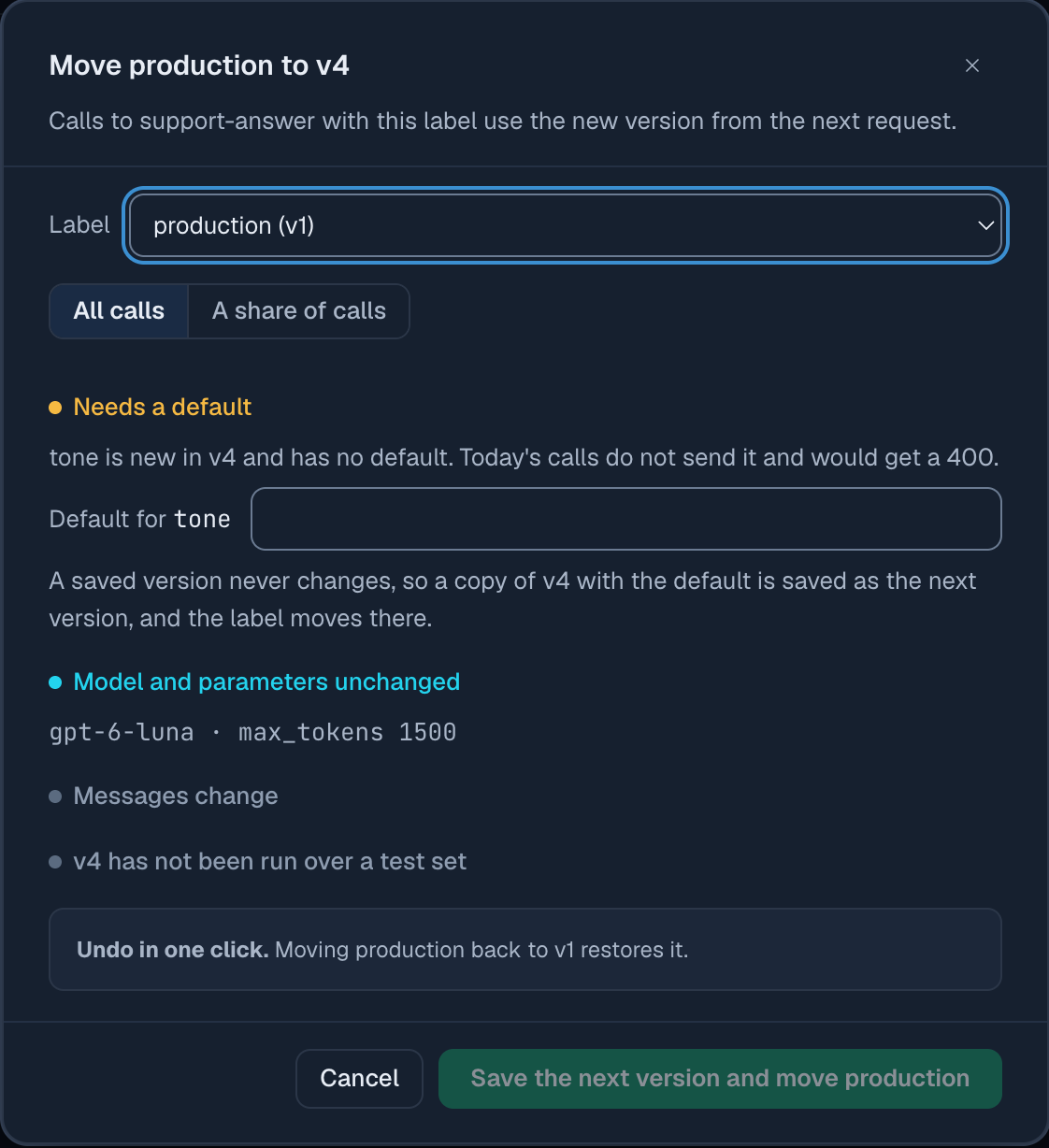
None of the five has a billing record. The first row is the change that would break callers: v4 adds a variable without a default, so every call that does not send tone fails. The console catches it before it ships. Moving production to v4 opens a dialog that checks what changes for today’s callers and asks for a default, which it saves as the next version.
If the library cannot be read for a moment, the gateway answers from the last copy it read, for up to 24 hours, and adds X-Synthorai-Prompt-Stale: 1 to the response. A prompt it has no recent copy of returns 503 prompt_unavailable; retry it. We did not observe either in the demo.
What can a version hold besides the text?
A version holds the system text, the messages, the model, five parameters, an output schema, and function tools. The rule for parameters is that yours win: the version’s temperature, max_tokens, top_p, response_format and reasoning_effort apply only where your request does not set the same field.
policy-check keeps its JSON schema on the version, so callers get JSON that follows it without sending a format. Saved through the API, the version names the format in params and holds the schema in schema:
version = {
    "model": "deepseek-v4.1-flash",
    "system": "You review messages to an online electronics shop's support desk. ...",
    "messages": [{"role": "user", "content": "{{customer_message}}"}],
    "params": {"max_tokens": 300, "response_format": "json_schema"},
    "schema": {"name": "policy_check", "strict": True, "schema": {
        "type": "object",
        "properties": {"topics": {"type": "array", "items": {"type": "string"}},
                       "risk": {"type": "string", "enum": ["low", "medium", "high"]}},
        "required": ["topics", "risk"], "additionalProperties": False}},
}
admin.post("/prompts/policy-check/versions", json={"body": version, "note": "v1: JSON check"}).raise_for_status()
A schema saved without response_format: "json_schema" is refused with a 400 that says so. One call of policy-check on DeepSeek V4.1 Flash returned {"topics": ["shipping", "refunds"], "risk": "medium"} in 151 input and 18 output tokens, for $0.000033. That call sent reasoning_effort: "none" from the caller, because the demo’s versions were saved before a version could hold it. A version can now store it in params: we saved a test version with reasoning_effort: "none" and rendered it, and the request carried reasoning_effort on Chat Completions and reasoning.effort on Responses. On Messages the version’s value is left out, because Claude models take thinking settings in a different form; send them from the caller there.
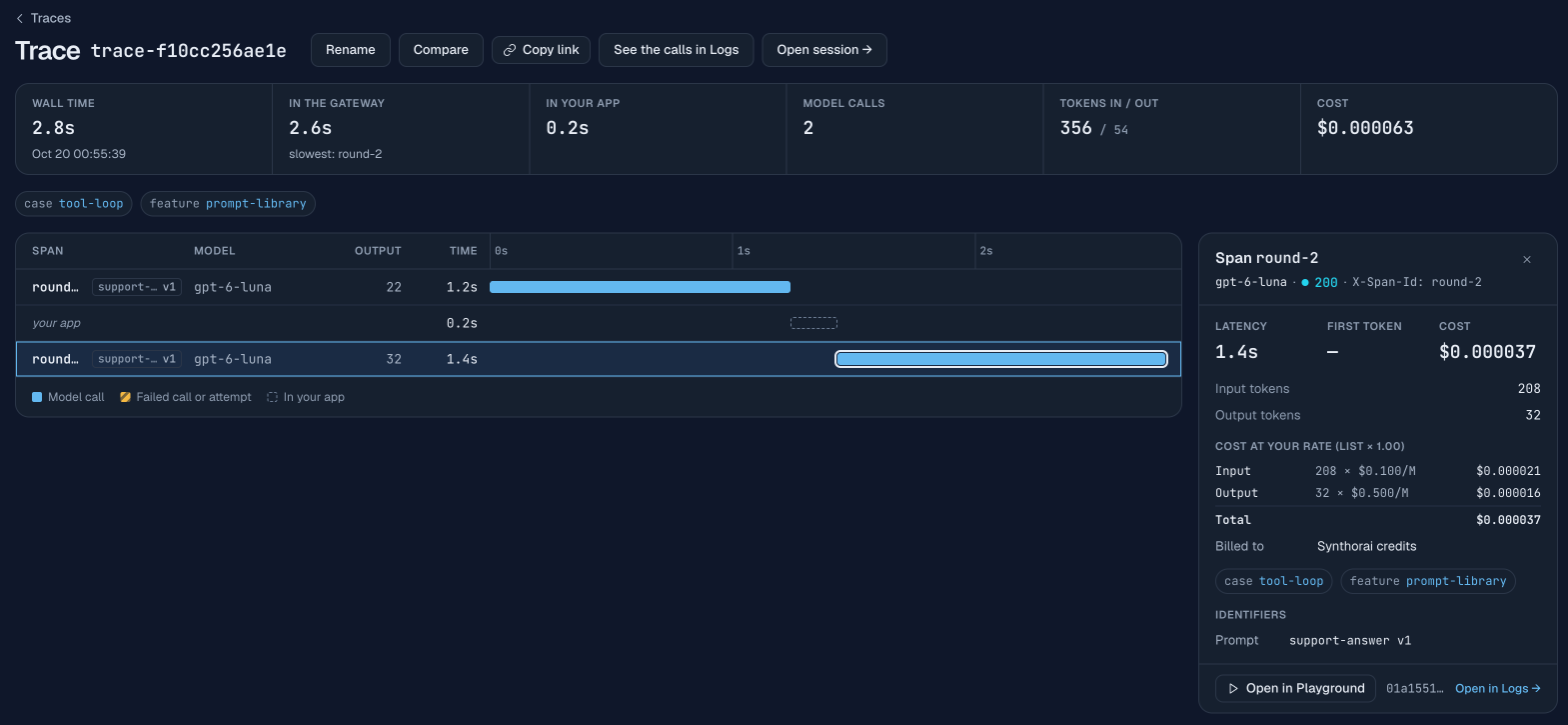
Tool calls and multi-turn chats work as they do without a library prompt. The version’s messages come first and the conversation you send follows them. In round 1 of the demo’s tool loop the model asked for lookup_order({"order_id": "A-50977"}); round 2 sent the model’s tool call and the tool result as ordinary messages, by the same id, and v1 answered from the result.
Where do you see which version answered a call?
Every call is recorded with its prompt and version, so you can find them three ways:
- On the response: the
X-Synthorai-Prompt-Versionheader, which the demo writes next to every call in its results. - In Logs: the filter
prompt = support-answerwithprompt_version = 3lists that version’s calls, and a request’s detail names its prompt and version.GET /api/v1/requeststakes the sameprompt_idandprompt_versionfilters. - In a trace: each model call’s row in the waterfall carries a “prompt vN” badge, and the call’s panel lists the prompt and version. The tracing headers from Trace an LLM agent work unchanged with calls by id.
The Prompts page totals calls, errors, spend, tokens and latency per version over 7, 30 or 90 days. That is the view the rollout guide uses to compare two versions on live traffic.
What is left out?
- Rollouts and tests. Sending a share of production to a candidate is in A/B test a prompt change, and testing a version on a fixed set of inputs is in Test a prompt before it ships.
- Partials. A block of text kept once and included in several prompts with
{{>id}}; each saved version pins the partial’s version it included. - Change webhooks. A signed POST when a prompt gets a version or a label moves, for syncing prompts to git or a chat channel. The demo’s
webhook.pyverifies a signature but we did not receive a live delivery. - Idempotency on create. An
Idempotency-Keyheader makes a retried request safe: the API answers a repeated key with its first answer for 24 hours instead of creating the prompt twice. That holds even after the prompt is deleted, so to recreate a deleted prompt, send a new key.
FAQ
What is prompt versioning?
Prompt versioning is keeping each prompt as numbered versions that never change once saved, and choosing which version production uses with a label instead of a code change. Rolling back is pointing the label at the previous version.
Does calling a prompt by id add latency or tokens?
In our 20 pairs it added neither: the median prompt was 114.5 tokens both ways, and the call by id was not slower. The gateway resolves the version and sends the provider an ordinary request.
How fast does a prompt change reach production?
Within about 10 seconds. In our runs the first call answered by the new version was sent 8.0 to 8.5 s (median) after the label moved while calls kept arriving, and immediately when the traffic had paused for 15 s.
Can I keep using the OpenAI or Anthropic SDK?
Both SDKs work unchanged: they send the prompt fields through extra_body, with any model name and an empty user message to satisfy their required arguments.
Related reading
- Prompt library guide: every field, error and response header on this page.
- Prompts in the console: the editor, the version diff and the move dialog.
- A/B test a prompt change: a 10% rollout and the per-version comparison.
- Test a prompt before it ships: test sets, checks and what one run can and cannot tell you.
- Trace an LLM agent: the session and trace headers the demo keeps sending.