
GPT Image 2.6 Sunburst vs Flare vs GPT Image 2 on Edits
Contents
- What changed in GPT Image 2.6?
- How do GPT Image 2, 2.5, and 2.6 compare on Arena?
- How did GPT Image 2, Sunburst, and Flare handle the same edits?
- How fast did the three models return a schedule edit?
- Did high complexity improve the schedule edit?
- When does markup help GPT Image 2.6 pick the right object?
- How were the edits tested?
- FAQ
- Is the GPT Image 2 comparison matched on planning effort?
- Did you test GPT Image 2.5 through Synthorai?
- When should I use markup for an image edit?
- Did high complexity make the schedule edits more reliable?
GPT Image 2 and both GPT Image 2.6 variants updated three fields on the same food label while preserving the surrounding copy. On a conference schedule, Sunburst passed 2/4 renders at medium complexity. Flare at medium and GPT Image 2 with its default planning each passed 0/4. The schedule asked the models to swap two talks and make the FULL badge follow one of them.
TL;DR
- GPT Image 2 and both 2.6 variants passed the same food-label edit.
- On the schedule, Sunburst passed 2/4 at medium complexity. GPT Image 2 and Flare each passed 0/4.
- Sunburst passed 2/4 schedule renders at medium and high
complexity. Flare swapped both talks in 0/4 medium renders and 2/4 high renders, with 0/4 full passes at either setting. - A visual cue raised target selection from 1/4 to 4/4 when the text gave no location.
What changed in GPT Image 2.6?
OpenAI released Images 2.6 on November 4, 2026. It positions Sunburst for detailed work and consistency across edits, and Flare for faster iteration. The release also brought visual annotations to the API, added a planning control, and introduced GIF and SVG output options. OpenAI release notes
The complexity setting controls planning before rendering. The separate quality setting controls rendering detail. OpenAI documents three planning levels, low, medium, and high, with high as the default on its API. The 2.6 requests set both parameters explicitly. OpenAI image generation guide
How do GPT Image 2, 2.5, and 2.6 compare on Arena?
The GPT Image 2.5 figures come exclusively from Arena’s public single-image editing leaderboard. In its November 12, 2026 snapshot, both 2.5 entries had higher displayed scores than the listed 2.6 Medium entries. Arena scores reflect voter preferences. The entries have different vote counts and configuration labels, and the scores below retain the uncertainty shown by Arena. Arena Single Image Edit leaderboard
| Arena entry | Score shown | Votes |
|---|---|---|
| GPT Image 2.5 Sunburst | 1519 ± 5 | 131,648 |
| GPT Image 2.5 Flare | 1484 ± 4 | 128,720 |
| GPT Image 2.6 Sunburst (Medium) | 1476 ± 11 | 3,493 |
| GPT Image 2 (Medium) | 1462 ± 3 | 364,695 |
| GPT Image 2.6 Flare (Medium) | 1460 ± 10 | 3,534 |
“Medium” is Arena’s entry label. In our gateway test, the GPT Image 2 request omitted the complexity field.
How did GPT Image 2, Sunburst, and Flare handle the same edits?
All three models passed the food-label edit. GPT Image 2 and both 2.6 variants correctly changed the sodium value, lot code, and net weight. Each preserved the surrounding copy. Sunburst and Flare also each passed six of six straightforward edits and preserved the surrounding details in the bottle-cap and reference-badge tasks when given a clear location.
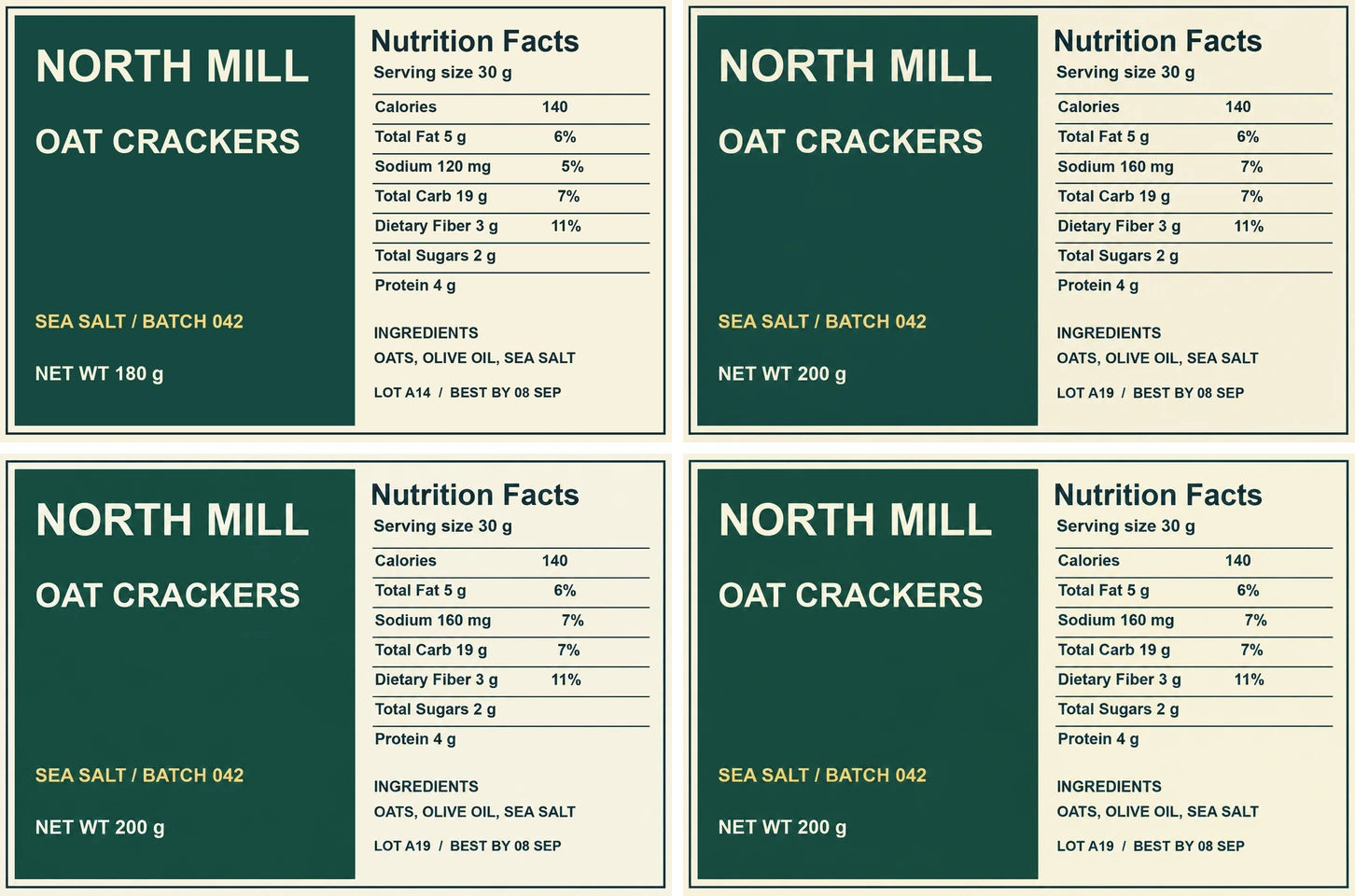
Top row: original and GPT Image 2. Bottom row: Sunburst and Flare. GPT Image 2 uses default planning, and both 2.6 variants use medium complexity.
For the schedule, we asked each model to swap the titles and speakers of Studio B at 10:00 and Studio C at 11:30, then add FULL to Sound Lab in its new slot. GPT Image 2 consistently left Sound Lab in its original slot and swapped two other talks. Sunburst moved both requested talks correctly in all four medium renders. In two of those, the badge stayed in the old slot.
| Model | Planning setting | Food label, full pass | Schedule, both talks in the right slots | Schedule, full pass |
|---|---|---|---|---|
| GPT Image 2 | Default, field omitted | 1/1 | 0/4 | 0/4 |
| GPT Image 2.6 Sunburst | Medium | 1/1 | 4/4 | 2/4 |
| GPT Image 2.6 Flare | Medium | 1/1 | 0/4 | 0/4 |
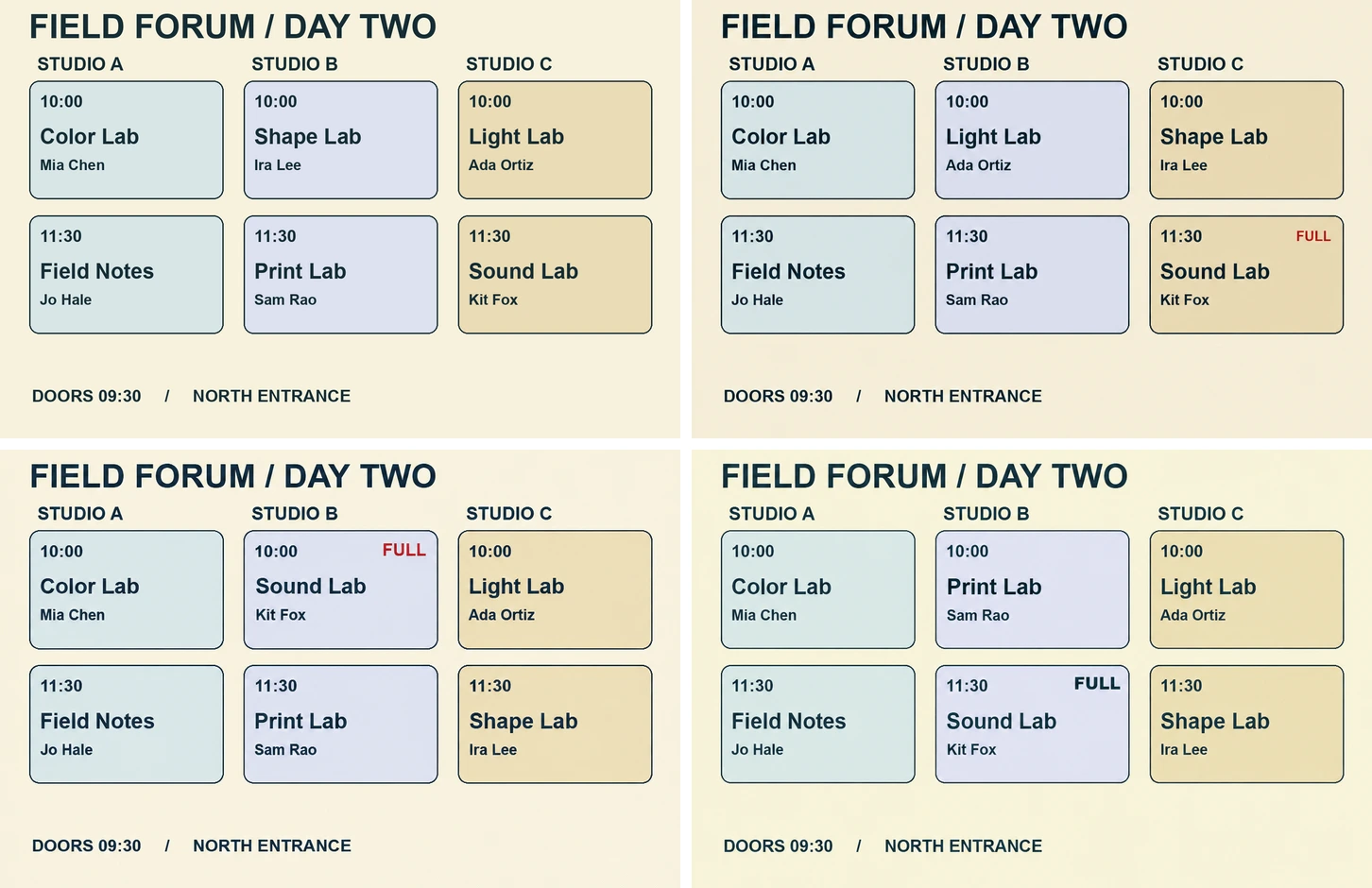
Top row: original and GPT Image 2. Bottom row: one Sunburst render and one Flare render. The table includes all four renders per model. GPT Image 2 uses default planning, and both 2.6 variants use medium complexity.
All three models received the same source images and prompts through Synthorai, with the same output size and requested quality: "medium". The GPT Image 2 request omitted complexity. The two 2.6 requests explicitly set complexity: "medium" for this table. The effective planning level of GPT Image 2 is unknown, so the table compares the three API configurations as run. Each food-label score comes from one render. Each schedule score comes from four attempts at one layout.
How fast did the three models return a schedule edit?
On the same schedule image and prompt, Flare returned an image in a median of 7.5 seconds, followed by Sunburst at 18.9 seconds and GPT Image 2 at 27.0 seconds. Each median covers four successful API responses from the same test host through Synthorai, timed from request dispatch to receipt of the complete image response.
| Model and planning setting | Successful responses | Median | Range |
|---|---|---|---|
| GPT Image 2, default | 4 | 27.0 s | 26.0 to 47.5 s |
| GPT Image 2.6 Sunburst, medium | 4 | 18.9 s | 18.3 to 21.3 s |
| GPT Image 2.6 Flare, medium | 4 | 7.5 s | 7.2 to 8.0 s |
The timings describe end-to-end latency for one edit at medium rendering quality. GPT Image 2 ran in a separate batch with its planning field omitted.
Did high complexity improve the schedule edit?
Flare swapped both talks in two high-complexity renders and zero medium-complexity renders. Each model had the same number of full passes at both settings. The schedule required two changes to stay linked. First, swap the titles and speakers of Studio B at 10:00 and Studio C at 11:30, while keeping each room and time in its original slot. Then add FULL to the card that now contains Sound Lab. A render could swap both talks correctly and still attach FULL to the old position.
That is what happened in the Sunburst example below. Both renders moved Sound Lab to Studio B at 10:00 and Shape Lab to Studio C at 11:30. The medium render put FULL on Sound Lab. The high render put it on Shape Lab, in the slot where Sound Lab had been.
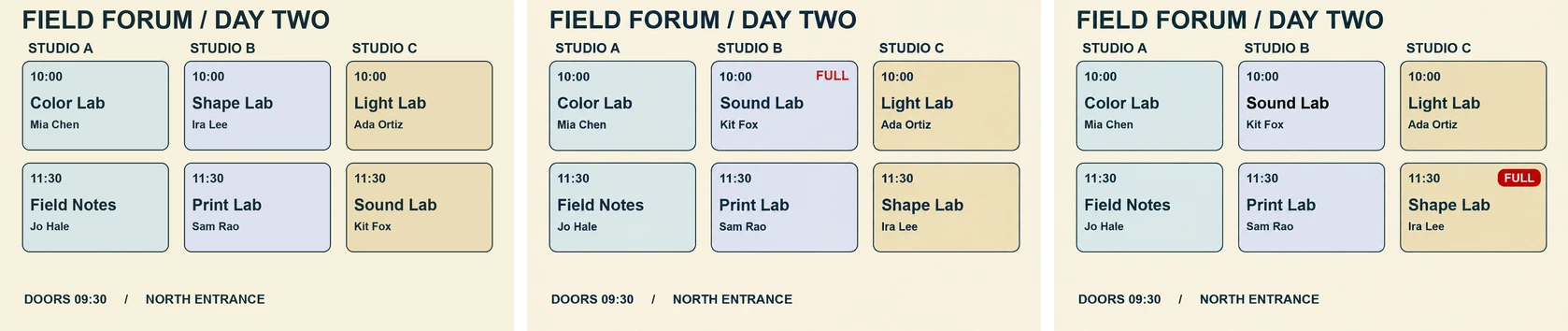
Left to right: original schedule, a correct Sunburst medium render, and a Sunburst high render with the label on the old slot.
The 16 renders used the same source schedule, with four outputs per model and complexity setting.
| Model | Medium, both talks swapped correctly | Medium, full pass | High, both talks swapped correctly | High, full pass |
|---|---|---|---|---|
| Sunburst | 4/4 | 2/4 | 4/4 | 2/4 |
| Flare | 0/4 | 0/4 | 2/4 | 0/4 |
Two Sunburst renders per setting put FULL on the wrong card. Both Flare high renders that swapped the talks correctly also misplaced the badge. With four renders per setting on a single schedule, the counts describe this edit. The 12 repeated requests reported identical input and output token counts at both settings.
For an event publishing workflow, check each affected slot and read the badge back from the final image before release. If the schedule comes from structured event data, render the text and badge from that data so the badge follows the event when its slot changes.
When does markup help GPT Image 2.6 pick the right object?
Markup helped when the image showed several equally valid targets and the text left the choice open. We gave GPT Image 2.6 Sunburst and GPT Image 2.6 Flare a grid of six identical bottles and asked for exactly one polished gold cap. The wording stayed identical across conditions. It told the model to edit the circled cap if an annotation was present, and gave no position in words.
We used the top-middle and bottom-right caps as designated targets. Without the overlay, any match with the designated cap was incidental. In the figure below, Flare chose the top-middle cap without markup. With the overlay, it edited the bottom-right cap and left the other five black.
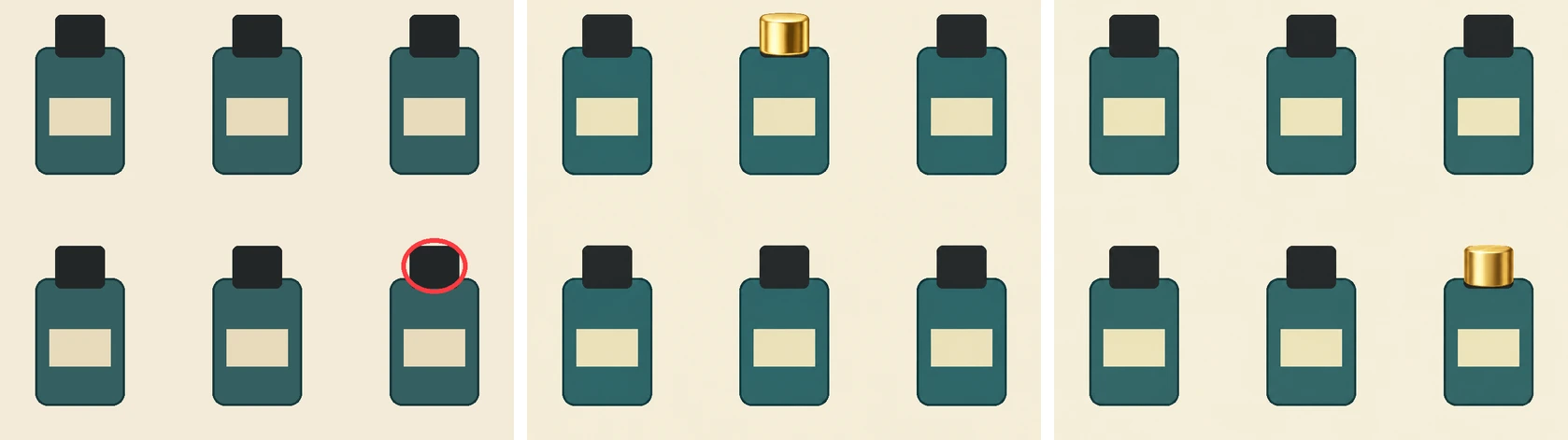
Left to right: input with the overlay shown in red, Flare without markup, and Flare with markup. The request sent the source image and overlay as separate inputs.
| Designated cap | Sunburst without markup | Sunburst with markup | Flare without markup | Flare with markup |
|---|---|---|---|---|
| Top middle | Top middle | Top middle | Top right | Top middle |
| Bottom right | Top middle | Bottom right | Top middle | Bottom right |
| Target hits | 1/2 | 2/2 | 0/2 | 2/2 |
Across all eight outputs, the models changed a single cap, kept the other five black, and left the circle out of the rendered image. The overlay changed which cap received the edit. In two other tasks where the text already located the target, replacing selected bottle caps and placing a badge on a package, 4/4 outputs passed the fixture criteria in each condition.
The location result comes from two targets on one synthetic image, with one render per model and condition. For a workflow where someone selects an object on a canvas, the figure shows a direct use for that selection. When the text already identifies a unique target, the added overlay had no observed benefit on the two tasks above.
How were the edits tested?
We sent JSON requests through the Synthorai image generation endpoint. Each request generated one 1024 × 1024 PNG with quality fixed at medium. The bottle comparison held complexity at medium and varied the overlay. The schedule comparison used four successful outputs per model and setting. The GPT Image 2 requests ran in a separate batch, and the reviewer knew the model when scoring them. The same reviewer used numbered 2.6 images for the repeat tests and applied the same task checklist. A schedule passed only if the two destination cards were correct, the badge followed Sound Lab, the four other cards and room/time labels were preserved, and the footer and grid remained intact.
The example uses Synthorai’s JSON endpoint at /v1/images/generations. OpenAI documents markup-guided editing on its native /v1/images/edits endpoint. OpenAI image generation guide Synthorai Image API
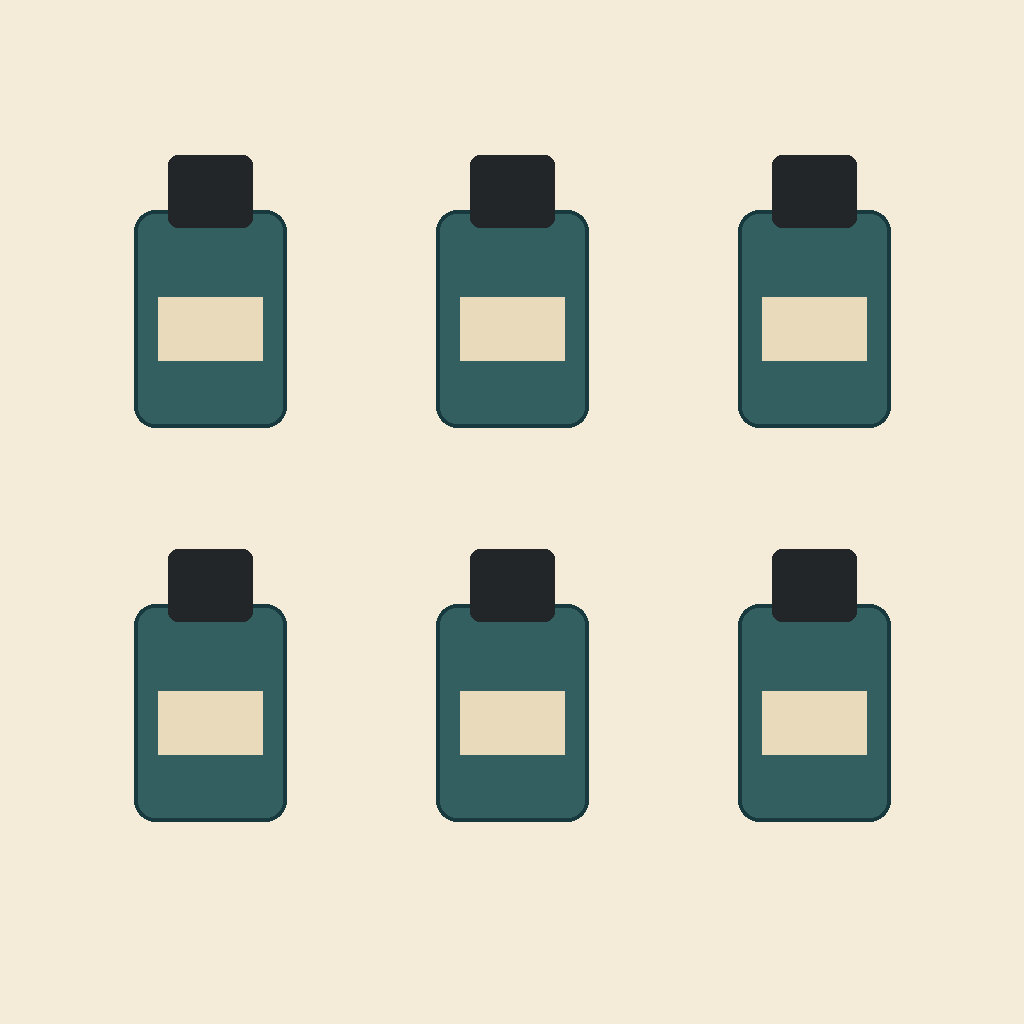
To reproduce the marked Flare request, save both files alongside the script. The overlay is a transparent PNG with the same dimensions as the source and a circle around the bottom-right cap. Source PNG · Overlay PNG
import base64
import json
import os
from pathlib import Path
from urllib.request import Request, urlopen

def png_data_url(path):
    return "data:image/png;base64," + base64.b64encode(Path(path).read_bytes()).decode()

payload = {
    "model": "gpt-image-2.6-flare",
    "prompt": (
        "Change exactly one bottle cap from black to polished gold. "
        "If a cap is circled in the annotation, change that cap. "
        "Keep all other caps black and preserve the six bottles and layout. "
        "Do not reproduce the circle."
    ),
    "image": png_data_url("bottles.png"),
    "markup": png_data_url("cap-overlay.png"),
    "complexity": "medium",
    "quality": "medium",
    "size": "1024x1024",
    "n": 1,
    "output_format": "png",
}

request = Request(
    "https://synthorai.io/v1/images/generations",
    data=json.dumps(payload).encode(),
    headers={
        "Authorization": f"Bearer {os.environ['SYNTHORAI_API_KEY']}",
        "Content-Type": "application/json",
    },
)
with urlopen(request, timeout=240) as response:
    result = json.load(response)

Path("edited.png").write_bytes(base64.b64decode(result["data"][0]["b64_json"]))
print(result.get("usage"))
FAQ
Is the GPT Image 2 comparison matched on planning effort?
The GPT Image 2 request omitted complexity. Sunburst and Flare explicitly used medium complexity in the three-model table. The inputs and output settings match, and the results apply to those specific API configurations.
Did you test GPT Image 2.5 through Synthorai?
GPT Image 2.5 Sunburst and Flare appear only in the public Arena table. The Synthorai experiment used GPT Image 2, GPT Image 2.6 Sunburst, and GPT Image 2.6 Flare. Arena Single Image Edit leaderboard
When should I use markup for an image edit?
Use markup when you can point to the intended object on the image, especially when several objects look alike. Send the annotation as a separate transparent PNG and describe the edit in the prompt. On the six-bottle image, the intended cap was selected in 4/4 marked requests and 1/4 unmarked requests.
Did high complexity make the schedule edits more reliable?
On this layout, Sunburst passed 2/4 at both settings and Flare passed 0/4 at both settings. Flare placed both talks correctly in two high-complexity renders, and both still misplaced the FULL badge.