
Gemini BYOK Does Not Disable Google Request Storage
Contents
- How do BYOK, Vertex and the Developer API fit together?
- Where should customers configure BYOK and request storage?
- What changed in Gemini request storage?
- Can a Custom endpoint call the Gemini Developer API?
- Does store=false work on the native Developer API?
- What did the local controls verify?
- Can fallback change the project’s data handling?
- What should you verify before production use?
- FAQ
- Does Gemini BYOK disable request logging?
- Should I configure BYOK through inference request parameters?
- Does store=false mean zero data retention?
- Does disabling fallback guarantee that every request stays in my project?
Gemini BYOK (bring your own key) selects customer credentials; it does not disable request storage. For the gateway path tested here, configure BYOK in Synthorai’s console and set the storage policy in the associated Google project. We found that Google’s Chat-compatible API rejected top-level store=false, while converting a native Gemini request to Chat omitted the field.
TL;DR
- Gemini is a model family. Gemini Developer API and Vertex AI are separate Google service paths for calling those models.
- Synthorai’s standard Google BYOK entry targets Vertex; a separately configured Custom endpoint can target the Developer API’s Chat-compatible interface.
- Configure gateway credentials and fallback in Synthorai’s console; configure Developer API project logging in Google AI Studio.
- In six synchronous gateway tests, explicit Chat storage booleans returned 400; native-to-Chat conversion omitted the booleans and the successful requests appeared in AI Studio logs.
How do BYOK, Vertex and the Developer API fit together?
BYOK describes whose credentials the gateway uses. Vertex AI and the Gemini Developer API identify the Google service receiving the request. A model name containing Gemini does not identify the service or its storage policy.
| Google service | Google API host | Synthorai configuration | Storage controls to review |
|---|---|---|---|
| Gemini on Vertex AI | aiplatform.googleapis.com, including regional hosts | Standard Google BYOK entry, labeled Vertex, with a credential authorized for Vertex | The selected Google Cloud project’s service-specific logging and retention controls |
| Gemini Developer API | generativelanguage.googleapis.com | Separate Custom endpoint using Google’s OpenAI-compatible interface and a Developer API key | AI Studio project logging; request-level options supported by the actual API interface |
A Custom endpoint is a gateway configuration, not a third Google service. It specifies the destination URL, API format, customer key and model list. Google’s Chat-compatible interface is one interface to the Developer API; its native GenerateContent interface uses a different request format.
The standard Vertex BYOK entry does not provide a dedicated Gemini Developer API key slot. A Google Cloud service account, commonly used for Vertex, is an application identity with project permissions. A Developer API key identifies a different service configuration. Use credentials authorized for the selected destination.
The experiments below target the Developer API. For Vertex, consult Google’s service-specific retention controls; the Developer API logging change does not establish Vertex behavior.
Where should customers configure BYOK and request storage?
Configure customer credentials in Synthorai’s console, then review storage in the console for the selected Google service. These settings control different parts of the request path.
| Where | What to configure |
|---|---|
| Synthorai console, BYOK | Customer credential or Custom endpoint, intended models, enabled state and fallback policy |
| Google AI Studio, Developer API project | GenerateContent request storage and log retention |
| Google Cloud, Vertex project | The relevant service’s logging and retention controls |
Follow the BYOK guide to configure the gateway. Applications then use their gateway API key for ordinary inference calls. Keep a Custom endpoint’s model list explicit: an empty list takes over every model under the documented behavior. Use model names accepted by that endpoint, since platform aliases may differ.
For the tested Developer API Custom endpoint path, use the Google project setting to establish the application-log policy. Google documents enabling and disabling project logging in AI Studio. If you disable it, verify the outcome with synthetic requests before using sensitive prompts. Our tests observed storage enabled; we did not measure the disabled setting.
Request-level control remains valid on Google’s native GenerateContent API, where a supported store value overrides the project setting. The gateway does not promise Google-specific compatibility for that parameter on the Chat-compatible path tested here. The following results explain why the backend configuration is the recommended control for this integration.
What changed in Gemini request storage?
New paid Gemini Developer API projects now store Generate Content requests unless the caller or project setting disables storage. Projects created before October 26 keep their existing setting. Creating a new key inside an older project does not create a new project or establish which logging default applies. Google documents the change in its October 26 release notes.
The request-level store property takes precedence over the project default. The logging guide covers synchronous, streaming and batch Generate Content calls, including calls through Google’s OpenAI-compatible interface. Stored project logs have a default 55-day retention window, with configurable windows of 7, 14, 28 or 55 days. Saving a log into a dataset changes that lifecycle.
Request storage is also separate from training use and security logging. Google’s paid-service terms say paid prompts and responses are not used to improve its products, while describing limited retention for safety and security. Turning off the application log addresses one specific storage mechanism.
Can a Custom endpoint call the Gemini Developer API?
The isolated Synthorai Custom endpoint pipeline successfully called Gemini 3.5 Flash-Lite through Google’s Chat-compatible endpoint when store was omitted. Google returned HTTP 200 and OK, and the gateway returned HTTP 200 to the client. With explicit top-level store=true or store=false, Google returned HTTP 400, meaning the request was invalid.
The isolated test environment used these Custom endpoint configuration values:
| Setting | Value |
|---|---|
| Endpoint API type | OpenAI Chat Completions (openai_chat) |
| Google base URL | https://generativelanguage.googleapis.com/v1beta/openai |
| Credential | Existing Gemini Developer API key, sent as Bearer authentication |
| Model list | gemini-3.5-flash-lite only |
| Platform fallback | Disabled |
The recorder confirmed that Chat-format client requests preserved each explicit boolean in the outgoing JSON. Google’s error was Invalid JSON payload received. Unknown name "store": Cannot find field. This result concerns the top-level Chat field; it does not establish that every possible Google-specific extension is unsupported.
The final synchronous matrix shows how the client request format affected transmission:
| Client request format | Input store | Outgoing Chat store | Google / client HTTP | AI Studio log |
|---|---|---|---|---|
| Chat | true | true | 400 / 400 | No generated response |
| Chat | false | false | 400 / 400 | No generated response |
| Chat | Omitted | Omitted | 200 / 200 | Visible |
| Native Gemini | true | Omitted | 200 / 200 | Visible |
| Native Gemini | false | Omitted | 200 / 200 | Visible |
| Native Gemini | Omitted | Omitted | 200 / 200 | Visible |
Each row represents one synthetic request to the same model and paid project. After the calls, AI Studio’s unfiltered All datasets list showed the exact markers for all four successful cases, including the native-format store=false case. The project’s GenerateContent storage setting was enabled. Native-to-Chat conversion dropped the flag, so the request reached Google without the requested opt-out and appeared in the application log.
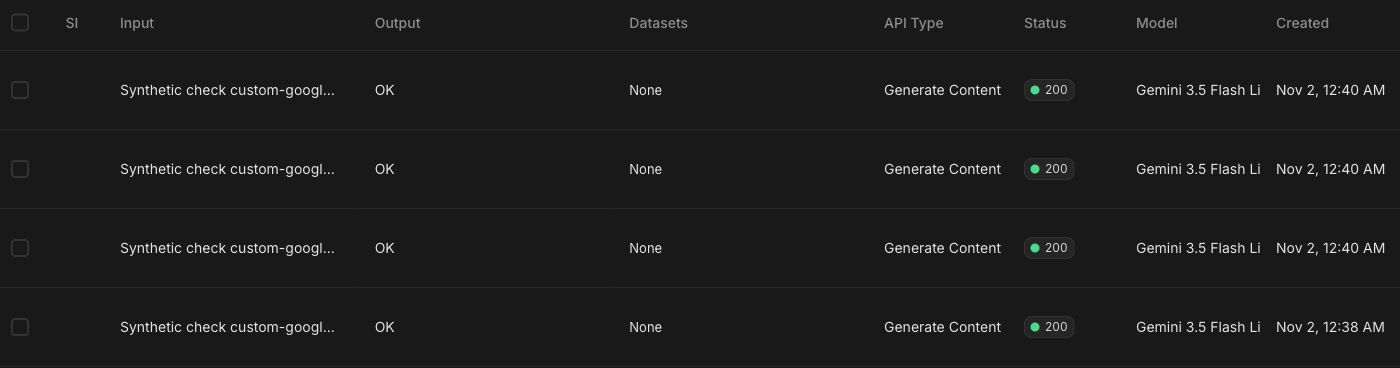
The screenshot’s input cells are truncated; we matched each full marker in the live list. Its first three rows correspond to native omitted, false and true, followed by Chat omitted. This verifies application-log visibility for these cases, not every Google retention mechanism.
We ran these tests on November 1, 2026 (UTC), using an existing paid project and synthetic prompts. The isolated gateway environment supplied a test user/workspace identity and temporary encrypted credential storage. A local recorder forwarded the outgoing body and customer Bearer credential unchanged to Google over HTTPS. Production console setup, checks on public destination URLs, client authentication and streaming were outside this test.
Does store=false work on the native Developer API?
Direct native GenerateContent calls to Gemini 3.5 Flash-Lite accepted both store=true and store=false. Each of the two requests returned HTTP 200, a response ID and 32 input tokens plus 1 output token. About 13 minutes later, the complete AI Studio list showed the true marker and OK output; the false marker was absent. This paired control shows why native and Chat-compatible interfaces need separate verification.

For native REST calls, store is a top-level boolean, separate from generation parameters in generationConfig. The REST reference defines that shape. This example is a direct Google control request, separate from gateway BYOK configuration:
import json
import os
import secrets
import urllib.request

marker = "storage-check-" + secrets.token_hex(8)
body = {
    "contents": [{"role": "user", "parts": [
        {"text": f"Synthetic request {marker}. Reply only OK."}
    ]}],
    "generationConfig": {"maxOutputTokens": 16},
    "store": False,
}
request = urllib.request.Request(
    "https://generativelanguage.googleapis.com/v1beta/"
    "models/gemini-3.5-flash-lite:generateContent",
    data=json.dumps(body).encode(),
    headers={"Content-Type": "application/json",
             "x-goog-api-key": os.environ["GEMINI_API_KEY"]},
    method="POST",
)
with urllib.request.urlopen(request, timeout=30) as response:
    result = json.load(response)
print({"marker": marker, "response_id": result.get("responseId"),
       "usage": result.get("usageMetadata")})
Check the marker in the authorized project’s logs after the request. Use a true positive control before interpreting a missing false-marker log. HTTP 200 establishes request acceptance; the log observation establishes visibility within the observed application log.
The paid project predates October 26 and had GenerateContent storage enabled with a displayed retention setting of 55 days. We changed neither setting. AI Studio’s individual log details failed to load, so observations used the complete list’s prompt, output, model, status and timestamp. These observations concern application logs, not all Google retention mechanisms.
What did the local controls verify?
Nine local recorder cases covered Chat, Responses and native Gemini request formats, each with true, false and omitted store. Chat and Responses preserved explicit booleans; native Gemini-to-Chat omitted them. These tests used synthetic customer credentials and local receivers, with no Google calls.
Two additional cases used a controlled customer-endpoint HTTP 503. With fallback off, the client received 503 and the platform received zero attempts. With fallback on, one stubbed platform attempt returned 200. This checks one failure scenario, not every credential-lifecycle or fallback condition.
Can fallback change the project’s data handling?
Fallback can send a request using credentials with different project settings. For a project-bound workload, that change needs to be part of the configured policy and its verification.
Synthorai’s documented custom-endpoint setting, Auto-fallback to Synthorai credits, determines whether the platform can answer after that endpoint fails. The implementation also distinguishes an eligible key failing upstream from a key being absent or ineligible. Those are different paths through the system.
| Scenario | What to verify |
|---|---|
| A configured customer credential receives an upstream error | Whether the permitted fallback stays within the approved credential and service set |
| The key is removed or disabled | Where the next request goes; the BYOK guide documents shared-credential fallback after key removal |
| The model is outside the key’s model filter | Whether the call is rejected or uses another credential |
| Credential resolution is unavailable | Whether the system refuses the call or follows its availability fallback behavior |
| The request explicitly lists a second model | Whether that model has an independently approved credential and service |
For a workload that must stay in one project, verify rejection whenever no approved credential and service are available. Disabling upstream-failure fallback alone does not establish that behavior for every row in this table.
What should you verify before production use?
For development tools whose prompts may appear in AI Studio logs, the tested Developer API Custom endpoint path completed requests when store was omitted. Configure its credentials, model list and fallback policy in the gateway console, and review the associated Google project’s logging setting.
For workloads requiring application logging to be disabled, Google’s documented project control is the recommended setting for this gateway integration. Verify its disabled behavior in your project; that configuration was not part of our experiment. Do not remove a rejected store=false field and assume the request has the same privacy behavior.
For project-bound or sensitive workloads, also verify credential ownership and every fallback destination, and review security retention, caches and cloud logging. Vertex requires a separate review of its own controls. BYOK configuration alone does not certify those conditions.
Record a synthetic marker, the destination project/service, the final storage field and the provider response ID where available. Correlate these with the provider’s logs. A final BYOK billing label cannot establish the destination of every preceding attempt.
For the broader processing chain, see LLM data retention and ZDR. For request correlation, see traces and sessions.
FAQ
Does Gemini BYOK disable request logging?
Gemini BYOK is configured in the gateway console to select customer credentials. Logging remains controlled by the actual service’s project settings and supported request-level options. Review the destination service and its logging configuration.
Should I configure BYOK through inference request parameters?
Configure Synthorai BYOK through the console, then send ordinary inference calls using the gateway API key. The standard Google vault entry targets Vertex; Developer API Custom endpoints are configured separately. Neither a Google key nor store=false in an inference payload replaces that setup. Configure request storage in the actual Google project as a separate step.
Does store=false mean zero data retention?
The native Gemini store=false setting controls application request storage. Provider security retention, caching and other state have separate rules, so the flag alone does not establish zero data retention for the complete request path.
Does disabling fallback guarantee that every request stays in my project?
An upstream-failure fallback switch covers one part of the decision. Missing or ineligible credentials and explicit model chains need separate checks. Require an observed rejection whenever a project-bound workload has no approved credential and service available.