
GPT-6.1 Terra vs GPT-5.6 Terra and Sol: 192 API Calls
Contents
- Where does GPT-6.1 Terra fit in OpenAI’s model lineup?
- What do the official benchmarks show?
- How did we test reasoning settings?
- What happened when reasoning was turned off?
- How do all three models compare on our tasks?
- Should you upgrade from GPT-5.6 Terra to GPT-6.1 Terra?
- Should you choose GPT-6.1 Terra or GPT-6.1 Sol?
- How do you set reasoning effort in the API?
- How should production validate invoice amounts?
- FAQ
- Is GPT-6.1 Terra worth upgrading to from GPT-5.6 Terra?
- Should I choose GPT-6.1 Terra or GPT-6.1 Sol?
- Can I turn reasoning off for invoice processing?
GPT-6.1 Terra is OpenAI’s lower-cost model for visual workflows, priced at $1 per million input tokens and $5 per million output tokens, half GPT-6.1 Sol’s rates. Reasoning effort controls internal reasoning before an answer. The none setting disables it; at other settings, reasoning tokens are billed as part of output. Turning reasoning off worked on all 16 table and button-selection tasks in our test, but only 3/8 invoice images and 0/8 matching text calculations.
TL;DR
- GPT-6.1 Terra
nonepassed 16/16 table and screenshot tasks but 3/8 invoice-image calculations in our synthetic test. - GPT-6.1 Terra
lowpassed 24/24 image tasks and 7/8 matching text-invoice tasks;mediumpassed 24/24 and 8/8. - GPT-6.1 Terra
mediumcost $0.028290 for 24 images; GPT-6.1 Sollowcost $0.055012. - In a separate matched run, GPT-6.1 Terra
mediumcost $0.028269 for 24 images; GPT-5.6 Terra cost $0.072094.
Where does GPT-6.1 Terra fit in OpenAI’s model lineup?
GPT-6.1 Terra targets visual reasoning, screen-based actions, and concise writing at a lower price than GPT-6.1 Sol. OpenAI released Terra on October 26, 2026. Its model-selection guide recommends clearly defined tasks with verifiable results, including screen workflows and scoped code fixes. Sol remains the more general option for complex projects.
GPT-5.6 Terra is the previous-generation baseline for deciding whether to upgrade. Sol is the current higher-priced alternative for deciding which model tier to use. The three models serve two decisions:
| Specification | GPT-5.6 Terra | GPT-6.1 Terra | GPT-6.1 Sol |
|---|---|---|---|
| Position in this comparison | Previous-generation baseline | New visual-workflow model | Higher-priced option for complex work |
| Standard input price per 1M tokens | $2 | $1 | $2 |
| Standard output price per 1M tokens | $12 | $5 | $10 |
| Cached-input read price per 1M tokens | $0.20 | $0.05 | $0.10 |
| Context window | 1,050,000 tokens | 1,050,000 tokens | 1,050,000 tokens |
| Maximum output | 128,000 tokens | 128,000 tokens | 128,000 tokens |
| Reasoning settings | none, low, medium, high, xhigh, max | none, low, medium, high, xhigh, max | low, medium, high, xhigh, max |
| Default reasoning | medium | medium | medium |
| Input / output modalities | Text and image / text | Text and image / text | Text and image / text |
| Endpoint used in our tests | Responses API | Responses API | Responses API |
Sources: the official GPT-5.6 Terra reference, GPT-6.1 Terra reference, Sol reference, and release changelog. Prices above apply to Standard requests with at most 272,000 input tokens. Above that boundary, uncached input rates double and output rates increase by 50% for the whole request. Cache writes have separate prices; none of our measured main requests reported cache reads or writes.
The new Terra retains the previous generation’s context, output limit, and reasoning-setting names. Its listed input price is 50% lower and output price 58.3% lower. Our matched upgrade test later in this article separates those price cuts from changes in token usage and task correctness.
What do the official benchmarks show?
OpenAI’s launch compares GPT-6.1 Terra with GPT-5.6 Terra and GPT-6.1 Sol. Here is what the launch text actually reports:
| Evaluation | GPT-5.6 Terra | GPT-6.1 Terra | GPT-6.1 Sol |
|---|---|---|---|
| Agents’ Last Exam: professional visual workflows | Baseline; absolute score not stated | At medium, +15 percentage points over predecessor at about one-third task cost | Absolute score not stated |
| MMMU-Pro: visual reasoning | Below new Terra at every reported setting; scores not stated | Nearly matches Sol; scores not stated | Described as nearly matched by new Terra; score not stated |
| Terminal-Bench 4.0: terminal coding tasks | Published score 21.5%; effort not specified | 50.3% at max | Score not stated |
| Internal factuality test: lower error rate is better | 53.6% errors at low | 16.7% errors at low | Error rate at low not stated |
Source: OpenAI’s launch evaluations. Missing scores remain unreported; the factuality evaluation is internal. Our API tests below address the upgrade and model-tier decisions on the same synthetic tasks.
How did we test reasoning settings?
We tested GPT-6.1 Terra at none, low, and medium, alongside GPT-6.1 Sol at low, on 32 inputs per configuration: 24 images and eight matching text controls. That produces 128 main-study calls. A separate upgrade comparison interleaved GPT-5.6 Terra and fresh GPT-6.1 Terra responses at medium on the same 32 inputs, adding 64 calls for 192 in total. The upgrade table uses only that separate batch.
| Task family | Inputs per configuration | Required result |
|---|---|---|
| Invoice images | 8 | Multiply line items, subtract a discount, calculate and round tax, subtract a deposit |
| Filtered tables | 8 | Aggregate the matching region and quarter, then calculate a return rate |
| Application screenshots | 8 | Identify the correct control ID and a point inside its button among similar cards |
| Invoice text controls | 8 | Calculate the same invoice values from an exact transcription |
We generated fictional documents with known answers, using three templates with varied values or layouts. Each image was 960 by 640 pixels, submitted with detail: "high". The image and text versions of an invoice used the same task instructions, schema, and business rules. Each input received one response per configuration.
The run used streaming Responses requests through Synthorai on October 29, 2026, with a shared 4,096-token output limit and interleaved configurations. All 128 main responses completed and returned schema-valid JSON. Exact task success required every requested value to match; screenshot coordinates had to fall inside the correct button. We graded in code using integer cents and decimal rounding, without a model judge.
These 24 images represent three task templates, rather than 24 different kinds of work. Sixteen paired comparisons across the main and upgrade studies, adjusted together with Holm’s method to account for testing several differences, produced no adjusted p-value below 0.05. The counts below describe this run; they do not establish a general quality ranking or equivalence between models.
What happened when reasoning was turned off?
GPT-6.1 Terra at none missed five of eight invoice-image calculations and all eight text-invoice calculations. In the same effort sweep, low scored 8/8 on invoice images and 7/8 on text controls; medium scored 8/8 on both. The cross-model results are collected in the three-model table below.
Errors in text-only inputs show that image reading cannot explain every failure. The eight paired inputs do not establish an image-format advantage.
One invoice makes the failure concrete:
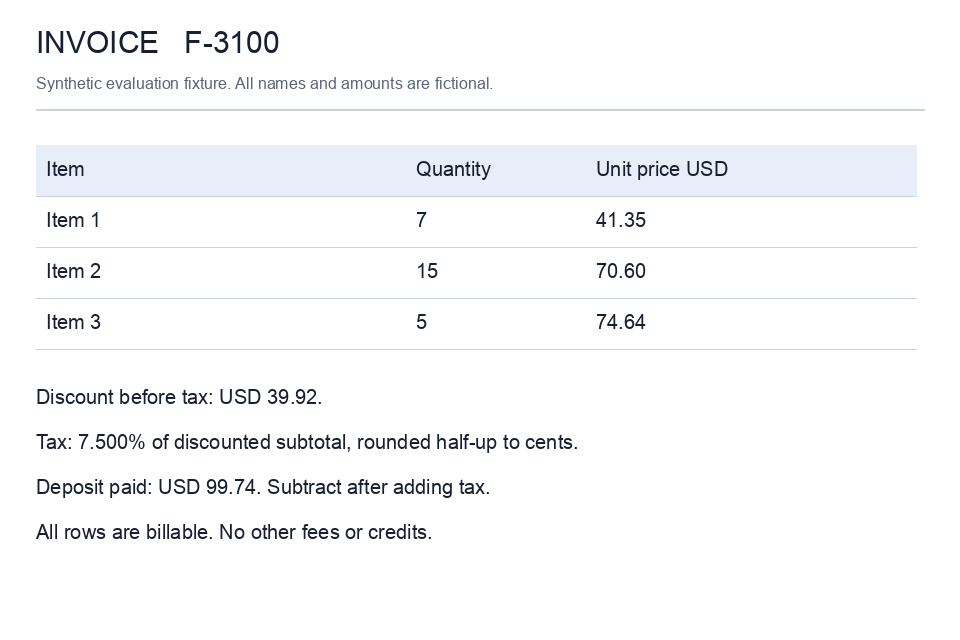
The line items are 7 × $41.35, 15 × $70.60, and 5 × $74.64. Their subtotal is $1,721.65. After the $39.92 discount, 7.5% tax rounded half-up is $126.13; subtracting the $99.74 deposit leaves $1,708.12 due.
On the text version, Terra low returned a $1,711.65 subtotal, $125.38 tax, and $1,697.37 due. The JSON matched the schema, but the arithmetic was wrong. Increasing effort is one variable to evaluate; typed output alone does not validate an amount.
In the original core sweep, all four configurations passed the eight filtered-table tasks and eight button-selection tasks. Those templates did not distinguish quality in that sweep; invoice errors explain the different completion counts.
How do all three models compare on our tasks?
GPT-5.6 Terra and GPT-6.1 Terra were compared at medium; GPT-6.1 Sol used low for the practical tier comparison. We use Terra medium for the main tier recommendation because its text-invoice result was 8/8 versus 7/8 at low; Sol uses the tested low setting. This compares candidate configurations at different efforts, not quality at equal reasoning effort. The one-task difference does not establish that medium is generally more accurate.
Core is the original effort sweep. Upgrade is the fresh old/new Terra comparison. New Terra has a column entry for each run wherever the measurements differ. Upgrade recommendations use its upgrade values; Terra-versus-Sol recommendations use its core values. No cost or latency ratio below combines batches.
| Measure | GPT-5.6 Terra | GPT-6.1 Terra | GPT-6.1 Sol |
|---|---|---|---|
| Configuration | medium, upgrade run | medium, core and upgrade runs | low, core run |
| Invoice images correct | 8/8 | 8/8 in each run | 8/8 |
| Matching text invoices correct | 8/8 | 8/8 in each run | 8/8 |
| Filtered tables correct | 8/8 | 8/8 in each run | 8/8 |
| Screenshot tasks fully correct | 2/8 | 8/8 in each run | 8/8 |
| All image tasks correct | 18/24 | 24/24 in each run | 24/24 |
| Cost for 24 images | $0.072094 | Core: $0.028290; upgrade: $0.028269 | $0.055012 |
| Same image usage at $1 input / $5 output per 1M tokens | $0.033500 | Core: $0.028290; upgrade: $0.028269 | $0.027506 |
| Cost per correct image task | $0.004005 | Core: $0.001179; upgrade: $0.001178 | $0.002292 |
| Median image response time | 2.57 s | Core: 5.75 s; upgrade: 6.43 s | 4.51 s |
Cost per correct task is total cost divided by fully correct responses, including the cost of incorrect answers without simulating retries. We use returned usage at the fixed Standard tariffs, counting reasoning within output tokens. The separate function-call probe is excluded. Response times are end-to-end through the gateway; serving infrastructure was not independently held fixed.
The older Terra’s six failures all returned coordinates inside the correct button but invented IDs such as cobalt-edit instead of reading the printed control ID. These are exact-field errors. Both generations calculated all invoices correctly at medium in the upgrade run.
Within the core effort sweep, new Terra none cost $0.024275 for the 24 images with 19/24 correct, versus low at $0.027835 with 24/24 correct. That makes the observed cost per correct image task $0.001278 for none and $0.001160 for low. The lower total spend at none did not produce the lower cost per successful result on this set.
Should you upgrade from GPT-5.6 Terra to GPT-6.1 Terra?
GPT-6.1 Terra is worth evaluating as an upgrade from GPT-5.6 Terra when inference cost or exact visual-field extraction matters. In the matched medium run, image-task cost fell 60.8%, with 24/24 fully correct versus 18/24. The six changed outcomes concern printed control IDs; the sample does not establish general quality superiority after statistical correction.
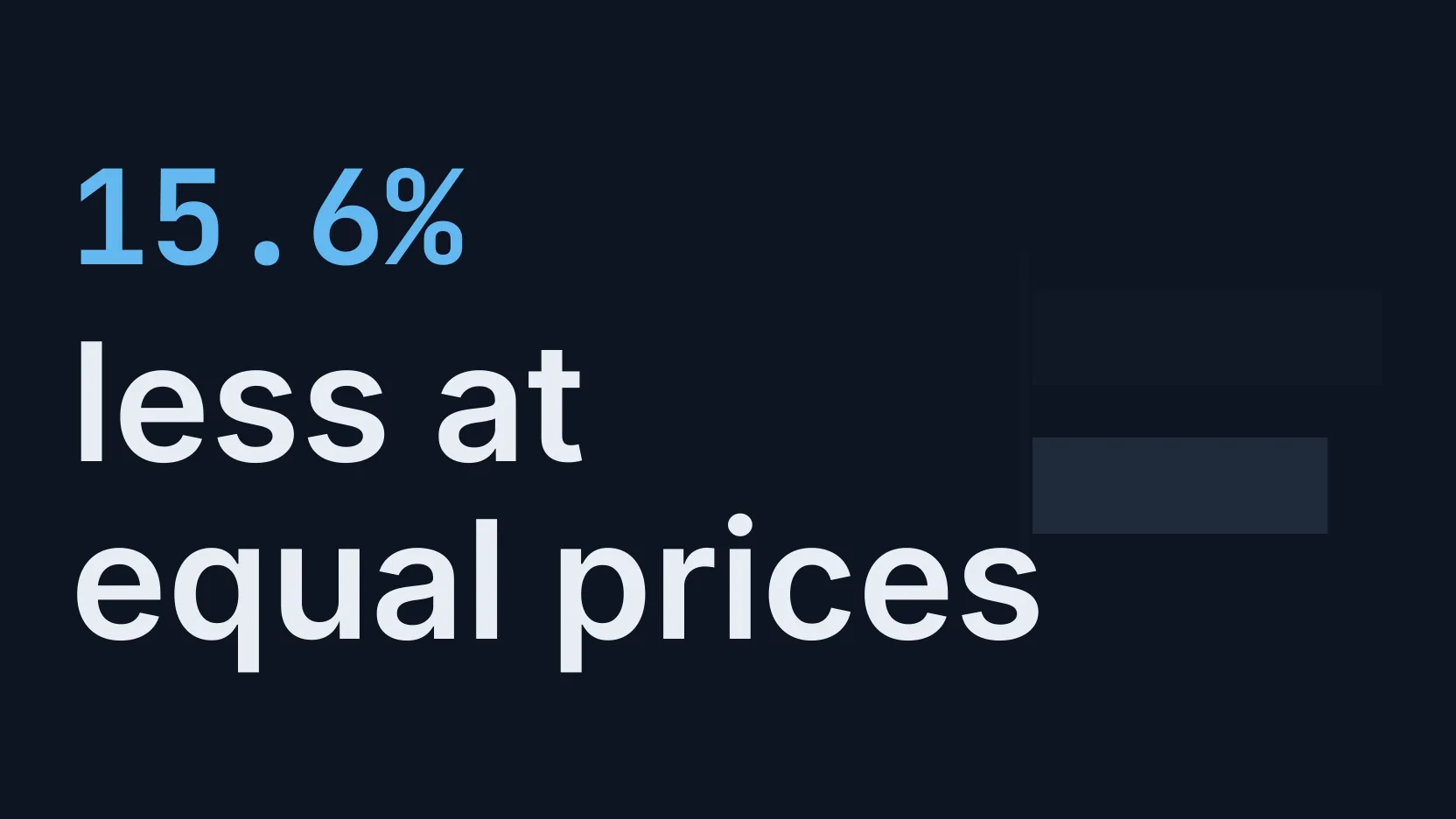
The old model’s current tariff is $2 input and $12 output per million tokens. New Terra reduces those prices by 50% and 58.3%. At the common $1/$5 tariff, its image-task usage still costs 15.6% less. Input counts were similar, 20,765 versus 20,789 tokens; output fell from 2,547 to 1,496 tokens.
For internal document processing or field extraction with validation, test the new model at the existing effort and check exact IDs and amounts before switching. For a latency-sensitive interaction, retain the old model as a comparison until the new one meets the application’s response-time target: median image latency was 2.57 seconds for the old model and 6.43 for the new in this run. For invoices that can trigger payments, keep deterministic arithmetic and approval checks with either generation.
Should you choose GPT-6.1 Terra or GPT-6.1 Sol?
GPT-6.1 Terra medium is the cheaper candidate for these bounded visual tasks; GPT-6.1 Sol low is the comparison to keep when response time or more complex work matters. In the core run both completed 24/24 images correctly, at $0.028290 versus $0.055012. The observed 48.6% saving is covered by Terra’s 50% lower input/output rates: repricing Sol’s usage at $1/$5 gives $0.027506, slightly below Terra’s $0.028290.
For validated batch extraction, evaluate Terra first on local examples and compare error types. For an interactive workflow, compare Sol’s observed 4.51-second median with Terra’s 5.75 seconds against the product’s actual latency target. Complex coding and open-ended agent projects require a representative evaluation beyond these three templates; OpenAI’s model-selection guide positions Sol for complex work. The equal completion counts here are not evidence of general equivalence.
How do you set reasoning effort in the API?
For GPT-6.1 Terra, set reasoning.effort explicitly and inspect both the answer and returned usage. The GPT-6 guide lists medium as the default and requires Responses for tool calling. Reasoning tokens consume the output allowance and are billed within output tokens, rather than added to them a second time.
This Python example illustrates a production extraction pattern, rather than reproducing the calculation benchmark. Install openai, set OPENAI_API_KEY, and save the pictured invoice as invoice.png. Request line items and printed rules, leaving absent fields as null. The supported rule here is a discount before tax, half-up rounding to cents, and a deposit after tax.
import base64
import json
from pathlib import Path
from openai import OpenAI

client = OpenAI(max_retries=0)
encoded = base64.b64encode(Path("invoice.png").read_bytes()).decode()
nullable_int = {"type": ["integer", "null"]}
rule = "discount_then_tax_half_up_then_deposit"
item_fields = {"quantity": nullable_int, "unit_price_cents": nullable_int}
properties = {
    "currency": {"type": ["string", "null"]},
    "items": {"type": "array", "items": {
        "type": "object", "properties": item_fields,
        "required": list(item_fields), "additionalProperties": False,
    }},
    "discount_cents": nullable_int,
    "tax_rate": {"type": ["string", "null"]},
    "deposit_cents": nullable_int,
    "calculation_rule": {"type": ["string", "null"],
                         "enum": [rule, "other", None]},
}
response = client.responses.create(
    model="gpt-6.1-terra",
    reasoning={"effort": "medium"},
    max_output_tokens=4096,
    store=False,
    input=[{"role": "user", "content": [
        {"type": "input_text", "text": (
            "Extract the printed invoice fields, not calculated totals. "
            "Use integer cents for prices, discount, and deposit, and an "
            "ISO currency code. Express the tax rate as a decimal string "
            "(7.5% becomes 0.075). Use null for missing or ambiguous fields. "
            f"Set calculation_rule to {rule} only when the printed rules "
            "explicitly match; use other for a different rule and null "
            "if unclear. Do not invent rules or default amounts to zero."
        )},
        {"type": "input_image", "detail": "high",
         "image_url": "data:image/png;base64," + encoded},
    ]}],
    text={"format": {
        "type": "json_schema", "name": "invoice_fields", "strict": True,
        "schema": {"type": "object", "properties": properties,
                   "required": list(properties), "additionalProperties": False},
    }},
)
if response.status != "completed":
    raise RuntimeError(f"Incomplete response: {response.status}")
if not response.output_text:
    raise RuntimeError("No invoice JSON returned; inspect refusal/error output")
extracted = json.loads(response.output_text)
print(extracted)
usage = response.usage
if usage is not None:
    reasoning = getattr(usage.output_tokens_details, "reasoning_tokens", None)
    print({"input_tokens": usage.input_tokens,
           "output_tokens": usage.output_tokens,
           "reasoning_tokens": reasoning})
We also ran a separate local function-call probe for the four original core configurations (new Terra at none/low/medium and GPT-6.1 Sol at low): select a screenshot control, read the actual stored selection, then return a verified result. All four completed the forced three-turn sequence correctly, for 12 API turns. Function results used matching call IDs and replayed output items. This is a local compatibility probe, not an autonomous desktop benchmark.
How should production validate invoice amounts?
For invoice posting and payments, extract typed operands and calculate totals in deterministic code. Validate the source fields and require approval before money movement, whichever model wins the cost or latency comparison.
Run this block after the extraction example. It rejects missing or unsupported inputs and calculates the pictured invoice’s totals. Integer cents avoid binary floating-point errors; Decimal applies the stated tax-rounding rule.
from decimal import Decimal, InvalidOperation, ROUND_HALF_UP


def invoice_totals(data):
    if data.get("currency") != "USD" or data.get("calculation_rule") != rule:
        raise ValueError("Missing or unsupported currency/calculation rule")
    items = data.get("items")
    if not isinstance(items, list) or not items:
        raise ValueError("Missing line items")
    for item in items:
        if (not isinstance(item, dict)
                or type(item.get("quantity")) is not int
                or item["quantity"] <= 0
                or type(item.get("unit_price_cents")) is not int
                or item["unit_price_cents"] < 0):
            raise ValueError("Invalid or missing line-item values")
    for key in ("discount_cents", "deposit_cents"):
        if type(data.get(key)) is not int or data[key] < 0:
            raise ValueError(f"Invalid or missing {key}")
    if not isinstance(data.get("tax_rate"), str):
        raise ValueError("Missing tax rate")
    try:
        rate = Decimal(data["tax_rate"])
    except InvalidOperation as exc:
        raise ValueError("Invalid tax rate") from exc
    if not rate.is_finite() or not Decimal(0) <= rate <= Decimal(1):
        raise ValueError("Unsupported tax rate")
    subtotal = sum(i["quantity"] * i["unit_price_cents"] for i in items)
    taxable = subtotal - data["discount_cents"]
    if taxable < 0:
        raise ValueError("Discount exceeds subtotal")
    tax = int((Decimal(taxable) * rate).quantize(
        Decimal("1"), rounding=ROUND_HALF_UP
    ))
    return {"subtotal_cents": subtotal, "tax_cents": tax,
            "balance_due_cents": taxable + tax - data["deposit_cents"]}


calculated = invoice_totals(extracted)
print({"source_fields": extracted, "calculated_totals": calculated})
The output is ready for review, not automatic posting. Type and rule checks cannot establish that a price was read correctly: reconcile the extracted fields against the source and review ambiguous terms before approving a payment. The extraction example is an implementation pattern; our 192 measured calls tested the calculation prompts described above.
For related measurements, see our image-input billing guide, PDF representation cost tests, and same-price model comparison.
FAQ
Is GPT-6.1 Terra worth upgrading to from GPT-5.6 Terra?
GPT-6.1 Terra reduced image-task cost by 60.8% versus GPT-5.6 Terra at medium in our matched run, or 15.6% when both use $1 input / $5 output per million tokens. Both passed all invoice calculations; the older model missed six printed control IDs. The newer model’s longer observed median latency makes response-time validation part of the upgrade decision.
Should I choose GPT-6.1 Terra or GPT-6.1 Sol?
GPT-6.1 Terra medium cost $0.028290 for 24 image tasks versus GPT-6.1 Sol low at $0.055012, with both scoring 24/24 in the core run. Evaluate Terra for validated batch work and compare Sol for interactive work: median response times were 5.75 and 4.51 seconds, respectively. These synthetic tasks do not establish general quality equivalence.
Can I turn reasoning off for invoice processing?
GPT-6.1 Terra at none answered only 3/8 invoice images and 0/8 matching text calculations correctly in our core run. Keep exact monetary calculations in code and validate extracted operands. For bounded table or button-selection tasks, none passed 16/16 here and is a candidate for a workload-specific evaluation.